

June 3, 2026
Zendesk Knowledge Base Software: A Practical Workflow Guide for SaaS Teams in 2026
Zendesk knowledge base software is not just a help center. This guide shows how SaaS teams should think about content workflows, support deflection, ownership, analytics, and implementation.
Support teams rarely break because they lack another help article.
They break because the same questions keep coming back, agents answer from memory, product changes are not reflected in documentation, and nobody knows whether the knowledge base is reducing work or just adding another place to maintain.
Zendesk knowledge base software is often purchased as a support feature. Teams think the problem is publishing answers. The real problem is building a repeatable knowledge workflow that connects tickets, product changes, customer education, search, analytics, and ownership.
That changes the conversation. The practical question is not whether Zendesk can host FAQs. It can. The question is whether your team can operate it as part of a support system without creating stale content, fragmented answers, and another dashboard nobody trusts.
Table of contents
- Zendesk knowledge base software is a workflow decision
- What Zendesk knowledge base software actually needs to do
- Map the knowledge base to your support architecture
- Content operations matter more than article count
- Zendesk knowledge base software versus common alternatives
- Implementation workflow for Zendesk knowledge base software
- Search, AI, and self-service need guardrails
- Analytics: measure fewer things better
- Common failure modes and how to avoid them
- Buying checklist for SaaS teams
- Where saasrow.com fits in the software decision
Zendesk knowledge base software is a workflow decision
The problem is not article storage
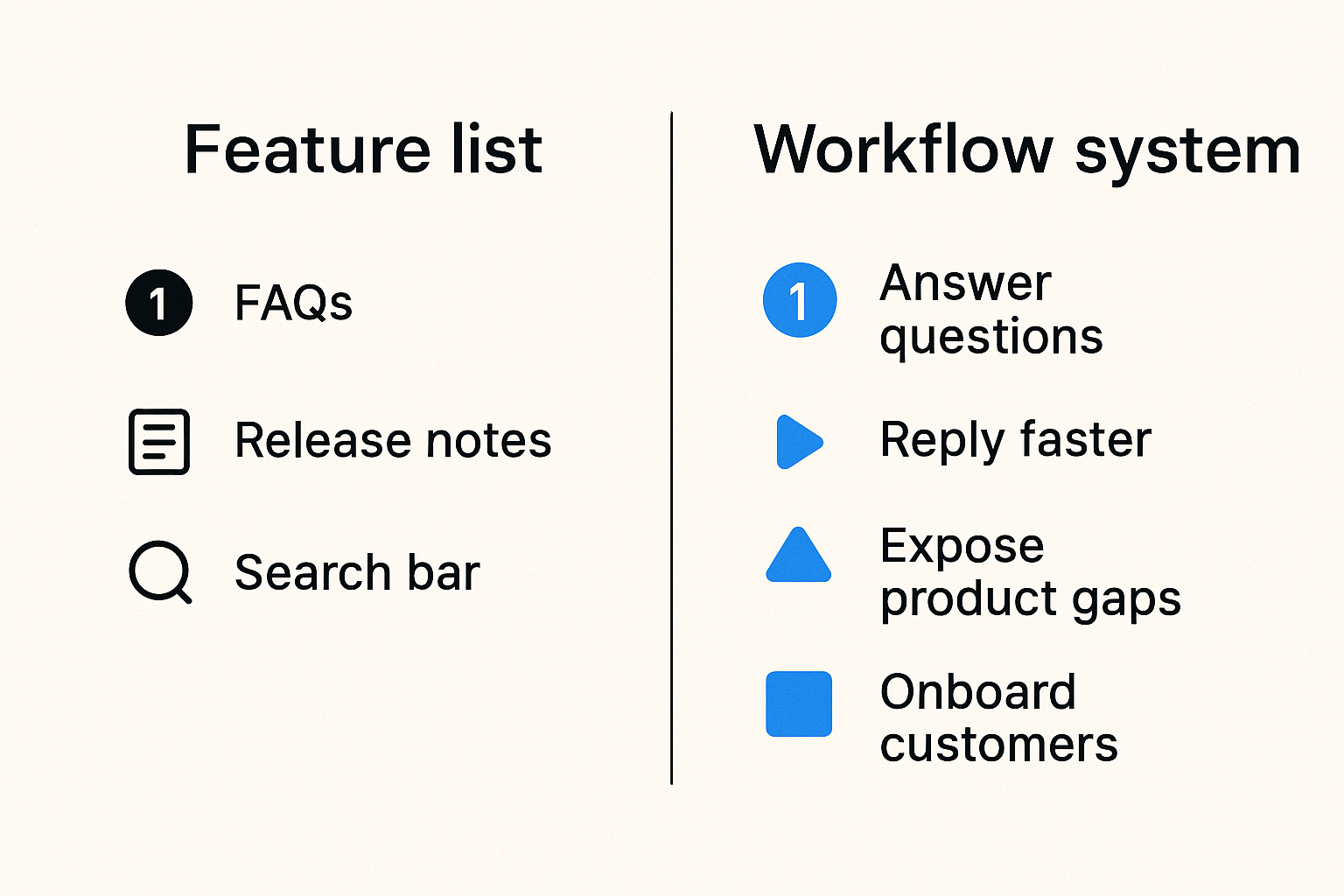
The mistake teams make is treating a knowledge base like a nicer folder for support content. They migrate FAQs, add a search bar, publish release notes, and assume self-service will improve.
In production, that is usually not enough. Customers do not care that an article exists. They care that the answer is current, specific, searchable, and consistent with what support agents say in tickets.
A useful way to think about Zendesk knowledge base software is as a routing layer for customer questions. Some questions should be answered before a ticket is created. Some should help an agent reply faster. Some should expose product gaps. Some should trigger onboarding improvements.
If the system only stores articles, it becomes passive. If it connects customer demand to maintained answers, it becomes operational.
Practical rule: Do not buy or configure a knowledge base around pages. Configure it around repeated customer questions and the workflows that keep answers correct.
What changes in 2026
By 2026, buyers expect software help to be immediate. They search before they submit a ticket. They ask AI assistants. They scan docs while evaluating products. They compare answers from your site, community forums, chat transcripts, and third-party reviews.
At the same time, SaaS products change faster. Pricing pages shift, permissions models evolve, integrations get rebuilt, and onboarding flows change. A help article that was accurate three months ago may now create support debt.
That is why Zendesk knowledge base software should not be evaluated as a static help center. It should be evaluated as a content operations system inside the broader support stack.
Related reading from our network: teams planning launches face a similar operating problem when readiness, onboarding, instrumentation, and feedback loops are disconnected, as covered in SaaS product launch workflow planning.
What Zendesk knowledge base software actually needs to do
Core jobs for a SaaS help center
A SaaS knowledge base has four practical jobs.
First, it should reduce avoidable tickets. That means customers can answer common setup, billing, account, integration, and troubleshooting questions without waiting for support.
Second, it should improve agent consistency. If five agents answer the same question five different ways, the knowledge base is not acting as the source of truth.
Third, it should support product adoption. The best help centers do not only fix problems. They help users complete workflows, discover features, and understand constraints before they get frustrated.
Fourth, it should generate feedback. Search terms with no results, articles with low helpfulness, and repeated tickets after article views are not just support metrics. They are product and onboarding signals.
Where Zendesk Guide fits
Zendesk Guide is the knowledge base product in the Zendesk ecosystem. Its practical advantage is proximity to support tickets, agents, customer context, and automation. If your team already runs Zendesk Support, the knowledge base can become part of the same service workflow instead of a separate documentation island.
That matters because customer questions rarely respect tool boundaries. A user reads an article, opens a ticket, gets an agent reply, receives a macro, and may return to the help center later. Zendesk can connect those movements more cleanly than a standalone site if the implementation is disciplined.
The tradeoff is that Zendesk knowledge base software works best when support operations owns the workflow. If nobody owns structure, review, labels, permissions, and article quality, the platform will not save the system.
Map the knowledge base to your support architecture
The inputs that create useful articles
The best knowledge bases are built from real demand. The weakest ones are built from internal assumptions.
Useful inputs include:
- Ticket tags and categories
- Chat transcripts and bot escalations
- Sales objections during evaluations
- Onboarding call notes
- Product release notes
- Failed searches inside the help center
- Agent macros that are repeatedly used
- Customer success notes from renewals and QBRs
The practical question is: which of these inputs will actually feed your knowledge base backlog?
If the answer is unclear, the backlog becomes random. Someone writes an article because a customer asked loudly. Someone else writes three onboarding guides because they had spare time. Meanwhile the highest-volume ticket issue remains undocumented.
The outputs that prove it is working
A knowledge base should produce operational outputs, not just published pages.
Those outputs include:
- Articles that agents can confidently link in replies
- Reduced repeat explanations for common issues
- Better onboarding paths for new users
- Fewer tickets for simple how-to questions
- Clearer escalation paths when an article is not enough
- Product feedback when documentation cannot solve the underlying issue
A good architecture connects the knowledge base to the rest of the customer operation. If a billing article reduces payment tickets, support should see it. If a setup guide still leads to confusion, product and onboarding should know.
For adjacent software operations, the same workflow-first thinking applies when choosing planning tools. The guide to project management software in 2026 uses a similar lens: ownership, integrations, and operating metrics matter more than feature checklists.
Content operations matter more than article count
Ownership and review cycles
Article count is a weak metric. A 600-article knowledge base can be worse than a 90-article one if half the content is stale and nobody knows which pages matter.
The mistake teams make is assigning knowledge base ownership to everyone. In practice, everyone means nobody. Support assumes product will update feature changes. Product assumes support will revise customer-facing details. Marketing edits tone but not accuracy. Agents stop trusting the content and go back to custom replies.
A practical ownership model is simple:
| Area | Primary owner | Reviewer | Trigger |
|---|---|---|---|
| Account and billing | Support ops | Finance or admin lead | Pricing, invoicing, plan changes |
| Product workflows | Product education or support | Product manager | Feature release or UI change |
| Integrations | Technical support | Engineering or partnerships | API, auth, or partner update |
| Troubleshooting | Support lead | Senior agent | Repeated issue or incident |
| Onboarding | Customer success | Product marketing | Activation drop-off or new segment |
Practical rule: Every high-value article needs an owner, a reviewer, and a trigger for revision. Without all three, content quality decays quietly.
A practical article lifecycle
Content operations become easier when the lifecycle is explicit. You do not need a complex editorial machine. You need a visible workflow.
A practical lifecycle looks like this:
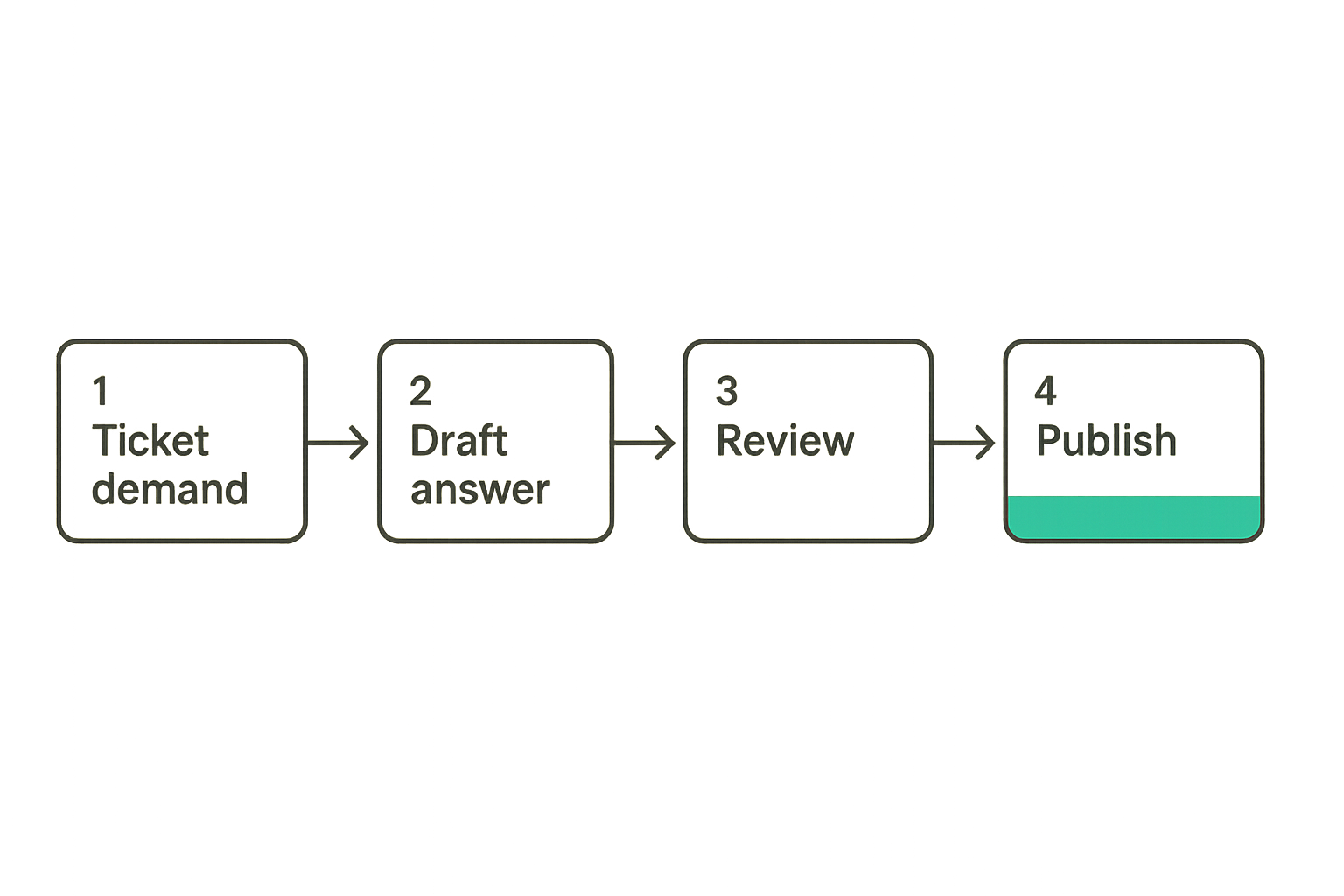
- Detect demand. Identify a repeated ticket, failed search, onboarding gap, or agent macro that deserves a maintained answer.
- Draft from real cases. Use actual customer language. If users search for reset team password, do not title the article credential administration unless that is how your audience talks.
- Validate accuracy. Confirm steps against the current product, permissions, plan limits, and edge cases.
- Publish with routing. Place the article in the right category, add labels, link it from related articles, and make sure agents can find it.
- Measure and revise. Review article views, helpfulness, tickets after view, and search terms. Update or retire content when behavior changes.
What breaks in practice is the last step. Teams publish and move on. Six months later, support agents know the article is wrong, but customers still find it through search.
Related reading from our network: content-heavy teams face the same review and quality-gate problem when scaling publishing workflows, which is why AI blog publishing workflow architecture is a useful parallel.
Zendesk knowledge base software versus common alternatives
When Zendesk is the cleanest option
Zendesk knowledge base software tends to make sense when support is already centered in Zendesk or when you want help content tightly connected to tickets, macros, agents, automations, and customer service reporting.
It is usually a strong fit when:
- Your support team already lives in Zendesk
- Agents need to suggest and reuse articles inside ticket workflows
- You want one customer support ecosystem instead of separate tools
- Your help center content is mostly customer support and product guidance
- You need permissioned internal knowledge for agents as well as public articles
- You want self-service reporting near support metrics
The practical benefit is reduced context switching. Agents do not have to search a separate documentation platform, copy links manually, and guess whether an article is approved.
When a separate knowledge tool may fit better
Zendesk is not automatically the best answer for every team. If your content is closer to developer documentation, API references, training academies, or marketing-led education, a specialized documentation platform or learning management tool may fit better.
Here is a simple comparison:
| Approach | Best fit | Strength | Watch out for |
|---|---|---|---|
| Zendesk knowledge base | Support-led SaaS help centers | Ticket and agent integration | Can become messy without content ops |
| Developer docs platform | API and technical documentation | Versioning, code examples, developer UX | May sit far from support workflow |
| CMS or website builder | Marketing-led resources | Design and SEO flexibility | Weak ticket integration |
| Internal wiki | Employee knowledge | Team documentation and policies | Not built for customer self-service |
| Learning platform | Courses and structured training | Progress, lessons, certification | Overkill for quick support answers |
The right choice depends on where the answer is used. If the answer is part of support resolution, Zendesk has a strong case. If the answer is part of developer adoption, training, or brand content, a separate system may be cleaner.
Practical rule: Choose the knowledge base platform based on the workflow around the answer, not the format of the article.
Implementation workflow for Zendesk knowledge base software
Start with ticket demand, not a blank sitemap
A common implementation mistake is starting with categories such as Getting Started, Billing, Account Settings, and Troubleshooting before looking at actual demand. Those categories may be fine, but they are not the strategy.
Start with the last 60 to 90 days of support data. Pull high-volume tags, repeated macros, common escalation reasons, and search terms from your current help experience if you have one. Talk to agents. Ask what they explain over and over.
Then create a first-release scope. Do not try to document everything. Your first version should cover the questions that create the most avoidable work or the most customer confusion.
A useful first-release target might include:
- Top 20 account and billing questions
- Top 20 setup and onboarding questions
- Top 10 troubleshooting issues
- Top 10 integration questions
- Five articles explaining plan limits, permissions, or product constraints
Build the first release in controlled layers
An implementation sequence keeps the project from becoming a content swamp.
- Define categories around user intent. Organize by what customers are trying to do, not your internal team structure.
- Create templates. Standardize article format for how-to guides, troubleshooting, billing, integrations, and conceptual explanations.
- Draft from support evidence. Use ticket language, screenshots, and agent notes.
- Review with accountable owners. Do not publish product instructions without product validation.
- Configure search labels and related links. Help users move between connected questions.
- Train agents. Show support how to suggest articles, flag gaps, and request updates.
- Launch quietly before announcing broadly. Let agents use it in real tickets before treating it as finished.
- Review weekly for the first month. Watch failed searches, article feedback, and ticket comments.
This is not glamorous work. It is the difference between a help center that becomes trusted infrastructure and one that becomes an abandoned content shelf.
Search, AI, and self-service need guardrails
Search is an information architecture problem
Search quality is not only a search-engine problem. It is an information architecture problem.
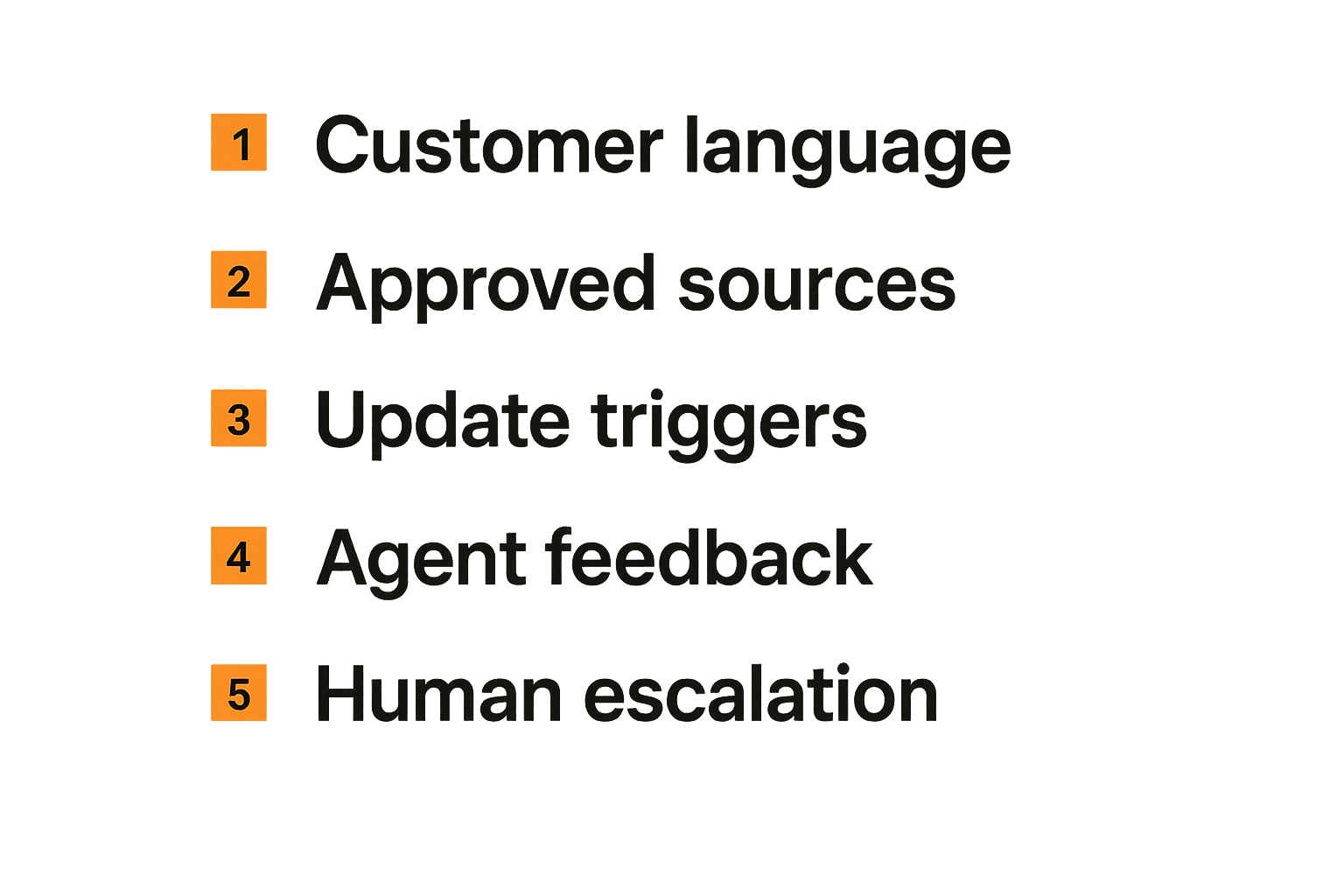
Customers search with messy language. They type invite user, add teammate, transfer owner, cannot log in, invoice missing, API token, cancel plan, and hundreds of other variations. Your article titles, headings, labels, and body copy need to reflect how customers describe the issue.
What breaks in practice is internal vocabulary. Teams title articles after product features instead of customer goals. A feature called Workspace Access Controls may be searched as how to stop a contractor seeing billing. If the article does not connect those concepts, search feels broken even when the answer exists.
Search works better when you:
- Use customer language in titles and headings
- Add synonyms through labels where appropriate
- Link related setup, permission, and troubleshooting articles
- Retire duplicate articles that compete with each other
- Review searches with no clicks or no results
AI answers are only as good as the source system
AI can make knowledge bases more useful, but it also exposes weak content operations. If your articles are outdated, contradictory, or too vague, AI-assisted answers can become confidently wrong.
That changes the conversation. The question is not whether AI can summarize support content. It can. The question is whether the underlying content is governed well enough to be summarized safely.
Before relying heavily on AI self-service, check whether your team can answer these questions:
- Which articles are approved sources for customer-facing answers?
- Which articles are internal only?
- How quickly are articles updated after product releases?
- Can agents flag inaccurate AI suggestions?
- Are sensitive account issues routed to humans instead of automated answers?
For SaaS teams, AI should accelerate resolution, not blur accountability. The source system still matters.
Related reading from our network: when support processes intersect with risk and escalation, SaaS incident response architecture is a useful security-side comparison for signals, ownership, and playbooks.
Analytics: measure fewer things better
Metrics that operators should trust
Knowledge base analytics can become noisy fast. Views, clicks, ratings, searches, deflection, and article usage all look useful. Some are useful. Some are easy to misread.
Focus on a smaller set of metrics that connect to decisions:
| Metric | What it helps decide | Caveat |
|---|---|---|
| Top article views | Which topics attract demand | High views may mean confusion, not success |
| Failed searches | What content is missing or poorly labeled | Needs review of customer language |
| Article helpfulness | Which pages need improvement | Low response volume can mislead |
| Tickets after article view | Whether self-service is failing | Requires careful attribution |
| Agent article usage | Whether support trusts the content | Agents need training and easy access |
| Content age by category | Where stale information may exist | Age alone does not prove inaccuracy |
A good weekly review can be lightweight. Pick the top failed searches, the lowest-performing high-traffic articles, and the tickets where agents had to explain something that should have been documented. Turn those into content tasks.
What breaks when metrics are vanity numbers
Many teams celebrate knowledge base traffic without asking whether it reduces friction. More views can mean customers are learning. It can also mean the product is confusing, onboarding is weak, or search is sending users in circles.
The mistake teams make is reporting pageviews upward and ignoring operational signals downward. A support leader needs to know which articles reduce tickets, which create confusion, and which topics should become product fixes.
A practical reporting cadence might look like this:
- Weekly: failed searches, flagged articles, new article requests
- Monthly: high-volume topics, agent usage, stale content risk
- Quarterly: deflection trends, onboarding gaps, product feedback themes
Practical rule: Measure the knowledge base by the work it changes, not the traffic it attracts.
Common failure modes and how to avoid them
What fails in practice
Most failed knowledge base projects do not fail dramatically. They decay.
The common failure modes are predictable:
- No single owner. Everyone can contribute, but nobody is accountable.
- Duplicate answers. Two articles answer the same question differently.
- Stale screenshots. The UI changes, but the article does not.
- Internal language. Customers cannot find answers because titles use company vocabulary.
- Weak agent adoption. Support agents do not trust the help center, so customers do not either.
- No feedback loop. Search failures and ticket repeats never become content tasks.
- Over-automation. Bots push articles that do not match the customer context.
- No retirement process. Old articles stay live because deleting feels risky.
What breaks in practice is trust. Once agents believe the knowledge base is unreliable, they stop linking to it. Once customers hit two outdated articles, they stop searching and submit tickets instead.
What works instead
What works is less dramatic and more operational.
Create a small knowledge council if needed, but keep accountability clear. Give support operations the system owner role. Let product, customer success, finance, and engineering review the content they understand best.
Use article templates so quality does not depend entirely on the writer. A troubleshooting article should include symptoms, likely causes, steps to resolve, escalation triggers, and related links. A billing article should include plan caveats, permissions, timing, and who can make changes.
Most importantly, make updates easy to request. Agents should be able to flag an article from their workflow with a short note: wrong step, missing edge case, outdated screenshot, unclear wording, customer searched this phrase.
That creates a practical loop between real customer work and maintained knowledge.
Buying checklist for SaaS teams
Questions to ask before choosing Zendesk
If you are evaluating Zendesk knowledge base software, the buying conversation should include operations, not only features.
Ask these questions before committing:
- Do we already use Zendesk for support tickets, or are we willing to center support there?
- Who will own the public knowledge base after launch?
- Who can approve articles that mention billing, security, permissions, or integrations?
- How will agents suggest, update, and flag content?
- What content should be public, internal, or restricted?
- How will the knowledge base connect to chat, bots, macros, and ticket forms?
- What metrics will we review every week?
- What content will we intentionally not build in Zendesk?
The last question matters. A knowledge base should have boundaries. If you try to make it serve every documentation, training, marketing, and internal wiki need, it will become harder to operate.
Budget, adoption, and rollout risk
The software license is only part of the cost. The real cost is implementation time, migration cleanup, article rewriting, agent training, permissions design, and ongoing maintenance.
Small teams should be especially careful with scope. It is better to launch a smaller, trusted help center than a large one filled with rushed articles.
A practical rollout plan for a small SaaS team might be:
- Week 1: audit tickets, tags, macros, and existing docs
- Week 2: define categories, templates, owners, and review rules
- Weeks 3 and 4: draft the first 50 to 75 high-value articles
- Week 5: train agents and test article use in real tickets
- Week 6: launch, measure, and revise weekly
For a more mature support operation, the sequence may include migrations, localization, internal knowledge, AI testing, permission models, and deeper reporting. But the principle is the same: launch around workflows, not content volume.
Where saasrow.com fits in the software decision
Use software content as an operating layer
saasrow.com is for readers who want practical articles, guides, and insights about software and productivity. That means the focus is not tool worship. It is how teams choose software wisely, connect it to workflows, and avoid buying features they cannot operate.
Zendesk knowledge base software is a good example of why that matters. The product can be useful, but only if the buyer understands the operating model around it: who owns content, how tickets become articles, how search is reviewed, how AI is governed, and how agents trust the system.
The same principle applies across SaaS buying. A tool is rarely the whole answer. The workflow around the tool determines whether it becomes leverage or overhead.
The closing test for Zendesk knowledge base software
Before you choose or expand Zendesk knowledge base software, run this simple test.
Can your team name the top customer questions it wants to reduce? Can it assign owners to the answers? Can agents flag gaps without leaving their workflow? Can product changes trigger content reviews? Can you tell whether the help center is reducing work or just attracting traffic?
If the answer is yes, Zendesk can become a serious part of your support architecture. If the answer is no, fix the operating model before expecting the software to fix the customer experience.
The practical question is not whether Zendesk knowledge base software has enough features. The practical question is whether your team can turn it into a maintained, trusted, measurable knowledge system.
Try saasrow.com
You are writing for readers who want practical articles, guides, and insights about software and productivity. Try saasrow.com.