

August 5, 2026
Time Tracking Software in 2026: A Practical Workflow Guide for SaaS Buyers
Time tracking software is not just a timer. This guide helps SaaS buyers and small teams choose tools by workflow fit, approvals, integrations, reporting, and adoption.
Your team does not need another timer button.
That is usually where time tracking software projects go wrong. Someone asks for better visibility, finance wants cleaner project costing, managers want fewer status meetings, and the buying conversation turns into a feature checklist: screenshots, mobile apps, idle detection, dashboards, exports.
Teams think the problem is tracking time. The real problem is designing a workflow that makes time data useful without turning work into clerical overhead.
That changes the conversation. Time tracking software in 2026 is not just a productivity tool. It is a small operating system for labor cost, project health, billing, utilization, payroll support, and management trust. If the workflow is wrong, the tool becomes surveillance theater. If the workflow is right, it reduces guesswork and helps teams make better decisions.
Table of contents
- Time tracking software is a workflow system
- Start with the jobs your time data must do
- Compare time tracking software by workflow fit
- Map the data model before you compare features
- Integrations decide whether time tracking software survives
- Design the approval workflow before rollout
- Privacy and trust are product requirements
- What breaks when teams implement time tracking software badly
- A practical buying checklist for time tracking software
- Where saasrow.com fits in your software workflow
Time tracking software is a workflow system
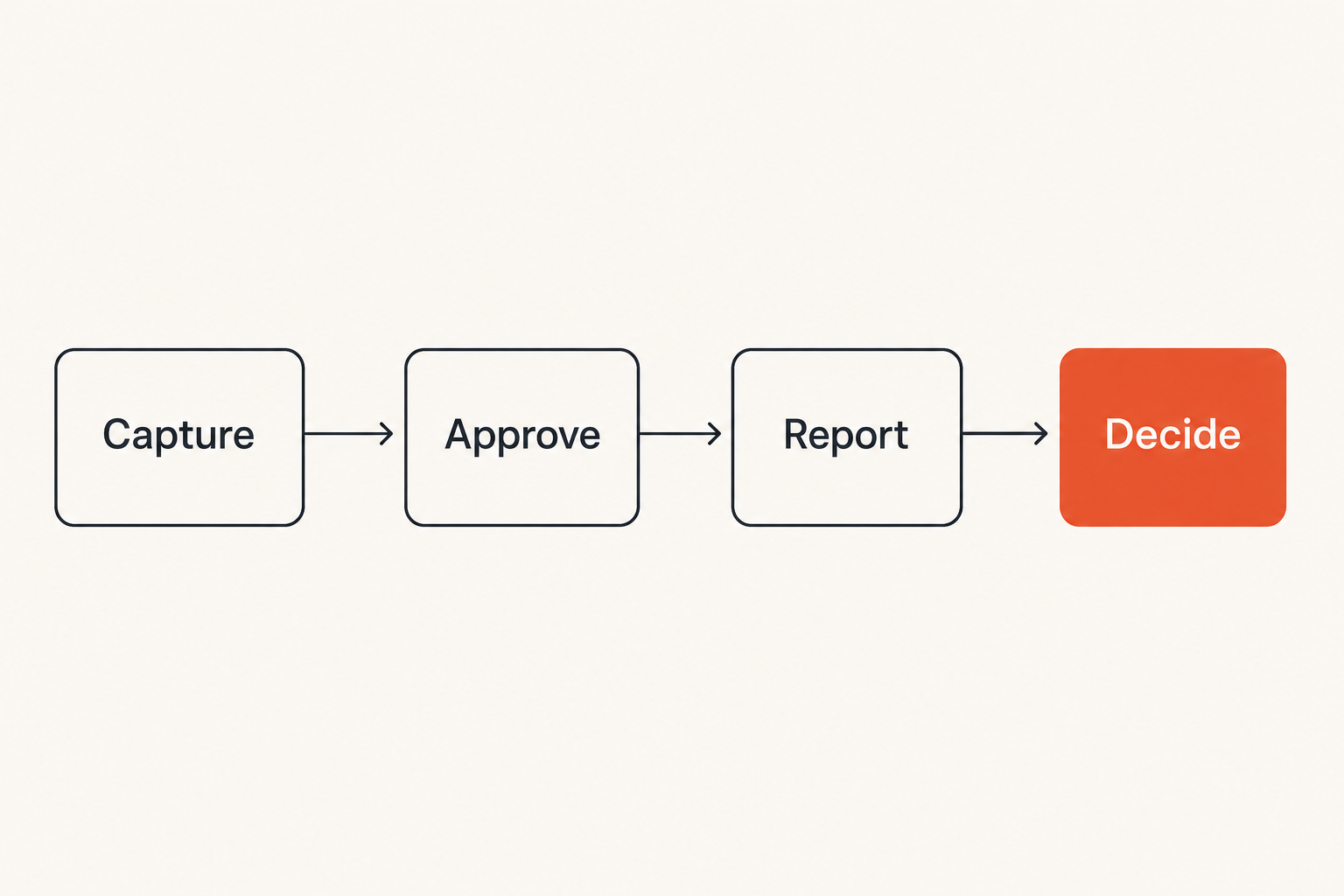
The mistake teams make is treating time tracking software like a stopwatch with reports attached. That framing leads to shallow comparisons. One tool has a prettier desktop app. Another has screenshots. Another has invoice export. Everyone debates features before agreeing on what the business is trying to control.
A useful way to think about it is this: time tracking sits between work execution and business interpretation. It translates activity into data that finance, operations, project leads, and individual contributors can use.
The timer is the smallest part of the system
The timer matters because capture must be easy. But capture is only the front door.
The system also needs to answer:
- What work was done?
- For which client, project, initiative, or internal function?
- Was the work billable, capitalized, operational, administrative, or support related?
- Who reviewed it?
- Where does the data go after approval?
- What decision changes because the data exists?
If those questions are unanswered, time tracking becomes a compliance ritual. People enter time because they are told to, not because the data improves the work.
Practical rule: Do not buy time tracking software until you can name the decisions the time data will support.
The real buyer is the operating model
The practical question is not which product has the most features. It is which product fits how your team works.
A five person design studio, a 40 person SaaS company, a fractional consulting team, and a remote support operation all need different defaults. Some need client invoices. Some need payroll support. Some need sprint-level planning. Some need proof of work for retainers. Some only need high-level capacity data.
This is why broad productivity buying guides are useful only when they force workflow thinking. If you are comparing time tracking as part of a larger software stack, it helps to evaluate it alongside adjacent tools for task management, reporting, and team coordination. The same workflow-first lens applies when choosing the best productivity software for small business in 2026, because the tool is only useful when it changes how the team operates.
Why this matters more in 2026
In 2026, many small teams are more distributed, more tool-heavy, and more cost-aware than they were a few years ago. Work happens across project boards, chat, docs, code repositories, CRM notes, support queues, calls, and asynchronous updates.
That fragmentation creates a management problem. Leaders want visibility, but the raw work trail is scattered. Time tracking software promises a clean layer above the mess.
What breaks in practice is that the clean layer often depends on human discipline. If the workflow is too heavy, entries are late. If categories are confusing, reports lie. If managers use the data badly, trust drops.
Start with the jobs your time data must do
Before comparing vendors, define the job. A time tracking system can serve several jobs, but not all at once with equal priority. The more jobs you force into the same workflow, the more careful your design needs to be.
Billing and client proof
For agencies, consultants, implementation partners, and service businesses, time data often supports invoices. The goal is not just knowing hours. The goal is defensible billing.
That means the software should support:
- Client and project structure
- Billable and non-billable separation
- Notes that explain work without creating novels
- Approval before invoicing
- Invoice export or accounting integration
- Locking or audit trail after billing close
If your clients dispute invoices, the time tracking system becomes evidence. Vague categories like miscellaneous work will not help. Neither will entries created two weeks late.
Project costing and margin control
For fixed-fee work, time tracking is less about billing and more about margin. You need to know whether the project is consuming more labor than planned.
This requires planned versus actual views. The best workflow shows budget burn early enough to act. If you discover the overrun after delivery, you have accounting data, not operating data.
Useful project costing outputs include:
- Hours by phase
- Hours by role
- Non-billable internal effort
- Rework and support load
- Estimate accuracy by project type
- Margin signals before the project is done
Related reading from our network: teams that sell expertise through outside channels face similar discipline problems, and the discussion of building a channel stack instead of a platform habit in Are Freelance Websites Worth It in 2026 is a useful adjacent lens for service operators who need to understand where their working time actually goes.
Capacity planning and team health
Some teams do not bill hourly and still need time tracking software. Product, operations, support, and internal teams may use time data to understand capacity.
The goal is not to count every minute. The goal is to see whether the team is spending time on the work it claims is important.
Examples:
- Too much roadmap time is being absorbed by support escalations.
- Managers are stuck in meetings instead of coaching or delivery.
- Engineers are losing time to operational toil.
- Customer success is carrying implementation work that should be scoped separately.
This version of time tracking requires restraint. If you need directional capacity planning, minute-level surveillance can make the system worse.
Compare time tracking software by workflow fit
Time tracking software categories overlap, but the operating fit is different. A comparison table is more useful than a generic best-of list because it shows the tradeoffs.
What works for small teams
Small teams need low-friction capture, simple reporting, and a short path from entry to decision. They usually do not need complex approval matrices on day one.
The best fit is often a tool that connects easily to the team’s existing calendar, tasks, and accounting system. If the tool requires a full-time admin to maintain project lists, it is probably too heavy.
What works for client services
Client services teams need stronger controls. That includes invoice-ready reports, rate handling, client-specific project structures, and review workflows.
They also need consistency. If one consultant enters detailed notes and another enters internal, the invoice review process becomes painful. Standard templates help more than long policy documents.
What works for SaaS and product teams
SaaS and product teams usually need allocation and trend visibility more than timesheets for billing. Time data can help compare roadmap investment, bug fixing, customer commitments, incidents, internal operations, and meetings.
But product teams should be careful. If time tracking becomes a substitute for product judgment, it creates false precision. A feature that took 20 hours is not automatically better or worse than one that took 80. The useful question is whether investment matches strategy.
| Team type | Primary use case | Workflow priority | Common mistake |
|---|---|---|---|
| Small business team | Visibility and coordination | Easy capture and simple reporting | Choosing an enterprise tool too early |
| Agency or consultancy | Billing and profitability | Client, project, approval, invoice flow | Weak notes and inconsistent categories |
| SaaS product team | Capacity allocation | Integration with roadmap and issue tracking | Treating hours as a proxy for impact |
| Support operation | Staffing and workload analysis | Queue, shift, ticket, and escalation mapping | Ignoring context behind spikes |
| Finance-led organization | Cost allocation and close | Auditability and export controls | Designing for finance but not users |
Practical rule: Choose the tool that fits your dominant workflow first. Secondary use cases should not make the daily workflow painful.
Map the data model before you compare features
The data model is the part buyers skip because it feels boring. It is also the part that determines whether reports are useful six months later.
A time entry is not just a start time and end time. It is a record with dimensions. Those dimensions might include user, team, client, project, task, role, rate, location, billable status, approval status, payroll period, department, and custom tags.
Projects tasks clients and cost codes
Your structure should reflect how the business makes decisions. If finance thinks in departments, project leads think in phases, and client managers think in retainers, the software needs a model that can serve all three without forcing users through a maze.
Keep the first version small. For example:
- Client or internal department
- Project or initiative
- Work type
- Billable status
- Short note when needed
You can add detail later. It is harder to remove complexity after people have built habits around bad fields.
Required fields versus lightweight capture
Required fields improve reporting, but every required field adds friction. If a user must classify every 12 minute task across six dropdowns, the entries will become inaccurate or delayed.
The better pattern is progressive structure:
- Require the minimum needed for core reporting.
- Use defaults based on project or task source.
- Allow quick capture during the day.
- Ask for cleanup during review, not during deep work.
- Lock periods only after corrections are complete.
The mistake teams make is trying to solve reporting quality by adding mandatory fields. Sometimes that works. Often it just moves bad data into more columns.
The reporting grain problem
Reporting grain means the level of detail at which data is useful. Too coarse and the report cannot explain anything. Too fine and the team spends more time classifying work than doing it.
A weekly capacity report may only need categories like roadmap, support, sales engineering, meetings, and admin. A client invoice may need project phase and work summary. Payroll may need regular hours, overtime, paid leave, and location.
Do not force one grain on every use case. Design views for different audiences.
Integrations decide whether time tracking software survives
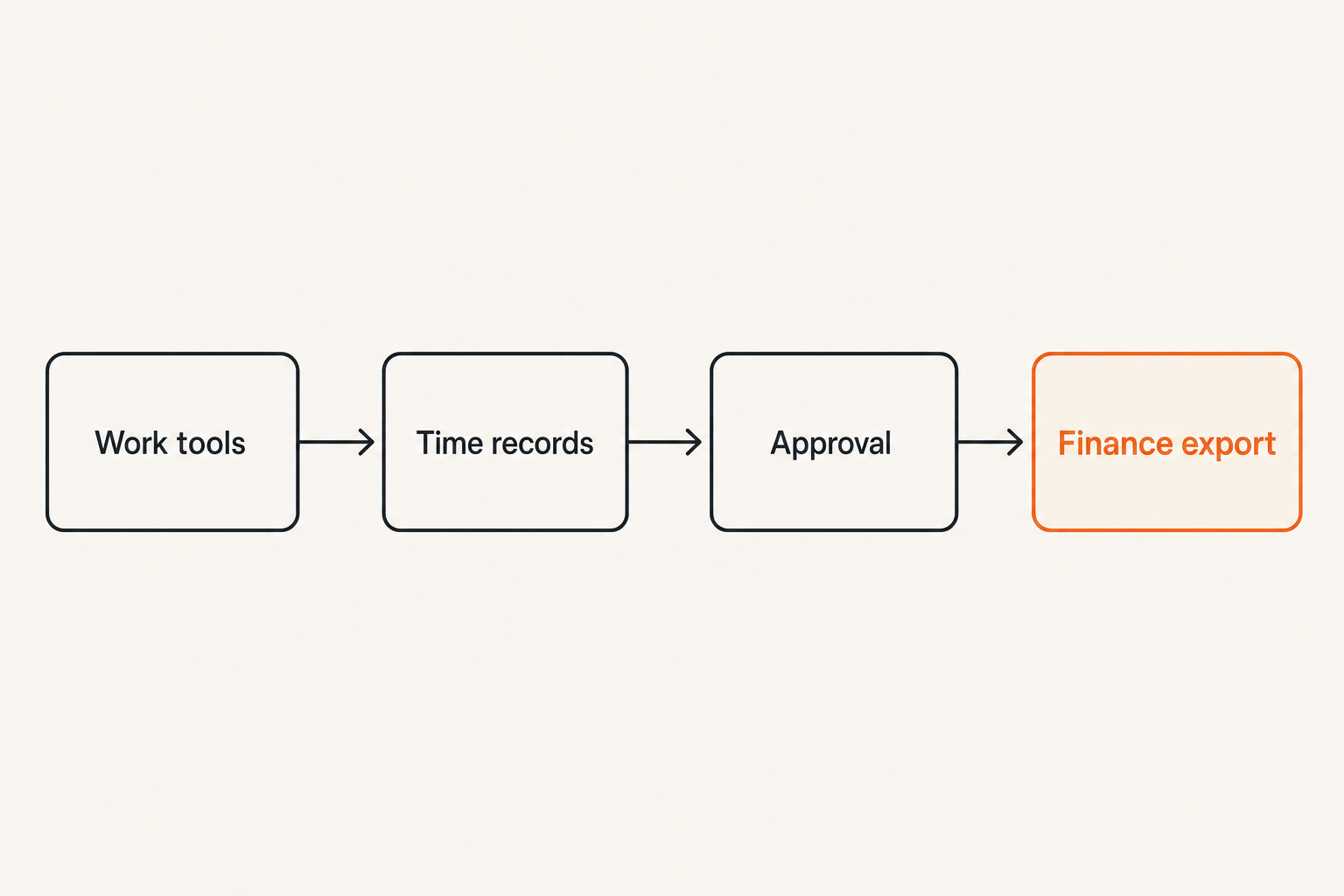
A standalone time tracking tool can work for a very small team. In most companies, it eventually fails unless it connects to the systems where work already happens.
The practical question is: can the time tracking software reduce duplicate entry?
Calendar project management and ticketing
Calendar integration helps capture meetings. Project management integration helps associate time with tasks. Ticketing integration helps support and engineering teams connect time to requests, incidents, and customer work.
Look for integrations that preserve context. A weak integration only imports a task title. A better integration keeps project, client, assignee, status, and link-back information intact.
Related reading from our network: software teams face a similar behavior problem when security workflows sit outside delivery work, which is why Security Awareness Training for CI/CD and Software Supply Chain Teams is a useful adjacent example of embedding process into the tools people already use.
Payroll accounting and invoicing
Finance integrations need more control than productivity integrations. If time data feeds payroll, accounting, or client invoices, you need predictable close periods, permissions, approval state, and export rules.
Ask vendors how they handle:
- Edited entries after approval
- Locked pay periods
- Multiple rates per person or project
- Tax or location data if relevant
- Invoice grouping
- Rounding rules
- Audit trails
This is where lightweight tools can hit a ceiling. That does not make them bad. It means you need to know when the ceiling matters.
Identity permissions and admin control
Permissions are often ignored until the first bad surprise. Managers should see their teams. Finance may need cross-company access. Contractors may need restricted project visibility. Users should not be able to change billing rates unless that is their job.
Identity features to check:
- SSO or simple account provisioning
- Role-based access
- Project-level permissions
- Admin audit logs
- Offboarding behavior
- Data export ownership
If your company is small, you may not need every control today. But you should understand the upgrade path.
Design the approval workflow before rollout
A good approval workflow prevents two bad outcomes: inaccurate data flowing downstream and managers spending every Friday chasing timesheets.
The approval process should match the rhythm of the business. Daily capture, weekly review, and monthly close is a common pattern because it balances accuracy with administrative sanity.
Daily capture weekly review monthly close
A practical implementation sequence looks like this:
- Define the business goal for time data, such as billing, project costing, or capacity planning.
- Build the first project and work-type structure.
- Configure defaults and integrations to reduce manual entry.
- Run daily capture for a small pilot group.
- Review weekly with managers and users.
- Correct categories and workflow rules.
- Close the period and export only approved data.
- Decide what report or decision improved.
This sequence matters because it treats rollout as a learning loop. You are not just installing software. You are installing an operating habit.
Who approves what
Approval ownership should follow accountability.
Project leads should approve project context. People managers may approve attendance or workload reasonableness. Finance should approve billing and export readiness. In a small company, one person may play multiple roles, but the logic still matters.
Avoid approval workflows where nobody knows what they are checking. If a manager clicks approve without reviewing anything, the control is fake.
Practical rule: Every approval step should have a named purpose. If nobody can say what the approver validates, remove or redesign the step.
Exception handling and corrections
Real life will break your clean workflow. People forget timers. Meetings run long. A task is assigned to the wrong project. A client changes scope. A contractor submits late entries.
Design exception rules up front:
- How late can entries be submitted?
- Who can edit approved time?
- What requires a note?
- When does finance lock a period?
- How are client disputes handled?
- What happens when a project code is missing?
This is where many rollouts get messy. The tool may support corrections, but the organization has not defined authority.
Privacy and trust are product requirements
Time tracking software touches trust directly. Even if the business goal is reasonable, users may read it as surveillance if the rollout is vague or punitive.
Trust is not a soft issue here. It affects data quality. People who distrust the system will game it, delay entries, over-explain, under-report, or classify defensively.
Monitoring is not the same as management
Some tools offer screenshots, app tracking, URL tracking, idle detection, keystroke-like signals, or productivity scores. These features may be relevant in some environments, especially regulated, hourly, or contractor-heavy work. They can also damage professional teams if used carelessly.
The practical question is whether the monitoring feature improves a legitimate workflow or substitutes for poor management.
If a manager cannot explain what decision a monitoring signal supports, collecting it is risky. More data does not automatically create better accountability.
Set visible rules before collecting data
Before rollout, document the rules in plain language:
- What data is collected?
- Why is it collected?
- Who can see it?
- What decisions can it affect?
- What decisions will it not affect?
- How can users correct mistakes?
- How long is data retained?
This does not need to be a legal treatise. It needs to be understandable. Ambiguity creates suspicion.
Use automation carefully
Automation can improve capture. Calendar suggestions, idle reminders, task-based timers, and automatic project mapping can reduce manual work.
But automation can also create false records. If a calendar event is auto-logged as client work but the meeting was canceled, your report is wrong. If idle detection cuts time during reading or thinking, your system penalizes real work.
Automation should suggest and assist, not silently rewrite reality.
What breaks when teams implement time tracking software badly
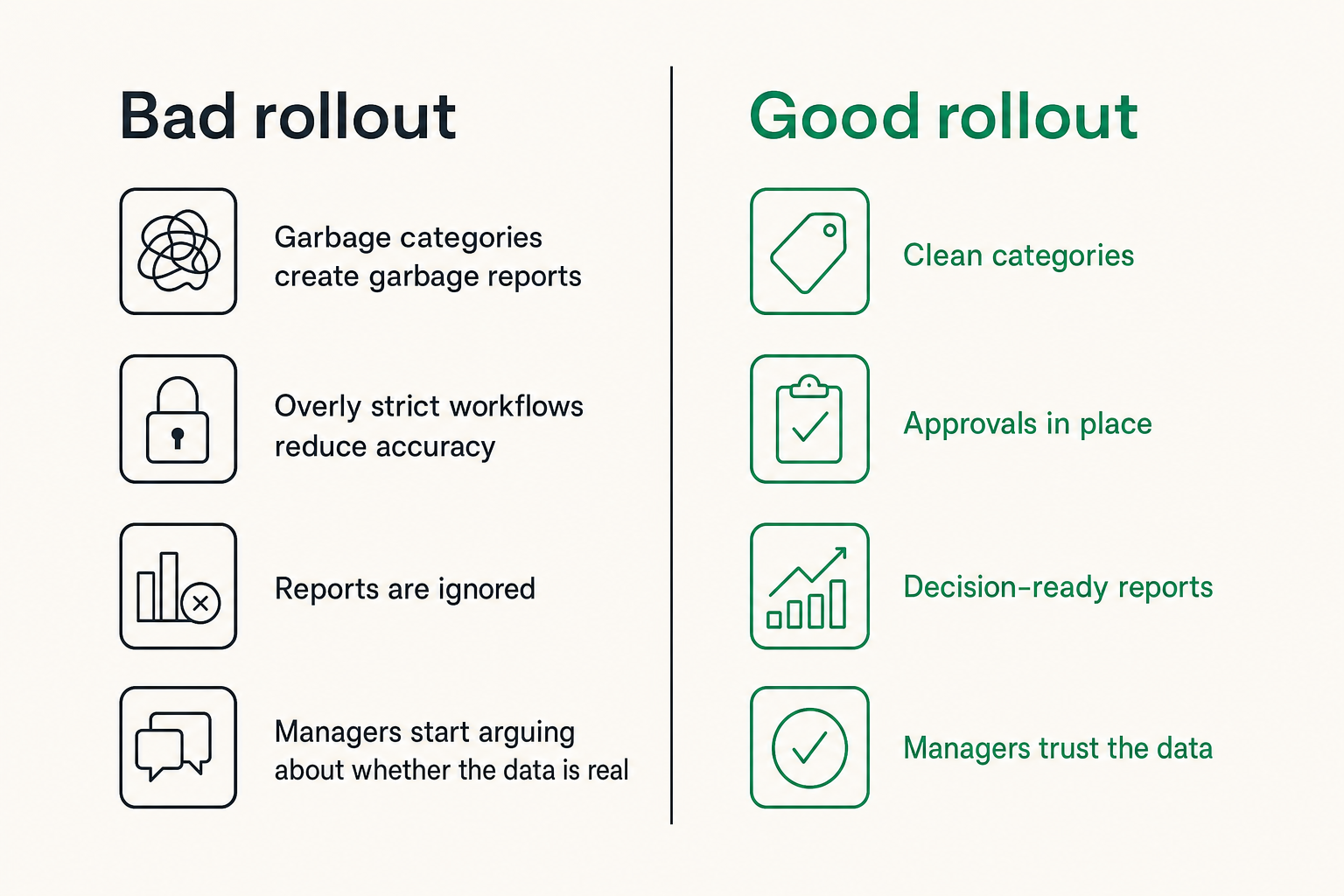
Bad time tracking implementations have a recognizable pattern. The launch looks organized. The tool is configured. The team gets instructions. For two weeks, compliance looks fine. Then accuracy slips, reports are ignored, and managers start arguing about whether the data is real.
This is not a software-only failure. It is usually a workflow failure.
Garbage categories create garbage reports
If project categories are unclear, people guess. If work types overlap, people choose randomly. If old projects stay open forever, entries scatter across dead codes.
The result is a dashboard that looks precise but cannot be trusted.
Common category mistakes:
- Too many similar work types
- No archive process for finished projects
- Internal work mixed with client work
- Billable status left to individual interpretation
- Catch-all categories that become dumping grounds
This is the same operational debt pattern that appears in many SaaS rollouts. Broken workflows rarely announce themselves as broken workflows. They show up as confusing screens, duplicate entry, and reports nobody believes. That is why the idea of spotting software gore before you buy or roll out SaaS applies directly to time tracking software.
Overly strict workflows reduce accuracy
Strictness feels like control. In practice, too much strictness can reduce data quality.
If users cannot save a draft without every field, they may delay entries. If they delay entries, they reconstruct the week from memory. If they reconstruct from memory, the data becomes fiction with timestamps.
What works:
- Fast capture during work
- Simple correction during review
- Clear defaults
- Short notes for ambiguous work
- Manager coaching when patterns look wrong
What fails:
- Mandatory detail for every tiny entry
- Punitive reminders without workflow fixes
- Approval chains that add no judgment
- Reports that shame individuals without context
- Rules that finance understands but users cannot follow
Dashboards without decisions become noise
Dashboards are easy to admire in demos. The harder question is what happens on Monday morning.
If a report shows that support work increased by 18 percent in an illustrative pilot, who investigates? If non-billable work rises, who decides whether scope changed? If a project exceeds its estimate, who talks to the client? If meetings consume half the week, who changes the operating cadence?
Do not build dashboards for curiosity. Build dashboards for decisions.
A practical buying checklist for time tracking software
Buying time tracking software should feel less like browsing apps and more like designing a small operating process. The checklist below is intentionally practical.
Evaluation questions that matter
Use these questions during vendor evaluation:
- What is our primary use case: billing, costing, capacity, payroll support, or compliance?
- Can users capture time in under a few seconds during normal work?
- Can managers correct project context without rewriting history invisibly?
- Can finance lock periods and export approved records?
- Can we archive projects cleanly?
- Can reports separate billable, non-billable, internal, and administrative work?
- Does the tool integrate with our project, calendar, accounting, and identity systems?
- Can permissions match our team structure?
- What happens when contractors leave?
- How easy is it to migrate or export data later?
For teams that connect time tracking to budgeting, the evaluation should include planning and variance review. Time data is often one input into labor forecasting, so it pairs naturally with the workflow questions in this budgeting software buying guide for 2026.
Pilot design for two weeks
Do not pilot with a fake project. Use real work, real managers, and real reporting needs.
A useful two-week pilot should include:
- One client-facing or revenue-related project
- One internal project
- At least one manager approval cycle
- At least one export or report review
- A feedback session with users
- A decision on what categories to remove
At the end of the pilot, ask three questions:
- Did capture create unacceptable friction?
- Did the data answer the intended business question?
- Did the review workflow catch and correct bad entries?
If the answer to any of these is no, fix the workflow before expanding the rollout.
Red flags during demos
Demos can hide operational pain. Watch for red flags:
- The vendor shows dashboards before explaining data capture.
- Approval workflows are possible but awkward.
- Exports require manual cleanup every time.
- Project setup depends on too many custom fields.
- Permission models are all-or-nothing.
- Mobile, desktop, and web capture behave differently.
- The tool assumes every team works like an agency.
- The vendor cannot explain how corrections are audited.
Related reading from our network: teams managing multiple products face a similar design challenge around operating cadence, ownership, and reporting; the product workflow angle in Product Line Strategy in 2026 is a useful comparison when thinking about how software choices scale beyond one team.
Where saasrow.com fits in your software workflow
Choosing software is easier when you stop treating the purchase as a feature contest. The better question is whether the tool fits the workflow you are trying to run.
That is the lens we use at saasrow.com. The goal is not to hype every new SaaS category. It is to help readers compare tools, understand tradeoffs, and avoid buying software that creates more operational drag than it removes.
Use software guides to reduce buying mistakes
Time tracking software is a good example because the category looks simple from the outside. Timers, reports, exports. The real work is underneath: data structure, approvals, integrations, privacy, reporting cadence, and behavior change.
When you evaluate software this way, demos become more useful. You can ask better questions. You can spot workflow gaps. You can avoid tools that look polished but do not fit your operating reality.
Closing thought on time tracking software
Time tracking software should make work easier to understand, not harder to perform.
The best implementation is not the one with the most detailed dashboard. It is the one where users can capture time with low friction, managers can review context quickly, finance can trust approved records, and the business can make better decisions before problems become expensive.
Teams think the problem is missing time data. The real problem is missing workflow design. Fix that first, and time tracking software becomes useful instead of annoying.
Try saasrow.com
saasrow.com publishes practical articles, guides, and insights about software and productivity for readers who want to choose tools wisely. Try saasrow.com.