

June 9, 2026
Invoicing Software in 2026: The Practical Workflow Guide for SaaS Buyers and Small Business Teams
A practical guide to choosing invoicing software by workflow fit: billing models, integrations, automation, controls, metrics, rollout, and common failure modes.
Invoicing software looks simple until the first month-end close goes sideways.
A customer changes plan mid-cycle. A payment fails. Sales promises custom terms. Finance needs revenue reports. Support needs to know whether an account is overdue. The founder wants cash collected faster, but nobody wants to create a billing mess that takes three days to untangle.
Teams think the problem is choosing invoicing software with a clean invoice template and a lower subscription price. The real problem is designing a billing workflow that stays accurate when customers, products, taxes, payments, and exceptions all move at the same time.
That changes the conversation. In 2026, the practical question is not which invoicing tool has the nicest dashboard. It is whether the system can support how your business actually sells, bills, collects, reconciles, and answers customer questions without forcing the team into spreadsheet archaeology.
Table of contents
- Why invoicing software is a workflow decision
- Map your billing model before comparing tools
- Core architecture of an invoicing system
- Automation that helps versus automation that breaks trust
- Integrations decide whether the system survives month end
- Implementation workflow for invoicing software
- Controls permissions and audit trails
- Metrics that show invoicing software is working
- Failure modes that appear after the demo
- Buying criteria for invoicing software
- Where saasrow.com fits in the decision
Why invoicing software is a workflow decision
What the invoice lifecycle really includes
An invoice is not a PDF. It is a business event with a lifecycle.
A useful way to think about it is this: invoice creation is only one step in a chain that includes quote approval, customer data, product data, tax rules, payment collection, reminders, reconciliation, dispute handling, revenue reporting, and support visibility.
The mistake teams make is evaluating invoicing software from the moment an invoice is generated. In production, the harder questions come before and after that moment:
- Who approved the price?
- Which customer entity should be billed?
- What payment method is allowed?
- What happens if payment fails?
- Who sees the overdue status?
- How does the invoice land in accounting?
- What gets reported as paid, outstanding, voided, credited, or refunded?
If your tool handles invoice creation but leaves the rest to manual coordination, you have not automated billing. You have only moved the formatting step into a web app.
Why now is different for small teams
Small teams used to get away with basic invoice generators because the sales motion was simpler. Send the work, issue the invoice, wait for payment, chase manually if needed.
Now even small businesses and SaaS teams often deal with subscriptions, annual prepayments, usage tiers, sales tax, VAT, payment links, failed card retries, multiple entities, and customer portals. The workflow has become more like a lightweight billing operation than a document task.
That does not mean every small team needs enterprise billing software. It does mean the buyer needs to understand the operating model before shopping. A cheap tool that works for ten simple invoices a month may become expensive when it creates reconciliation gaps, customer confusion, or unpaid invoices nobody owns.
The source of truth question
Every invoicing system creates a source-of-truth decision. Sometimes the invoicing tool owns customer balances. Sometimes accounting does. Sometimes the payment processor has the most reliable payment status. Sometimes the CRM contains the contract reality while billing contains the cash reality.
You need to decide what wins when systems disagree.
Practical rule: Before selecting invoicing software, decide which system owns customer identity, invoice status, payment status, and accounting records.
Without that decision, teams end up with multiple versions of the truth. Sales says the customer renewed. Finance says the invoice is overdue. Support says the account is active. The customer says they already paid. Everyone may be partly right, which is exactly the problem.
Map your billing model before comparing tools
One time recurring and usage based billing
Your billing model determines the kind of invoicing software you need.
A professional services firm may need project-based invoices with milestones, deposits, retainers, and partial payments. A SaaS company may need monthly subscriptions, annual contracts, proration, plan changes, coupon codes, and usage add-ons. A productized service may need a mix of one-time setup fees and recurring retainers.
The practical question is: what billing events can happen without human judgment, and what billing events require review?
Here is a simple mapping:
| Billing pattern | Common need | Risk if unsupported |
|---|---|---|
| One-time invoices | Fast creation, payment links, reminders | Slow cash collection and manual chasing |
| Recurring billing | Schedules, renewals, failed payment handling | Missed invoices or duplicate billing |
| Usage-based billing | Metered data, cutoffs, auditability | Customer disputes and revenue leakage |
| Milestone billing | Project status, approvals, partial payments | Billing before delivery or forgetting billable work |
| Hybrid billing | Multiple line types and terms | Spreadsheet side systems become mandatory |
If you cannot describe your model in a few rows like this, do that before watching demos.
Discounts credits and exceptions
Most demos show the happy path. Real billing lives in exceptions.
A customer gets a three-month discount. A late renewal receives a credit. A failed service delivery triggers a partial refund. A founder approves custom terms for a strategic account. A customer upgrades mid-cycle and expects fair proration.
What breaks in practice is not the standard invoice. It is the exception that nobody modeled.
Good invoicing software should make exceptions visible and controlled. It should not require hidden notes, offline spreadsheets, or institutional memory. Credits, discounts, voids, refunds, and write-offs need clear states and ownership.
Practical rule: If an exception changes revenue, cash, tax, or customer access, it should be tracked in the system instead of buried in a comment thread.
Tax currency and regional rules
Tax handling is one of the easiest areas to underestimate. Even if you are not a tax expert, your software choice affects how much manual cleanup your finance or accounting partner must do.
Look for whether the tool supports the regions, currencies, tax IDs, exemptions, invoice numbering rules, and document requirements that match your customer base. Do not assume a tool designed for domestic freelancers will handle international SaaS billing gracefully.
For SaaS teams, the important question is not just whether the invoice can show tax. It is whether customer location, tax status, product tax category, and reporting exports are handled consistently.
Core architecture of an invoicing system
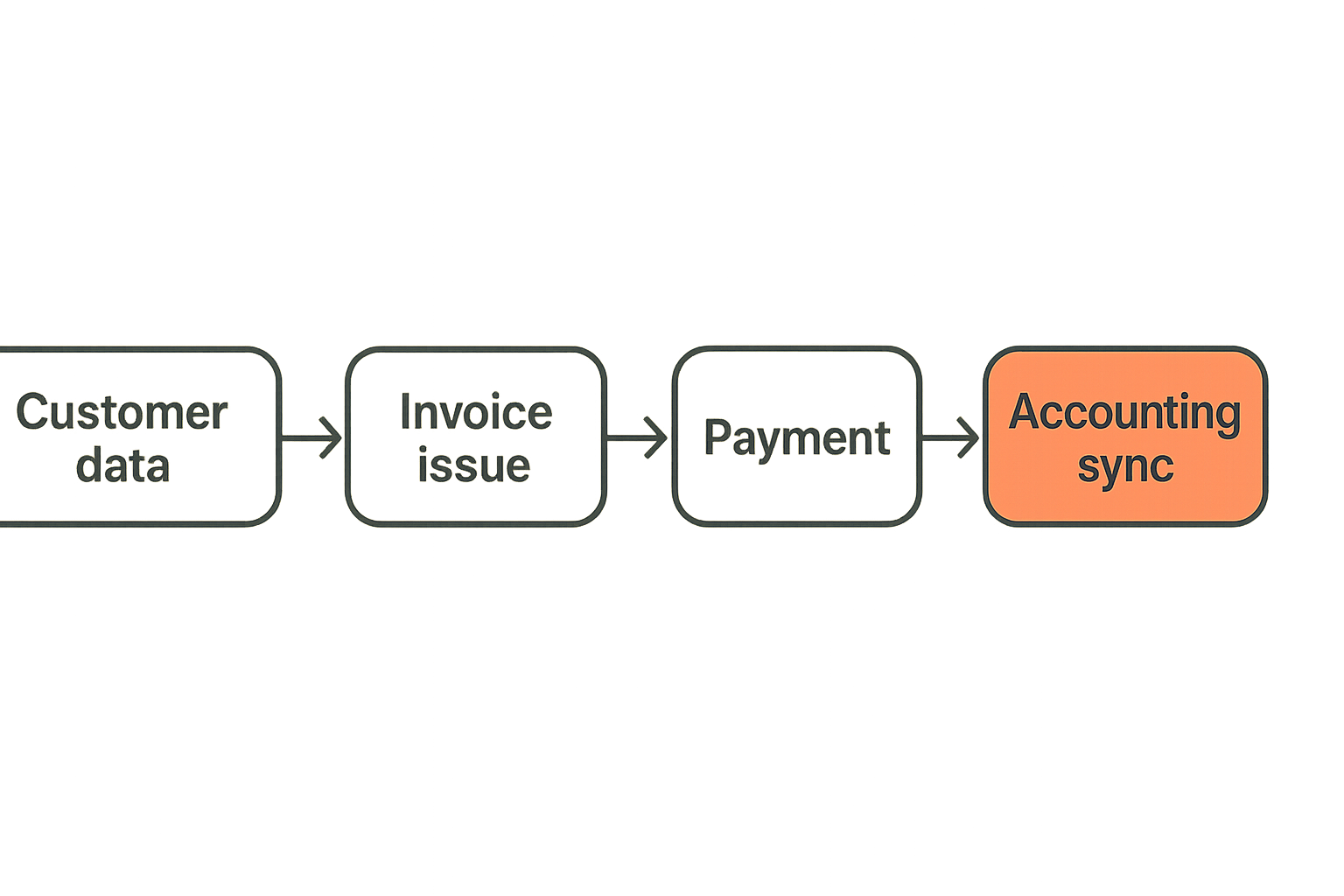
The objects every team should understand
Even if you are not technical, you should understand the basic objects inside invoicing software. This helps you ask better questions and avoid buying based on surface-level screens.
The core objects usually include:
- Customer: the person or business entity being billed.
- Contact: the person receiving invoices or reminders.
- Product or service: what is being sold.
- Price: the amount, currency, billing period, or usage rate.
- Invoice: the bill issued to the customer.
- Payment: the money event tied to one or more invoices.
- Credit note: the correction that reduces an amount owed.
- Tax record: the rule and amount applied.
- Ledger or accounting export: the financial record used for books.
If these objects are weakly modeled, the user interface may still look fine. The problems appear when you need reporting, reconciliation, automation, or migration.
Invoice state is more important than invoice design
Teams often obsess over invoice layout. Branding matters, but state matters more.
A practical invoice state model may look like this:
invoice:
  draft: editable before customer delivery
  issued: sent and locked for normal edits
  viewed: customer opened or accessed invoice
  partially_paid: payment received below balance
  paid: balance settled
  overdue: due date passed with balance open
  disputed: customer or team has raised an issue
  voided: canceled before payment or recognition
  credited: adjusted after issue
  written_off: balance closed as uncollectible
This is where many basic tools fall short. They can generate an invoice, but they do not support enough state to show what should happen next. The result is manual notes, Slack messages, and status columns maintained by whoever is least tired that week.
Where accounting begins and billing ends
Invoicing software and accounting software overlap, but they are not the same job.
Billing manages customer-facing events: invoices, payment requests, reminders, credits, and customer balances. Accounting manages the financial record: revenue recognition, tax reporting, bank reconciliation, chart of accounts, and compliance output.
Some tools combine both. Others integrate with accounting platforms. Either can work. The architecture problem is making sure the boundary is explicit.
If billing says an invoice is paid but accounting does not receive the payment correctly, month-end close slows down. If accounting shows a balance but billing has issued a credit that never synced, support may chase a customer incorrectly.
The workflow guide at Invoicing Software in 2026 goes deeper on evaluating billing lifecycle fit before getting distracted by demo polish.
Automation that helps versus automation that breaks trust
Recurring invoices and renewals
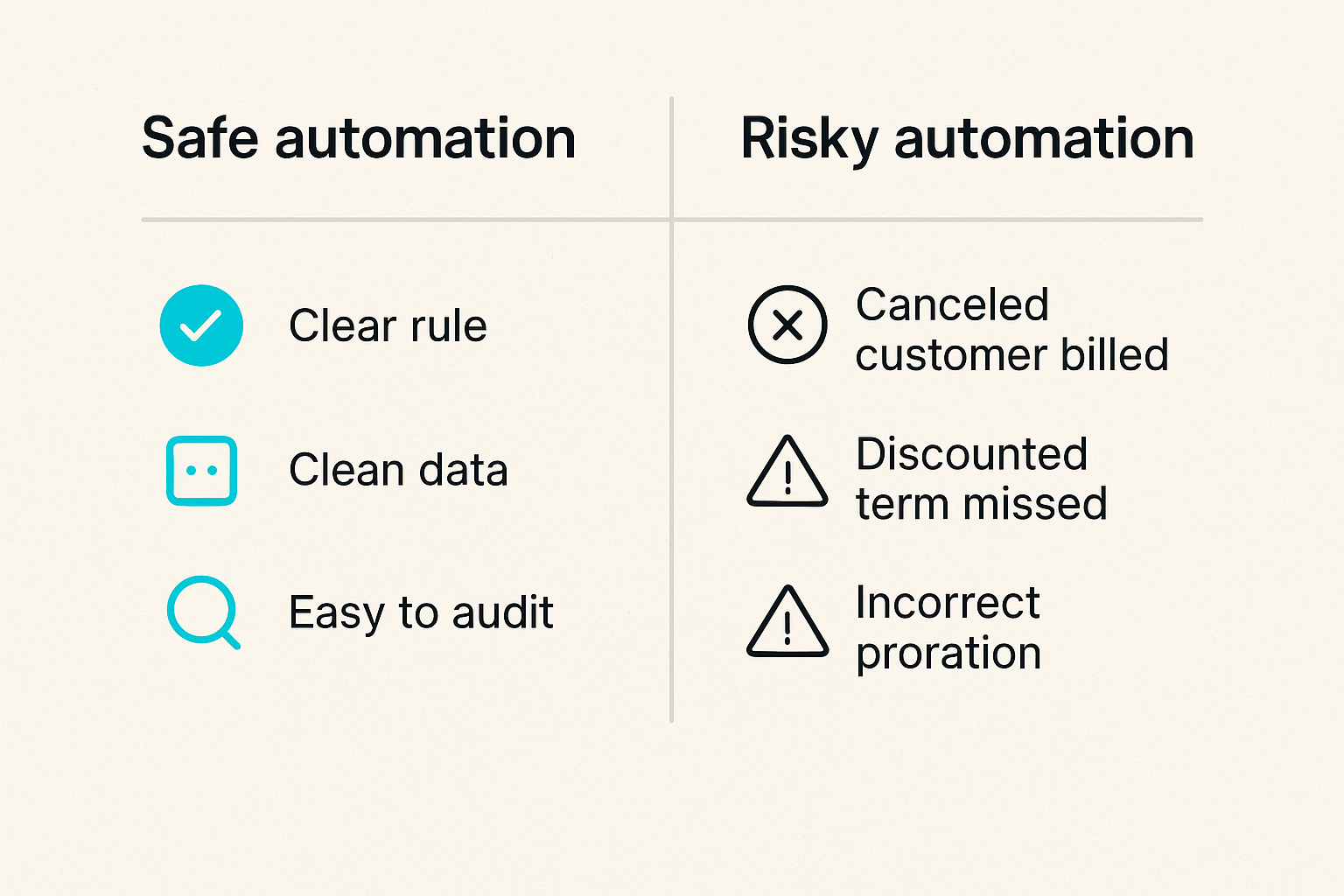
Automation is useful when the rule is clear, the data is clean, and the result is easy to audit. Recurring invoices are a good example. If a customer pays the same amount on the same date under stable terms, automation saves time and reduces missed billing.
But recurring automation can also create silent errors. A canceled customer keeps getting billed. A discounted term expires but nobody reviews the renewal. A plan change creates an incorrect proration. The automation did what it was told, but the workflow failed.
The mistake teams make is treating automation as a replacement for ownership. It is not. Automation should remove repetitive work while making exceptions more visible.
Related reading from our network: teams building operating systems around automation may find useful parallels in Automation Direct in SaaS, especially the idea that automated workflows need clear triggers, owners, and validation points.
Payment reminders and dunning
Payment reminders are one of the highest-leverage features in invoicing software, but tone and timing matter.
A good reminder workflow might include:
- Friendly notice before due date.
- Due-date reminder with payment link.
- Overdue reminder after a short grace period.
- Internal escalation for high-value accounts.
- Final notice before service limitation or collections.
The workflow should distinguish between low-risk late payments and accounts that need human review. Sending the same aggressive reminder to every customer can damage relationships. Sending no reminders creates cash drag.
Practical rule: Automate reminders, but route strategic accounts, disputed invoices, and unusual balances to a human before escalation.
Approval gates for risky changes
Not every billing action should be automated or broadly available. High-impact changes should have gates.
Examples include:
- Applying large discounts.
- Issuing refunds.
- Voiding issued invoices.
- Changing legal billing entities.
- Editing tax-sensitive fields.
- Writing off balances.
- Modifying renewal terms close to invoice date.
A useful comparison:
| Area | What works | What fails |
|---|---|---|
| Recurring billing | Automated schedules with reviewable changes | Blind renewals with no exception queue |
| Reminders | Segmented reminders by risk and customer type | Same message sent to every overdue account |
| Credits | Documented credit notes with approval | Negative line items used as informal fixes |
| Refunds | Permissioned refunds tied to payments | Anyone can refund without audit context |
| Plan changes | Proration rules visible before invoice issue | Manual edits after customer complaints |
That changes the conversation from whether the tool has automation to whether the automation is safe enough to run without daily cleanup.
Integrations decide whether the system survives month end
Accounting integrations
The invoicing tool does not live alone. It usually has to talk to accounting software, payment processors, CRM, project tools, spreadsheets, and sometimes customer support systems.
Accounting integration is the first place to inspect. Ask what syncs, when it syncs, and how errors are handled. A checkbox that says accounting integration is not enough.
You need to know:
- Are customers matched or duplicated?
- Are invoice numbers preserved?
- Are payments synced separately or with invoices?
- Are credit notes supported?
- Are tax amounts mapped correctly?
- Can failed syncs be retried safely?
- Is there a log of what moved and what failed?
What breaks in practice is silent partial sync. The invoice arrives in accounting, but the payment does not. The customer exists twice. The tax code maps incorrectly. A finance person then becomes the integration repair layer.
Payment processor and bank feeds
Payment links are convenient, but payment architecture matters. The invoicing system must know whether a payment was initiated, authorized, captured, failed, refunded, disputed, or settled.
For simple teams, payment processor integration may be enough. For teams with higher volume, bank reconciliation and payout matching become important. A customer paying by card today may not equal settled cash in the bank tomorrow, especially with fees, refunds, disputes, or payout batching.
The software should make payment status understandable without forcing non-finance users into processor dashboards. Support should know if a customer attempted payment. Finance should know what actually settled. Operators should know which invoices need action.
CRM project and support context
Sales and delivery context often explain invoice behavior. A customer may be overdue because procurement needs a PO. A project milestone may not be approved. A renewal may be waiting on contract signature.
This is why invoicing software should fit the wider productivity stack. It does not always need deep integration with every tool, but the handoffs must be clear.
Related reading from our network: remote teams face similar coordination issues when tools become disconnected, and Cloud Based Productivity and Collaboration Tools is a useful adjacent model for thinking about access, ownership, and rollout across a distributed stack.
Implementation workflow for invoicing software
Clean up before migration
Moving messy billing data into a new system does not make it clean. It makes the mess faster.
Before migration, clean up:
- Duplicate customers.
- Old unpaid invoices that need write-off decisions.
- Inconsistent customer names.
- Missing tax IDs.
- Outdated product names.
- Unclear payment terms.
- Unused discounts and legacy price rules.
- Manual spreadsheet adjustments.
This does not require perfection. It does require deciding which records matter and which ones should not be carried forward. Migration is a good forcing function because it reveals where your current process depends on memory.
Pilot with real edge cases
Do not pilot invoicing software with only simple invoices. That proves almost nothing.
Use a pilot set that includes:
- A standard new customer invoice.
- A recurring renewal.
- A customer with a discount.
- A partial payment.
- A failed payment retry.
- A credit note.
- A refund or void.
- A tax-exempt or regional customer.
- A month-end accounting sync.
Run the pilot from invoice creation through reconciliation. Include sales, finance, support, and whoever handles customer questions. The goal is to find operational friction before the tool becomes the default system.
Roll out with owners and rollback rules
A clean rollout needs owners. Someone owns configuration. Someone owns invoice operations. Someone owns accounting sync. Someone owns customer-facing questions. Someone owns vendor management.
A practical rollout sequence looks like this:
- Define billing models and approval rules.
- Clean customer and product data.
- Configure invoice templates, taxes, payment methods, and reminders.
- Connect accounting and payment integrations in a test mode if available.
- Run pilot invoices with real edge cases.
- Reconcile pilot output against expected results.
- Train users by role, not by feature list.
- Freeze old workflows on a chosen date.
- Monitor exceptions daily for the first billing cycle.
- Review issues after month end and adjust rules.
Rollback rules matter too. If a payment sync fails, who pauses automation? If invoice numbering is wrong, who stops issuing invoices? If customers receive incorrect reminders, who disables the campaign?
Controls permissions and audit trails
Who can create edit void and refund
Invoicing software touches money, customer trust, and financial records. Permissions should reflect that.
Small teams often give everyone admin rights because it feels faster. It is faster until someone edits an issued invoice, changes a tax field, or refunds the wrong payment. Then the time saved disappears into cleanup.
A basic role model might look like:
| Role | Allowed actions | Restricted actions |
|---|---|---|
| Sales | View invoice status, request discounts | Issue refunds, edit tax, void invoices |
| Finance | Create, issue, credit, reconcile | Change CRM contracts without approval |
| Support | View payment and overdue status | Modify balances or payment terms |
| Admin | Configure system and permissions | Should still use approval for high-risk actions |
| Founder or manager | Approve exceptions | Avoid daily operational edits |
The goal is not bureaucracy. The goal is to prevent casual changes from becoming financial ambiguity.
Audit trails reduce blame and rework
Audit trails are productivity features, not just compliance features.
When something looks wrong, the team needs to know what happened. Who changed the due date? When was the reminder sent? Why was the invoice voided? Which sync failed? Was the refund approved?
Without an audit trail, investigation becomes chat archaeology. People search inboxes, message threads, and spreadsheets. That slows down cash collection and damages internal trust.
A useful audit trail should show user, timestamp, old value, new value, related object, and reason when required. It should also be readable by non-engineers.
Security is part of productivity
Security and productivity are often treated as opposites. In billing workflows, weak security creates rework and risk.
Customer billing data may include names, addresses, payment metadata, tax IDs, commercial terms, and account status. Access should be limited to people who need it. Sensitive changes should be logged. Integrations should avoid shared credentials where possible.
Related reading from our network: the security model in ADT Home Security for CI/CD is not about invoicing, but the sensor-alert-owner-response pattern is a useful way to think about billing controls and exception handling.
For teams reviewing communication around billing disputes or account status, the same access and retention questions show up in collaboration tools; the guide to encrypted messaging software is a relevant adjacent read for SaaS teams tightening operational data flows.
Metrics that show invoicing software is working
Collection speed and overdue exposure
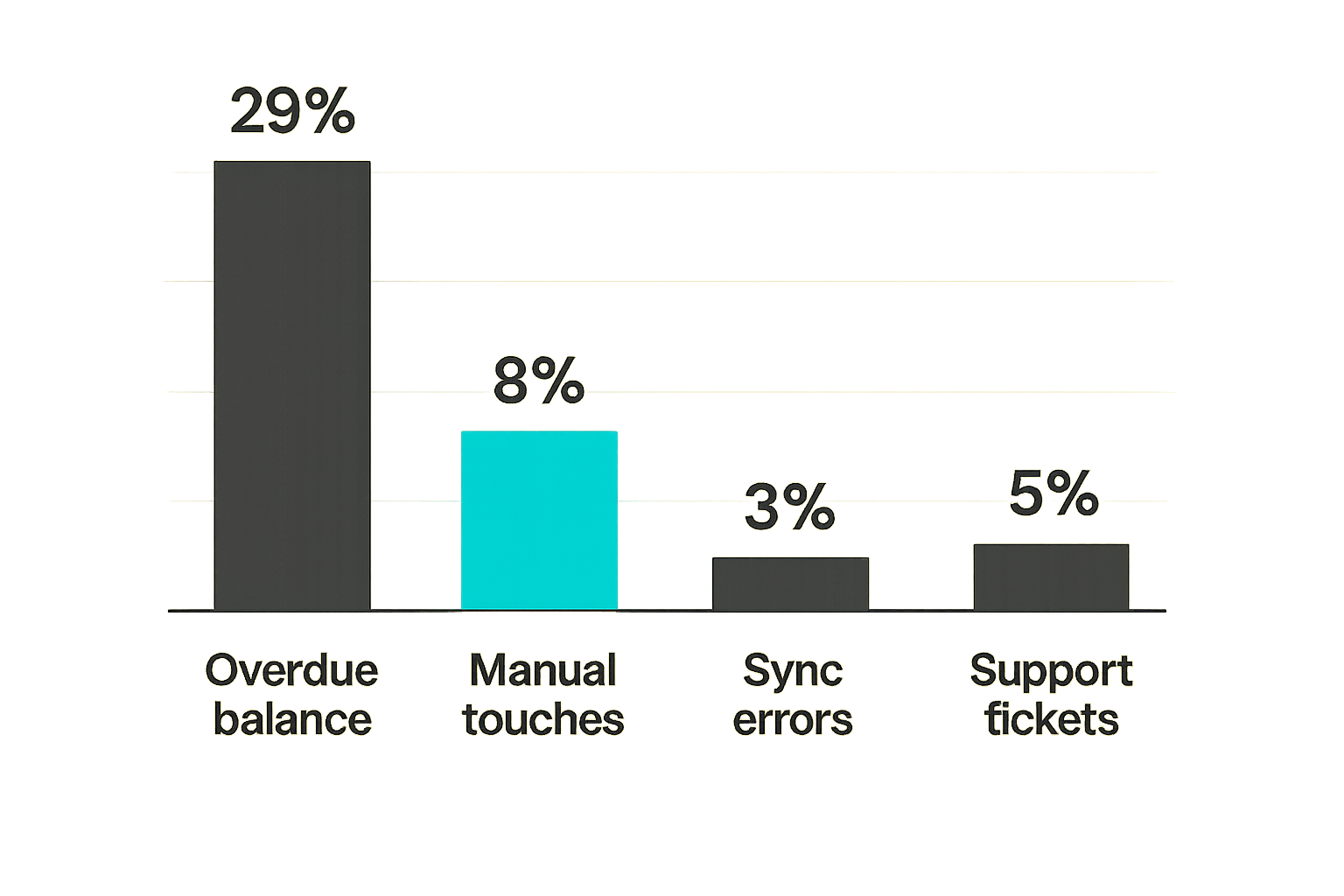
A better invoicing system should improve operational visibility. It may or may not instantly improve cash collection, but it should make the collection process measurable.
Track metrics such as:
- Average days to payment.
- Total overdue balance.
- Overdue balance by age bucket.
- Percentage of invoices paid before due date.
- Failed payment recovery time.
- Amount in dispute.
Do not use metrics only to pressure customers or finance staff. Use them to identify workflow gaps. If many invoices go overdue because customers never received them, that is a delivery issue. If payments fail and nobody follows up for ten days, that is an ownership issue. If invoices are disputed because line items are unclear, that is a product or service description issue.
Exception rate and manual touches
The best invoicing software reduces avoidable manual touches while making necessary manual touches clear.
Useful measures include:
- Invoices edited after issue.
- Invoices requiring credit notes.
- Failed syncs per billing cycle.
- Manual payment matching events.
- Customers with duplicate records.
- Reminder escalations requiring human review.
A high exception rate does not always mean the tool is bad. It may mean your pricing, contracts, or fulfillment process is inconsistent. That is still valuable to know.
Support load and customer confusion
Billing confusion creates support tickets. Customers ask why they were charged, whether payment went through, why tax was added, or why a discount disappeared.
Good invoicing software should reduce these questions by making invoices clear, customer portals useful, payment links reliable, and account status visible to support.
Track the volume and type of billing-related tickets before and after rollout. If support load increases, the issue may be configuration, communication, or invoice design. It may also be that automation is sending messages before the team is ready.
Failure modes that appear after the demo
Duplicate invoices and sync drift
Duplicate invoices are one of the fastest ways to lose customer trust. They happen when systems are not coordinated: a recurring rule fires in one tool, a manual invoice is created in another, or a retry creates a second record instead of updating the first.
Sync drift is more subtle. Billing and accounting slowly diverge. The CRM says one plan, the invoice says another, the accounting system has an old customer record, and the payment processor shows a refund that never reached the ledger.
The fix is not more meetings. The fix is idempotent workflows where possible, clear ownership, and exception queues that reveal mismatches quickly.
Tax gaps and regional assumptions
Tax mistakes often come from assumptions. A tool works in your home country, so the team assumes it works everywhere. A customer enters an address, so the team assumes tax is correct. A product is categorized once, so nobody reviews it when the business expands.
If you sell across regions, involve your accountant or tax advisor before rollout. Software can automate calculations and documents, but only if the configuration and inputs are right.
The practical question is whether the invoicing software can support your next customer segment, not just your current one.
Over customization creates maintenance debt
Customization feels powerful during implementation. Every edge case gets a field, rule, tag, automation, template, or workaround.
Then the person who understood the setup leaves. A new product launches. A tax rule changes. A workflow breaks because one custom field did not sync. Nobody wants to touch the system because every change has side effects.
What works is a small number of clear rules. What fails is rebuilding your business logic inside a tool that was meant to support billing, not become a custom ERP.
Practical rule: Customize invoicing software only when the rule is stable, owned, documented, and worth maintaining.
Buying criteria for invoicing software
Must have criteria
Your must-have list should be short and tied to operating reality. For many small businesses and SaaS buyers, the list includes:
- Supports your actual billing model.
- Handles recurring invoices if you sell recurring services.
- Integrates cleanly with accounting.
- Provides reliable payment links or processor connections.
- Supports taxes, currencies, and invoice requirements for your markets.
- Offers clear invoice states and customer balances.
- Includes permissions and audit trails.
- Exports data in a usable format.
- Provides customer-facing payment history or portal access if needed.
- Makes failed payments, overdue invoices, and sync errors visible.
If a tool fails one of these, do not bury the issue under nice design or a discount.
Nice to have criteria
Nice-to-have features can matter, but they should not drive the decision too early.
Examples include:
- Advanced branding.
- Multiple invoice template styles.
- AI-generated descriptions.
- Built-in proposal tools.
- Time tracking.
- Inventory support.
- Embedded financing offers.
- Deep analytics dashboards.
- Custom customer portal branding.
Some of these may be valuable. The test is whether they support your workflow or distract from gaps in the core billing lifecycle.
Related reading from our network: if your invoicing process supports a launch or new go-to-market motion, the operational planning ideas in Product Hunt in 2026 are a useful adjacent reminder that tooling only works when the surrounding workflow is owned.
Demo scripts that reveal reality
Do not let the vendor run only their standard demo. Bring your own script.
Ask them to show:
- Creating a customer with multiple billing contacts.
- Issuing a recurring invoice with a discount that expires.
- Changing a plan mid-cycle and showing proration.
- Recording a partial payment.
- Handling a failed payment and retry.
- Creating a credit note after invoice issue.
- Syncing the invoice and payment to accounting.
- Showing what support can see without finance permissions.
- Exporting invoice, payment, tax, and customer data.
- Recovering from a failed integration sync.
This kind of demo changes the power dynamic. You are no longer evaluating claims. You are testing operating fit.
Where saasrow.com fits in the decision
Compare tools by workflow not hype
saasrow.com is built for readers who want practical articles, guides, and insights about software and productivity. For invoicing software, that means looking past feature grids and asking how the tool behaves when real work happens.
The useful comparison is not only tool A versus tool B. It is workflow A versus workflow B:
- Manual invoices versus recurring schedules.
- Spreadsheet tracking versus system states.
- Shared admin access versus role-based controls.
- End-of-month cleanup versus continuous reconciliation.
- Generic reminders versus segmented collection workflows.
A buyer who understands the workflow can evaluate software faster and avoid being pulled around by every new feature announcement.
Connect invoicing to the wider software stack
Invoicing touches accounting, payments, CRM, support, project management, collaboration, and reporting. Treat it as part of the software stack, not a standalone utility.
That does not mean you need the most expensive platform. It means every connection should have a purpose. If the CRM sends customer data, decide which fields matter. If accounting receives invoices, decide how errors are handled. If support can view account status, decide what they can and cannot change.
The productivity gain comes from fewer unresolved handoffs. Teams should spend less time asking where the truth lives and more time acting on clear information.
The final decision rule
The final decision is simple, but not easy.
Choose the invoicing software that supports your billing model, reduces manual exception handling, integrates with your financial workflow, and gives the right people enough visibility to act without creating risk.
Avoid tools that look fast in the demo but require spreadsheets to explain reality. Avoid tools that automate before controls are clear. Avoid tools that make month-end close depend on one person remembering five manual fixes.
Invoicing software is not just an admin tool. It is the operating layer between your work, your customers, and your cash.
Try saasrow.com
saasrow.com publishes practical articles, guides, and insights about software and productivity for teams that want to choose tools wisely. Start with Try saasrow.com and build a better invoicing software workflow from the system outward.