

June 6, 2026
Encrypted Messaging Software: A Practical Buying and Workflow Guide for SaaS Teams
Encrypted messaging software is not just a private chat app. For SaaS teams, it is a workflow decision involving identity, retention, integrations, support, and operational risk.
Your team already has too many places to talk. Slack or Teams for internal work. Email for vendors. A helpdesk for customers. SMS when something is urgent. Maybe Signal or WhatsApp when someone wants privacy.
Then somebody asks whether the company needs encrypted messaging software. The first reaction is usually tool fatigue. Another inbox. Another app to manage. Another policy nobody reads.
Teams think the problem is finding the most private chat app. The real problem is deciding which conversations deserve stronger protection, who owns those conversations, and how the tool fits into daily work without creating a shadow communication layer.
That changes the conversation. Encrypted messaging software is not a definition exercise. It is an architecture and workflow decision. If you buy it like a normal chat app, you will compare features that look similar on pricing pages. If you buy it like a business system, you will ask harder questions about identity, retention, device trust, escalation, onboarding, and what happens when people leave.
This guide is written for SaaS buyers, small teams, and productivity-minded operators who need practical clarity. As a guest contribution from the team at qrypt.chat, it focuses on what breaks in practice and how to choose secure messaging without slowing the business down.
Table of contents
- Why encrypted messaging software is a workflow decision
- What encrypted messaging software must protect
- Build the evaluation model before comparing vendors
- Encrypted messaging software comparison criteria that matter
- The productivity tradeoff most teams underestimate
- Implementation workflow for a clean rollout
- Common failure modes when teams implement secure messaging badly
- What works and what fails in production
- How to evaluate vendors without getting lost in feature lists
- Where encrypted messaging software fits in a SaaS stack
Why encrypted messaging software is a workflow decision

The visible app is only one layer
The mistake teams make is treating encrypted messaging software as a nicer private chat app. The interface matters, but the interface is not the system.
The system includes account provisioning, device enrollment, key management, access recovery, employee offboarding, admin visibility, notifications, integrations, and support expectations. A clean mobile app does not help if the wrong contractor keeps access for three months after a project ends.
A useful way to think about it is this: encrypted messaging is a communication control, not only a communication channel. It should reduce exposure for sensitive conversations while keeping the team able to move quickly.
The real buying question
The practical question is not whether encryption is good. It is where encryption changes operational risk enough to justify a new workflow.
For a SaaS business, that might include:
- Customer escalation involving account details or payment issues.
- Security incident coordination.
- Founder, finance, or legal discussions.
- HR conversations involving employee records.
- Vendor negotiations with commercial terms.
- Product roadmap conversations before public release.
Not every message needs the same treatment. If the whole company moves every casual conversation into a locked-down tool, adoption may collapse. If nothing sensitive moves, the tool becomes security theater.
Practical rule: Do not start with the app. Start with the conversations that would create real damage if exposed, forwarded, searched, or retained in the wrong place.
Where teams get surprised
Teams usually discover the hard parts after rollout. Someone sends a customer support screenshot into the wrong channel. A founder uses a personal account because setup was annoying. A former employee remains in a private group. A compliance question appears and nobody knows what messages exist, where they live, or whether they can be exported.
What breaks in practice is rarely encryption math. It is ownership. Who decides which messages belong in the encrypted channel? Who approves external users? Who audits access? Who helps a user recover access without weakening security?
If those questions are not answered, the tool may increase complexity without reducing risk.
What encrypted messaging software must protect
Message content is the obvious part
Most buyers focus on message content. That is understandable. End-to-end encryption is designed so message contents are readable only by intended participants, not by the service provider or a random intermediary.
For business use, content protection matters when messages include credentials, account details, incident findings, legal strategy, board updates, pricing negotiations, or personally identifiable information. In those cases, normal collaboration tools may be too searchable, too integrated, or too widely accessible.
But message content is only one category of exposure.
Metadata still matters
Metadata can include who talked to whom, when they talked, how often they communicated, what devices were used, and sometimes group names or notification previews. Even if the message body is protected, metadata can still reveal sensitive business patterns.
For example, frequent messages between the CEO, legal counsel, and a security lead may reveal an incident before any public statement. A sudden increase in conversations with a finance advisor may suggest fundraising or acquisition activity.
Not every encrypted messaging provider handles metadata the same way. Some minimize it. Some need more of it for sync, search, routing, or admin features. The right answer depends on your risk profile, but buyers should ask directly.
Devices are part of the system
A perfectly encrypted message displayed on a compromised or unmanaged phone is not protected in any meaningful business sense. Devices are where secure communication often becomes messy.
Small teams commonly have a mix of company laptops, personal phones, tablets, shared workstations, and contractors using their own devices. That does not mean secure messaging is impossible. It means device assumptions need to be explicit.
Questions to ask:
- Can admins remove a lost device?
- Can users verify devices for sensitive conversations?
- What happens when a user changes phones?
- Are desktop sessions persistent?
- Can screenshots, downloads, or forwarding be controlled where needed?
- How are notifications displayed on lock screens?
Practical rule: If the device is outside your control, treat the encrypted app as only one control, not the whole security boundary.
Build the evaluation model before comparing vendors
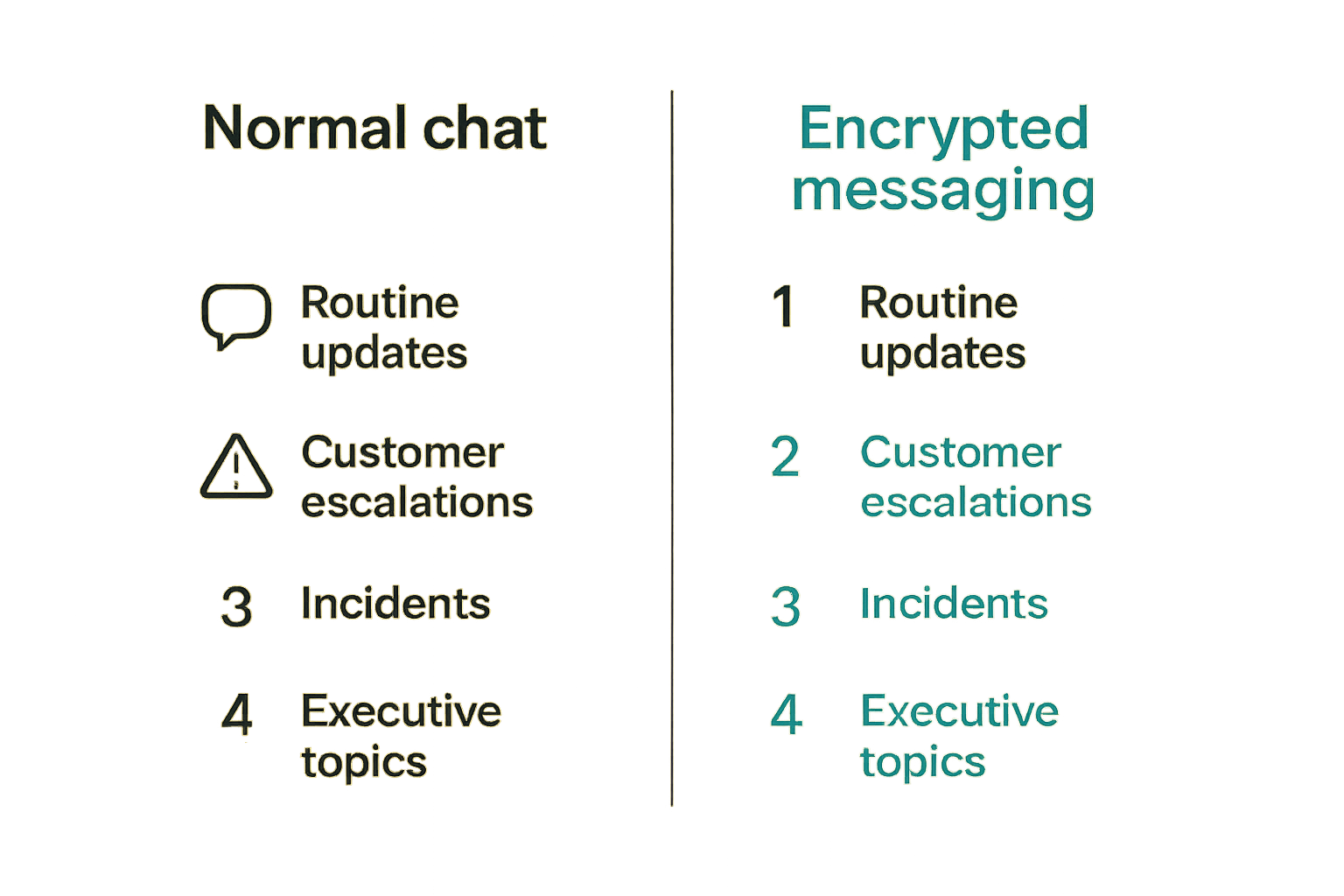
Start with conversation classes
Before you compare vendors, classify conversations. This keeps the buying process grounded in actual work.
A simple model works for most SaaS teams:
| Conversation class | Example | Suggested channel | Main concern |
|---|---|---|---|
| Low sensitivity | Daily status, scheduling, general updates | Standard team chat | Speed and search |
| Business sensitive | Pricing, roadmap, vendor terms | Restricted workspace or encrypted messaging | Unauthorized sharing |
| Customer sensitive | Account issues, support escalations, screenshots | Helpdesk plus secure escalation | Data exposure |
| Security sensitive | Incident response, vulnerability details | Encrypted messaging software | Containment and access |
| Executive sensitive | Legal, finance, personnel, acquisition discussion | Encrypted messaging software | Confidentiality and governance |
This table is not a policy by itself. It is a decision aid. The goal is to stop treating all conversations as identical.
Map users to risk
Next, map roles. In a small business, risk often follows responsibilities more than department names.
High-risk users may include founders, finance managers, HR leads, customer support leads, security owners, system administrators, and anyone handling sensitive customer data. External participants may include lawyers, accountants, agencies, auditors, investors, or high-touch customers.
The tool should support the shape of those relationships. If external guests are common, guest access and expiration matter. If only internal staff use the tool, identity provider integration and offboarding may matter more.
Define what good looks like
Encrypted messaging software should have a job. Do not define success as adoption alone. A company-wide tool with lots of chatter may still fail if sensitive conversations remain scattered across email and personal apps.
Better success criteria include:
- Sensitive incident conversations happen in the approved channel.
- External access is time-bound and reviewed.
- Offboarding removes access quickly.
- Users understand when to use secure messaging versus normal chat.
- Support teams can escalate sensitive cases without exposing data broadly.
- Leadership can communicate privately without moving to unmanaged personal apps.
That changes the conversation from feature preference to operational fit.
Encrypted messaging software comparison criteria that matter
Encryption design
Encryption claims are easy to market and hard for buyers to compare. You do not need to become a cryptographer to ask better questions.
Ask whether messages are end-to-end encrypted by default, whether encryption covers group chats and files, how keys are created and stored, what happens during account recovery, and whether the provider can access plaintext content. Also ask how the product handles message search, backups, exports, and multi-device sync, because those features often create tradeoffs.
Be skeptical of vague language. Secure in transit and secure at rest are useful baseline controls, but they are not the same as end-to-end encrypted messaging.
Identity and access
For business buyers, identity is often more important than the chat UI. A secure messaging tool should make it clear who a person is, what organization they belong to, what devices are trusted, and when access should end.
Useful identity features may include single sign-on, domain verification, admin-managed accounts, device approval, external guest controls, and clear membership lists. Smaller teams may not need every enterprise control on day one, but they should avoid tools that make identity ambiguous.
The danger is a group full of display names and phone numbers where nobody is sure which contractor, vendor, or former employee still has access.
Admin controls and governance
Admin controls should match the risk level. For some teams, simple user management is enough. For others, policy controls, audit logs, data retention options, legal hold workflows, and access reporting are necessary.
This is where the buyer must balance confidentiality with business accountability. Some encrypted systems intentionally limit admin visibility to preserve privacy. That can be good. It can also make regulated workflows harder.
The practical question is: what visibility do you need to run the business without turning private communication into another surveillance-heavy collaboration tool?
Integration boundaries
Integrations are useful, but they also create openings. If encrypted messages are copied into ticketing systems, CRM notes, email summaries, AI assistants, or searchable knowledge bases, the protection may disappear downstream.
This does not mean secure messaging must be isolated from the rest of the stack. It means integration boundaries need design.
For example:
- A helpdesk can link to a secure escalation room without copying sensitive content.
- An incident tool can notify the right people without exposing vulnerability details.
- A CRM can record that a secure conversation occurred without storing the conversation body.
- A workflow tool can create a task from a message only after user approval.
Practical rule: Never assume encryption follows the message after it leaves the app. Design the handoff, or the handoff becomes the leak.
The productivity tradeoff most teams underestimate
Security that adds friction moves conversations elsewhere
Security tools fail when they make the safe path slower than the risky path. If users must wait for approvals, remember complex rules, or switch devices constantly, they will route around the system.
This is especially true in small teams where speed is part of the culture. People solve the immediate problem first. They send the screenshot. They forward the email. They create the temporary group. The policy review happens later, if at all.
The best secure messaging workflow is not the one with the most controls. It is the one where the right secure action is also the easiest action for the relevant use case.
Speed matters during incidents
Incident response is where poor communication design becomes expensive. During an outage, suspected breach, or urgent customer escalation, people need to assemble quickly, share context, decide ownership, and keep a timeline.
If the secure channel is rarely used, nobody remembers logins. If membership is unclear, the wrong people get invited. If the channel is too locked down, updates happen in parallel text threads. If it is too open, sensitive details spread.
A secure incident room should be preplanned. The team should know who starts it, who joins, what gets posted there, and what stays in the ticketing or status page workflow.
The right default reduces decisions
People make better security decisions when defaults are clear. A policy that says use judgment for sensitive information is not enough. It pushes every employee into a risk assessment they are not trained to make.
Better defaults sound like:
- Security incidents start in the secure messaging tool.
- Customer screenshots with personal data are not posted in general chat.
- Executive hiring and compensation discussions use secure messaging.
- Vendor contract negotiations stay out of public channels.
- External guests expire unless renewed.
The point is not to create bureaucracy. The point is to remove ambiguity.
Implementation workflow for a clean rollout
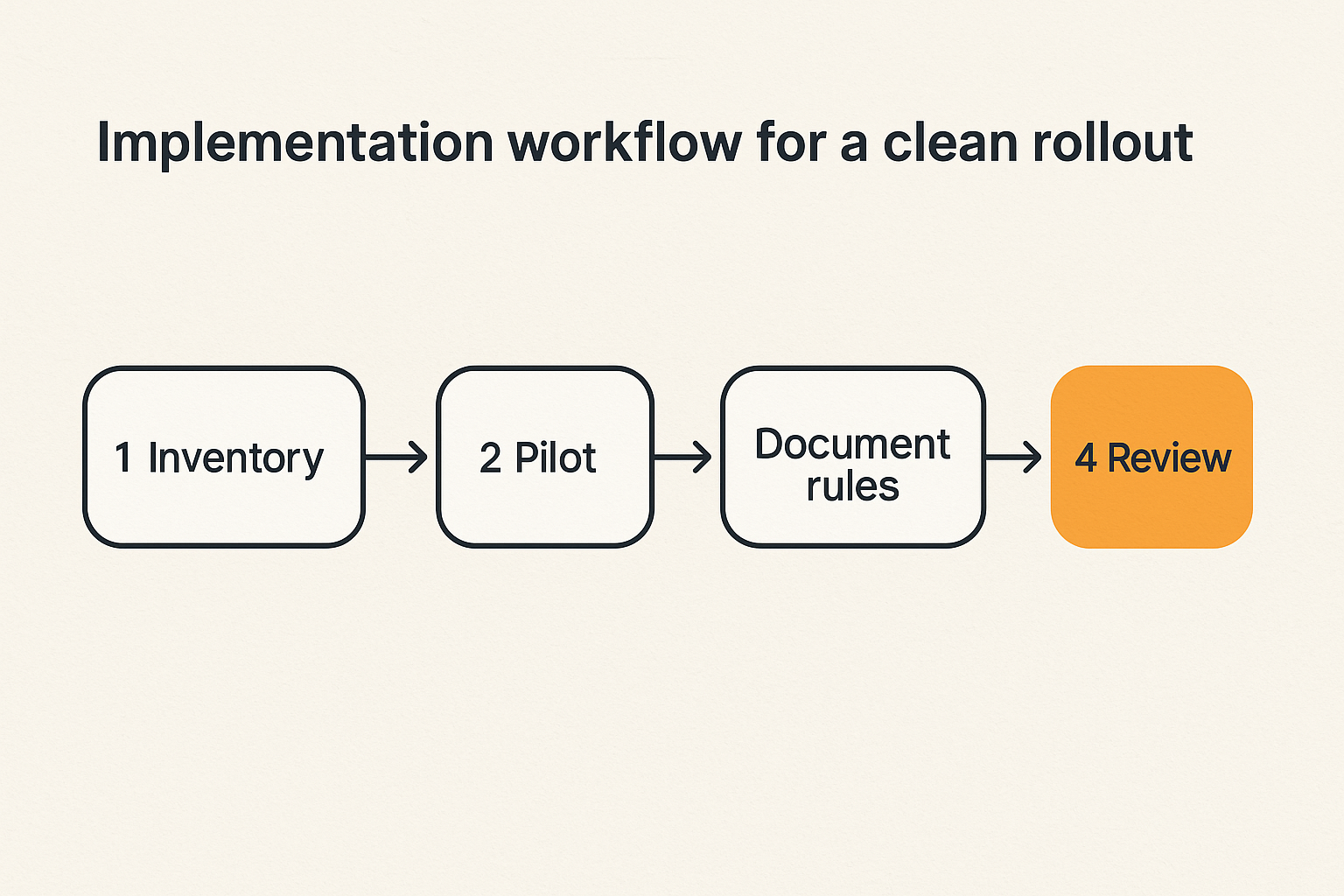
Step 1 inventory sensitive workflows
Start with a short inventory, not a company-wide policy project. List the workflows where confidentiality actually matters.
- Identify the top five sensitive conversation types.
- Name the teams involved in each one.
- List the current channels used today.
- Mark where data is copied, forwarded, or stored.
- Decide which workflows should move first.
This is usually enough to reveal the real problem. Many teams discover that sensitive communication is not in one bad place. It is spread across email, chat, docs, support tickets, personal phones, and meeting notes.
Step 2 pilot with real teams
Pilot with a group that has real sensitive work. Do not pilot only with IT or leadership if the main use case involves support, customer success, or finance.
A good pilot should test:
- Onboarding speed.
- Device setup.
- External participant access.
- Notifications.
- File sharing.
- Search expectations.
- Escalation from existing tools.
- Offboarding.
The pilot should include a realistic scenario. For example, a customer reports a possible account exposure. Support escalates to security and leadership. The team needs to share screenshots, discuss risk, assign tasks, and decide what belongs in the ticket versus the secure room.
Step 3 document operating rules
Keep the rules short. If the policy needs a training course before anyone can use the tool, it is too complicated for daily operations.
Document:
- Which conversations belong in encrypted messaging software.
- Who can create rooms or groups.
- Who can invite external users.
- How long external access lasts.
- What files can be shared.
- What should never be copied into other tools.
- Who handles access removal.
- What to do when a device is lost.
The mistake teams make is writing a policy for auditors instead of users. Users need operational rules they can remember under pressure.
Step 4 review after adoption
After 30 to 60 days, review what actually happened. Look for missed escalations, duplicate channels, support complaints, device issues, and users who never completed setup.
Ask managers and frontline users different questions. Managers may care about risk and reporting. Frontline users may care about speed, notifications, and whether they can find the right group.
The review should produce specific changes: adjust defaults, remove unused groups, shorten guest access, improve onboarding, or change which workflows belong in the tool.
Common failure modes when teams implement secure messaging badly
Shadow channels multiply
The most common failure is channel sprawl. The company adds encrypted messaging software, but nobody retires or constrains the old behavior. Sensitive conversations continue in email, standard chat, personal apps, and private side groups.
Now the team has more tools and less clarity. During an incident, half the conversation is in the secure room and half is somewhere else. Afterward, nobody has a reliable record of decisions or ownership.
This happens when rollout focuses on access instead of workflow. Giving everyone accounts is not adoption. Adoption means the right conversations moved.
No one owns offboarding
Offboarding is boring until it fails. If someone leaves the company, changes role, exits a vendor contract, or finishes a project, their secure messaging access must be reviewed.
Small teams often assume this is handled by whoever manages payroll, Google Workspace, Microsoft 365, or the password manager. But if the messaging tool is separate and not connected to identity workflows, access can linger.
The fix is simple: assign ownership. One person or function owns user lifecycle. The tool should be on the same onboarding and offboarding checklist as email, file storage, CRM, code repositories, and finance tools.
Retention conflicts with reality
Encrypted messaging creates a retention question. Some teams want messages to disappear quickly. Others need records for legal, compliance, support quality, or internal accountability.
Neither extreme is automatically correct. Keeping everything forever increases exposure. Deleting everything instantly can create operational and legal problems.
The practical answer depends on conversation class. Security incident chatter may need a summarized post-incident record in an approved system. HR discussions may need formal records outside the chat. Vendor negotiations may need contracts and approvals stored elsewhere, not endless message history.
What breaks in practice is assuming the messaging tool is the system of record. For most SaaS teams, it should not be. It should be the secure conversation layer, with final decisions documented in the appropriate business system.
What works and what fails in production
What works
What works is narrow, explicit, and easy to use.
Strong implementations usually have these traits:
- Clear use cases before tool selection.
- Named owners for administration and offboarding.
- Prebuilt groups for incident response and leadership workflows.
- Guest access rules for vendors and advisors.
- Simple user guidance with examples.
- A documented handoff into tickets, docs, or records when needed.
- Periodic access reviews.
A secure messaging tool should feel like part of the operating system of the business, not an emergency-only vault nobody opens.
What fails
What fails is vague, overbroad, and disconnected.
Bad implementations often look like this:
- Everyone gets invited, but no workflows change.
- Leaders keep using personal apps for sensitive topics.
- Support teams do not know when to escalate.
- External guests stay forever.
- Incident rooms are created from scratch during the incident.
- Files are downloaded and reuploaded into less secure systems.
- The company cannot explain what the tool is for after three months.
This is not a vendor problem only. A good product can fail inside a bad workflow.
A simple operating policy
A useful operating policy can be short enough to fit in an internal handbook:
- Use standard chat for normal team coordination.
- Use encrypted messaging software for security incidents, sensitive customer escalations, executive legal or finance topics, and confidential HR matters.
- Do not copy sensitive message content into email, public chat, or AI tools unless approved for that workflow.
- External guests require an owner and an expiration date.
- Lost devices must be reported immediately.
- Final business decisions must be recorded in the appropriate system of record.
- Access is reviewed monthly for high-risk groups.
This kind of policy is not perfect, but it is operational. People can follow it.
Practical rule: If employees cannot explain when to use the secure channel in one sentence, the rollout is not finished.
How to evaluate vendors without getting lost in feature lists
Ask workflow questions first
Feature matrices are useful later. Start with workflow questions.
Ask each vendor:
- How does a new employee join the workspace?
- How does a contractor get temporary access?
- How is a lost device removed?
- What can an admin see and not see?
- What happens if a user forgets a password or loses a phone?
- Can groups be owned by the company rather than one individual?
- How are files protected?
- What are the limits of search?
- Can messages expire by policy?
- How does the tool support incident response?
The answers will reveal whether the product is built for personal privacy, business governance, or some balance of both.
Run a support and incident scenario
Do not buy based only on a demo. Run a scenario with your own team.
Example scenario:
A customer reports that an account setting exposed private data to the wrong user. A support rep receives screenshots. The support lead escalates to engineering and leadership. Legal may need to review. The team must coordinate quickly without spreading customer data across the company.
During the test, watch where people hesitate. Do they know where to start the conversation? Can they invite the right people? Are notifications reliable? Does anyone paste sensitive data into normal chat because it is faster? Can the final decision be documented outside the secure room?
This exercise exposes friction better than a procurement checklist.
Check exit and portability
Software buyers often forget the exit plan. Encrypted messaging can be especially tricky because strong privacy, limited provider access, and local device storage may affect exports and migration.
Before signing, ask:
- Can admins export required business records, if your policy needs that?
- What cannot be exported by design?
- How are deleted messages handled?
- What happens when the contract ends?
- Can users retain personal conversation history after leaving?
- How does the vendor support legal or compliance requests?
The right answer depends on your needs. The wrong answer is discovering the limitations during a dispute, audit, or urgent migration.
Where encrypted messaging software fits in a SaaS stack
Use saasrow.com as a comparison layer
Encrypted messaging software should sit beside your collaboration stack, not randomly on top of it. For SaaS buyers, the decision belongs in the same evaluation process as project management, CRM, helpdesk, password management, document storage, and meeting tools.
That is where a software comparison mindset helps. Instead of asking which private messenger has the cleanest interface, compare tools by workflow fit: who uses it, what it protects, what it integrates with, what it deliberately does not integrate with, and how it changes team behavior.
For a site like saasrow.com, the useful angle is not hype around privacy. It is practical software selection. Buyers need to understand tradeoffs, not just feature claims.
What to document before switching
Before you choose or replace encrypted messaging software, document the basics:
- Current communication tools.
- Sensitive workflows.
- Required users and external guests.
- Identity and offboarding process.
- Device assumptions.
- Retention requirements.
- Integration needs.
- Support ownership.
- Pilot success criteria.
- Exit requirements.
This does not need to become a 40-page procurement document. A two-page decision brief is enough for many small teams. The value is forcing the team to make assumptions visible before the vendor demo shapes the conversation.
Encrypted messaging software can improve privacy and reduce exposure, but only when it is designed into the way people work. If it becomes another isolated app, the business gets more complexity and only partial protection.
The final test is simple: can the team move a sensitive conversation from discovery to decision without leaking it into the wrong tools, losing ownership, or slowing the response? If yes, the software is doing its job.
Try saasrow.com
saasrow.com helps software buyers compare tools, understand tradeoffs, and choose SaaS products that fit real workflows. Try saasrow.com.