

June 4, 2026
Cloud Computing Software: A Practical Buying and Workflow Guide for SaaS Teams
Cloud computing software is not just a hosting decision. This guide helps SaaS buyers and small teams compare tools, avoid workflow drag, and choose cloud platforms that actually support daily operations.
Cloud computing software is easy to buy and hard to operate well.
A small team signs up for a project management app, a file storage platform, a CRM, a database service, a support tool, and an analytics dashboard. Each one looks useful on its own. Six months later, work is scattered across tabs, data lives in five places, costs creep upward, and nobody is sure which tool owns the source of truth.
Teams think the problem is choosing the best cloud app. The real problem is designing a cloud workflow that people can actually run every day.
That changes the conversation. Instead of asking, “Which cloud computing software has the most features?” the practical question is, “Which software reduces operational friction without creating new dependency, security, cost, or support problems?”
Table of contents
- Cloud computing software is an operating model, not a login screen
- Start with the workflow before you compare cloud computing software
- The main categories of cloud computing software buyers should understand
- How to evaluate cloud computing software without drowning in features
- Integration is where most cloud software decisions succeed or fail
- Security and access control are productivity features
- Cost management is part of the architecture
- What breaks when cloud computing software is implemented badly
- A practical implementation sequence for SaaS and small business teams
- How to choose cloud computing software with less regret
- Where saasrow.com fits in the buying workflow
Cloud computing software is an operating model, not a login screen

Cloud computing software is often sold as convenience: open a browser, invite the team, and start working. That is partly true. It is also incomplete.
In practice, cloud software changes how work is assigned, how files move, how customers are supported, how approvals happen, how data is stored, and how managers understand performance. The tool becomes part of the operating model.
The mistake teams make is treating a cloud app like a digital filing cabinet. They buy it, migrate some data, and assume the workflow will organize itself. It usually does not.
The UI is only the visible layer
A useful way to think about it is this: the user interface is the front door, not the building.
Behind every cloud tool are identity systems, permissions, integrations, notifications, data exports, billing rules, uptime assumptions, support processes, and vendor dependencies. A clean dashboard can hide a fragile workflow if the system does not connect to the rest of the business.
For example, a cloud CRM is not only a contact database. It may trigger invoices, sync with email, create support context, feed marketing reports, and influence sales forecasting. If those handoffs are unclear, the CRM becomes another place where partial information lives.
Practical rule: Do not evaluate cloud computing software only by what it lets users enter. Evaluate what happens after the data is entered.
Why small teams feel cloud sprawl first
Large companies can absorb some inefficiency with dedicated operations, IT, and finance teams. Small teams usually cannot. If a five-person company has seven disconnected cloud tools, the people doing the customer work are also doing the reconciliation work.
That is why cloud sprawl feels like a productivity problem before it looks like a technology problem. People waste time searching, re-entering, asking for access, checking which report is accurate, and resolving mismatched records.
The practical question is not whether cloud tools are useful. They are. The question is whether each tool earns its place in the workflow.
Start with the workflow before you compare cloud computing software
Most bad software purchases start with a feature checklist. Better purchases start with a workflow map.
Before comparing vendors, write down the actual work. Who starts the process? What information is required? Where does the work wait? Who approves it? What system needs the final result? What happens when something goes wrong?
This sounds slower than browsing product pages. It is usually faster because it prevents a team from buying software that solves the visible symptom while ignoring the operational bottleneck.
Map the work that happens before and after the tool
Suppose you are buying cloud computing software for customer onboarding. The tool may handle forms, tasks, file uploads, and messaging. But the real workflow includes sales handoff, contract terms, payment status, account setup, training, support escalation, and renewal context.
If you only evaluate onboarding screens, you miss the full chain.
A simple mapping exercise helps:
- Define the trigger: what starts the workflow?
- List required inputs: what information must be correct?
- Identify decision points: who approves, rejects, or escalates?
- Name systems of record: where does final data live?
- Document exceptions: what happens when the normal path fails?
This is not bureaucracy. It is buying discipline.
Decide what the software must own
Every cloud tool should have a clear ownership boundary. It should be obvious what the software owns and what it does not.
For example:
| Workflow area | Good ownership boundary | Risky ownership boundary |
|---|---|---|
| CRM | Owns accounts, contacts, pipeline stage | Also becomes informal project management |
| File storage | Owns approved documents and shared assets | Becomes a dumping ground for every draft |
| Support desk | Owns tickets, SLAs, customer issues | Also becomes product roadmap tracking |
| Project management | Owns tasks, owners, due dates | Also becomes long-term knowledge base |
| Analytics | Owns metrics and reporting views | Also becomes source data correction layer |
When a tool owns too much, people bend workflows around it. When it owns too little, nobody trusts it.
Practical rule: A cloud tool should have one primary job, a few supported handoffs, and a clear boundary where another system takes over.
The main categories of cloud computing software buyers should understand
Cloud computing software is a broad term. For SaaS buyers and productivity-focused teams, it helps to group tools by the kind of work they support rather than by vendor category.
The categories overlap, but the buying logic is different for each one.
SaaS applications for daily business work
These are the tools most teams recognize immediately: email, documents, CRM, accounting, HR, project management, design, support, chat, scheduling, and collaboration platforms.
The evaluation question is usually: does this make daily work easier without fragmenting the team?
For these tools, usability matters a lot. But usability should not mean “nice interface only.” It should mean that a normal user can complete the workflow without workarounds, private spreadsheets, or constant admin help.
Cloud platforms for builders and technical teams
Some cloud computing software is closer to infrastructure: hosting, databases, object storage, AI inference, media processing, identity, monitoring, and deployment tools. Non-technical buyers may not use these directly, but they shape product reliability and cost.
This is where the authoring perspective matters. The team at c0mpute.com works around decentralized compute, AI inference, FFmpeg transcoding, and DID-based payments, which makes the same point from a technical angle: cloud decisions are really decisions about workload placement, trust boundaries, cost control, and operational handoffs.
Even if your team is not building infrastructure, the lesson applies. The cloud is not magic. Workloads still need ownership, monitoring, retries, limits, and support paths.
Automation and integration layers
Automation tools, workflow builders, API connectors, and integration platforms sit between systems. They can save large amounts of time when used carefully.
What breaks in practice is invisible dependency. A team creates a dozen automations, nobody documents them, and six months later a small field change breaks invoicing, reporting, or onboarding.
Automation should be treated like lightweight infrastructure, not a pile of clever shortcuts.
How to evaluate cloud computing software without drowning in features
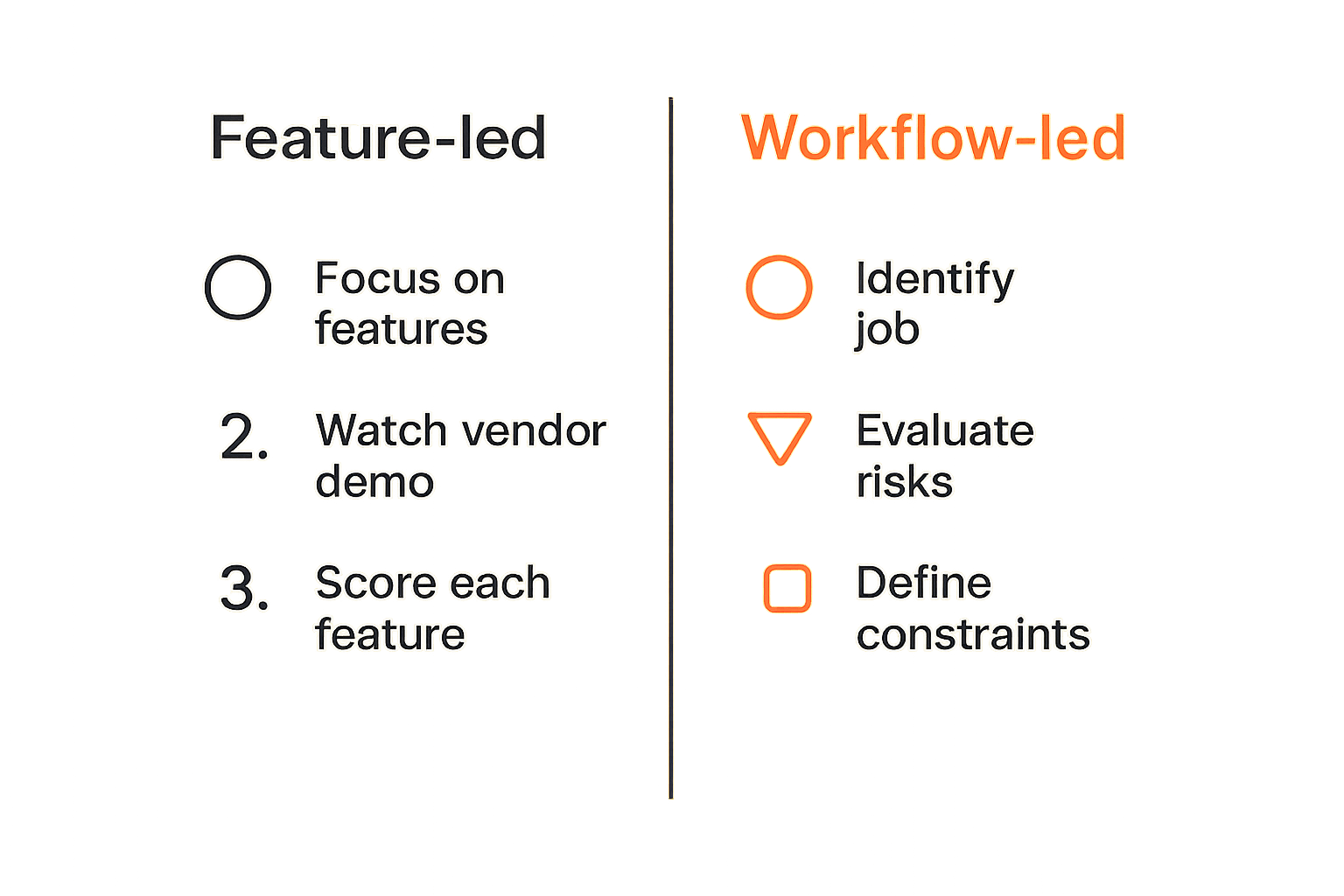
Feature lists are useful only after the team knows what it is trying to protect.
A vendor demo will naturally emphasize what the product can do. Your job is to understand what your workflow needs it to do repeatedly, safely, and affordably.
That changes the evaluation from “Which tool is most impressive?” to “Which tool fits our operating constraints?”
Use jobs, risks, and constraints
A practical evaluation model has three columns:
| Lens | Question | Example |
|---|---|---|
| Job | What work must the software perform? | Track customer onboarding tasks |
| Risk | What goes wrong if it fails? | Customers miss setup steps or churn early |
| Constraint | What limits the solution? | Small team, no dedicated admin, existing CRM |
This model keeps the buying process grounded. A tool can have excellent advanced reporting and still be a poor fit if the team mainly needs reliable task ownership and CRM sync.
For each shortlisted product, score it against real jobs, risks, and constraints. Do not score it only against features.
Separate buying criteria from demo excitement
Demos are designed to compress value into a short session. That is not a criticism; it is how software is sold. But a polished demo can make edge cases disappear.
Before the demo, define your buying criteria. For example:
- Must support role-based access for contractors.
- Must export customer data in a usable format.
- Must integrate with the accounting tool or support webhooks.
- Must allow approvals before customer-facing messages are sent.
- Must have clear pricing as usage grows.
During the demo, ask the vendor to walk through your workflow, not their best-case workflow.
Practical rule: If a cloud software demo cannot show your messy real-world workflow, assume the implementation will require extra process, extra tools, or extra manual work.
Integration is where most cloud software decisions succeed or fail
Integration is not a technical nice-to-have. It is the difference between a tool that improves productivity and a tool that creates another queue.
A team can tolerate imperfect design if the workflow is connected. It will struggle with beautiful software that traps data.
APIs and webhooks matter even for non-engineering teams
Many buyers hear “API” and assume it is only relevant to developers. That is a mistake. APIs and webhooks influence whether your systems can exchange information without manual effort.
A webhook can notify another system when a deal closes, a ticket updates, a file is approved, or a payment succeeds. An API can let reporting tools retrieve data, operations teams sync records, or support staff see customer context.
Even if you never write code, you may rely on automation platforms that depend on those technical interfaces. Cloud computing software with weak integration support often becomes expensive later because every handoff needs a human.
Avoid copy-and-paste operations as a hidden tax
Copy-and-paste work looks harmless when volume is low. It becomes dangerous as the business grows.
Manual transfer creates delay, errors, and unclear accountability. It also hides true process cost because nobody labels those minutes as software expense.
A better implementation asks:
- Which data must move automatically?
- Which data should require human review?
- Which system is allowed to overwrite another system?
- What happens when sync fails?
- Who receives an alert when an integration breaks?
The mistake teams make is automating everything or nothing. The practical answer is to automate predictable handoffs and keep judgment-heavy decisions visible.
Security and access control are productivity features
Security is often treated as a blocker: something that slows people down after the “real” software decision has been made. In a cloud workflow, that view is backwards.
Good access control makes work faster because people know where they can act, what they can see, and who can approve exceptions. Weak access control creates fear, bottlenecks, and cleanup work.
Permission design should match real roles
Most teams start with two roles: admin and user. That is rarely enough.
A practical permission model may include owners, managers, contributors, reviewers, finance users, contractors, external clients, and read-only observers. The exact list depends on the tool, but the principle is the same: access should reflect how work actually happens.
If everyone is an admin, mistakes become more expensive. If nobody has enough access, work slows down and people move to shadow systems.
Permission design should be reviewed before rollout, not after the first incident.
Auditability matters when work moves fast
Cloud computing software makes collaboration faster. That also means mistakes spread faster.
Audit logs, version history, approval trails, and activity records help teams answer basic operational questions:
- Who changed this record?
- When was this file shared?
- Why did this customer receive that message?
- Which automation updated the status?
- Was this deletion accidental or intentional?
This is not only about compliance. It is about support, accountability, and recovery.
Practical rule: If the software controls customer data, money, access, or commitments, auditability is not optional.
Cost management is part of the architecture
Cloud tools often look cheap at the start. A per-seat price, starter tier, or usage-based plan can be perfectly reasonable for a small team. The issue is not the starting cost. The issue is whether the pricing model matches how your team grows.
Cost surprises usually come from pricing units that buyers did not inspect closely.
Watch the pricing unit, not only the monthly plan
A cloud software plan may charge by seat, project, contact, automation run, file size, API call, storage, compute time, transaction, support level, or feature tier.
Two tools with the same monthly entry price can behave very differently at scale.
| Pricing unit | Works well when | Watch out when |
|---|---|---|
| Per seat | Most users need full access | Many light users or clients need access |
| Usage-based | Demand is predictable | Volume spikes are common |
| Per contact | Database is clean | Records duplicate or grow quickly |
| Per automation | Workflows are stable | Teams experiment heavily |
| Storage-based | Files are managed | Media-heavy teams keep everything forever |
The practical question is: what behavior does the pricing model encourage?
If the model discourages people from inviting collaborators, users may route around the system. If it punishes normal growth, finance will eventually push for a disruptive migration.
Forecast the cost of adoption, not just subscription
Subscription cost is only one part of total cost. Teams should also account for setup, migration, training, workflow design, integration, admin time, data cleanup, and support.
A low-cost tool can become expensive if it requires constant manual repair. A higher-cost tool can be cheaper overall if it removes repetitive work and reduces mistakes.
Do a simple 12-month forecast before buying:
- Expected number of users.
- Expected volume of records, files, tasks, or transactions.
- Required integrations and automation runs.
- Admin hours per month.
- Migration or setup services.
- Support tier needed for business-critical use.
This does not need to be perfect. It needs to be honest enough to prevent surprises.
What breaks when cloud computing software is implemented badly
Bad implementation rarely fails all at once. It degrades slowly. People create side spreadsheets. Managers ask for manual updates. Teams stop trusting dashboards. Customers receive inconsistent answers. Finance questions the bill. Security reviews become painful.
What breaks in practice is not just the tool. It is confidence in the workflow.
No owner means no system
Every cloud tool needs an owner. Not just a budget owner, but an operating owner.
The owner is responsible for permissions, data quality, naming conventions, integrations, vendor communication, internal documentation, and periodic cleanup. Without that role, the tool becomes everybody’s responsibility and nobody’s system.
For small teams, ownership can be lightweight. One person may own the CRM, another the project tool, another the knowledge base. The point is clarity.
Ownership should answer:
- Who approves new users?
- Who changes fields or workflow stages?
- Who reviews integrations?
- Who handles vendor issues?
- Who decides when the tool is no longer fit?
Disconnected tools create duplicate work
Duplicate work is one of the clearest signs of poor cloud architecture.
If sales updates the CRM, customer success updates a spreadsheet, finance updates accounting, and support updates a ticketing system with the same customer status, the team does not have four productive systems. It has four partial versions of reality.
Common failure modes include:
- Multiple tools claiming to be the source of truth.
- No naming convention for customers, projects, or files.
- Integrations that sync in one direction but not the other.
- Notifications that create noise instead of action.
- Reports built from stale exports.
- Former employees or contractors retaining access.
The fix is not always fewer tools. Sometimes the fix is clearer boundaries and better handoffs.
A practical implementation sequence for SaaS and small business teams
Rolling out cloud computing software should feel boring in the right way. The goal is not a dramatic launch. The goal is controlled adoption with fewer surprises.
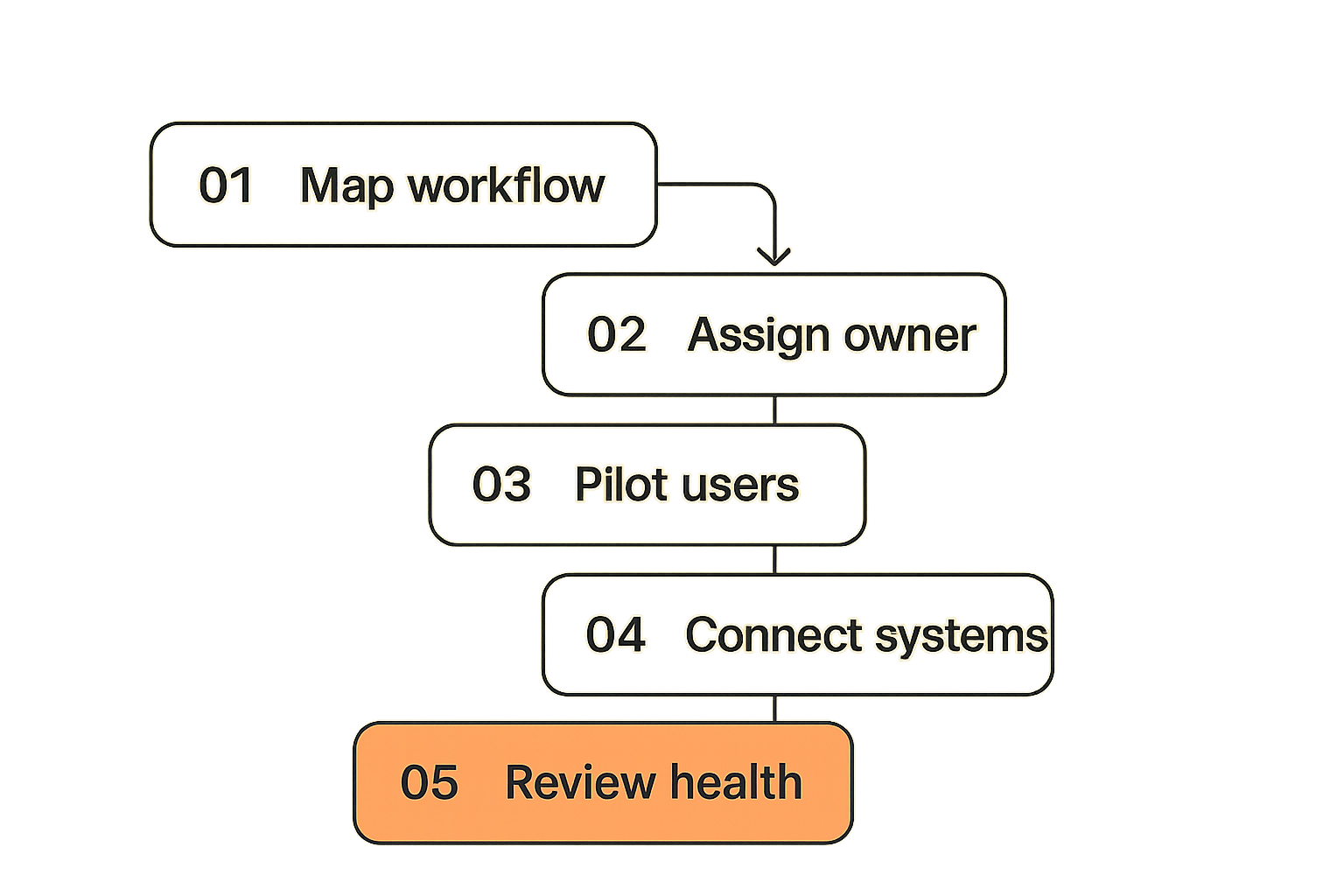
A useful implementation sequence looks like this:
- Define the workflow and success criteria.
- Assign an operating owner.
- Configure roles, permissions, and naming rules.
- Migrate a small, clean data set first.
- Connect only the essential integrations.
- Run a pilot with real users and real edge cases.
- Document the normal process and exception paths.
- Review usage, cost, errors, and support issues after 30 days.
This sequence prevents the most common mistake: inviting everyone before the system is ready.
Roll out in layers
Layered rollout reduces risk.
Start with one workflow, one team, or one customer segment. Prove that the software handles the work correctly. Then expand.
For example, a team implementing a new support platform might begin with email tickets only, then add chat, then add automation, then add customer satisfaction reporting. Each layer should have a clear owner and rollback plan.
The goal is not to move slowly forever. It is to avoid turning every problem into a company-wide interruption.
Measure workflow health after launch
Launch is not the finish line. It is the point where real usage starts exposing gaps.
Track practical signals:
- Are users completing work inside the tool?
- How many manual workarounds remain?
- Are integrations failing or creating duplicates?
- Are permissions causing delays?
- Is reporting trusted?
- Are costs tracking with expectations?
- Are support requests decreasing or increasing?
These are better indicators than login counts alone. A user can log in every day because the tool is useful or because the process is confusing.
How to choose cloud computing software with less regret
The best cloud computing software for your team is not always the most popular tool, the newest AI-enabled platform, or the one with the longest feature list. It is the one that fits your workflow, risk tolerance, budget, and operating capacity.
This is especially important in 2026 because many products are adding automation and AI features quickly. Some of those features are genuinely useful. Some are thin layers over workflows that still need clean data, clear ownership, and reliable integration.
What works
What works is disciplined and practical:
- Start with the workflow, not the category page.
- Define the source of truth for each important record.
- Prefer tools with clear integration paths.
- Design permissions before inviting the whole team.
- Forecast pricing based on actual growth patterns.
- Assign an operating owner.
- Pilot with real edge cases, not clean demo scenarios.
- Review usage and cost after launch.
This approach makes the software buying process less exciting, but far more reliable.
What fails
What fails is equally predictable:
- Buying because a tool is popular without mapping the workflow.
- Letting every department choose disconnected systems independently.
- Treating data migration as a last-minute task.
- Ignoring APIs, exports, and webhooks until integration is urgent.
- Giving broad admin access because permissions are inconvenient.
- Measuring adoption only by seats purchased.
- Keeping tools nobody owns because canceling them feels disruptive.
The mistake teams make is assuming productivity comes from adding software. Productivity usually comes from removing ambiguity.
Where saasrow.com fits in the buying workflow
Software comparison should not be a one-time search activity. It should be part of how a team manages its operating system.
When a workflow changes, the software stack should be reviewed. When costs rise, pricing models should be rechecked. When a team adds a new role, permissions and collaboration patterns should be revisited. When automation becomes important, integration quality should move higher on the buying criteria.
Use comparison as an operating discipline
A practical comparison process helps teams avoid both extremes: buying too quickly and researching forever.
Use saasrow.com as a place to compare software options with the workflow in mind. Look for tools that match the work you actually do, the size of your team, the level of integration you need, and the amount of administration you can realistically support.
The closing point is simple: cloud computing software is not just a subscription. It is part of how your team makes decisions, serves customers, and protects time. Choose it like an operating decision, not a browser tab.
Try saasrow.com
Find practical software guides, comparisons, and productivity-focused insights for choosing better tools. Try saasrow.com.