

July 15, 2026
Budgeting Software in 2026: A Practical Buying and Workflow Guide
A practical 2026 guide to budgeting software for SaaS buyers, small business teams, and productivity-focused professionals who need better forecasts, cleaner ownership, and fewer spreadsheet loops.
Budgeting software usually enters the conversation after the spreadsheet has already failed.
The file has too many tabs. Department owners send updates in different formats. Finance spends the last week of every month chasing numbers instead of explaining what changed. Someone asks whether the team can hire, renew a tool, delay a project, or cut spend, and the answer depends on which version of the budget is open.
Teams think the problem is spreadsheet pain. The real problem is budget workflow architecture.
That changes the conversation. The practical question is not which budgeting software has the cleanest dashboard. It is which system can hold assumptions, ownership, approvals, actuals, variance, and decisions without turning finance into a manual data-cleaning department. In 2026, budgeting software is less about replacing Excel and more about making the operating rhythm of the business visible, repeatable, and reviewable.
Table of contents
- Budgeting software is workflow architecture, not a prettier spreadsheet
- What budgeting software must own in 2026
- Spreadsheet, accounting add-on, or dedicated budgeting software
- The core budgeting workflow to design before buying
- Integration architecture: where budgeting software breaks
- Evaluation criteria for SaaS buyers and small teams
- Common failure modes in budgeting software rollouts
- What works: an operating model for practical budgeting
- Budgeting software comparison checklist
- Product fit: how saasrow.com approaches budgeting software decisions
- Closing: choose budgeting software like an operating system
Budgeting software is workflow architecture, not a prettier spreadsheet
Budgeting software is often purchased as a reaction. The team is tired of broken formulas, unclear versions, and slow monthly reporting. That frustration is real, but it is also a shallow diagnosis.
The mistake teams make is evaluating budgeting tools as if the only job is to make financial planning look cleaner. A good interface helps. It does not fix unclear ownership, mismatched categories, late approvals, or disconnected operating data.
A useful way to think about it is this: budgeting software is a coordination layer between finance and the rest of the company. It should help the business answer what we planned, what actually happened, why it changed, who owns the decision, and what we do next.
The spreadsheet pain that triggers the search
Most searches begin with familiar symptoms:
- Multiple budget versions circulate at the same time.
- Department owners overwrite formulas or send offline edits.
- Actuals arrive late from accounting.
- Hiring plans live outside the budget.
- SaaS subscriptions, contractors, and project costs are tracked separately.
- Leadership asks for scenarios faster than finance can safely rebuild the model.
None of these are purely spreadsheet problems. They are state management problems. The budget has a lifecycle, and spreadsheets usually do not enforce that lifecycle well unless the team is small, disciplined, and financially simple.
The real buying question
The real buying question is not which budgeting software has the most templates. It is whether the system supports how your team makes budget decisions.
You need to know:
- Who submits budget inputs?
- Who approves changes?
- Which systems provide actuals?
- How often are forecasts refreshed?
- How are assumptions documented?
- What happens when numbers change after approval?
If those answers are vague, any budgeting platform will become a nicer-looking version of the same mess.
Practical rule: Do not buy budgeting software until you can describe the monthly budget workflow in plain language from input to decision.
Where budgeting tools fit in the finance stack
Budgeting software does not replace accounting software. Accounting records what happened. Budgeting software helps plan what should happen, compare it against actuals, and manage the conversations that follow.
For small business teams, the stack often looks like this:
- Accounting system for general ledger, invoices, bills, and close.
- Payroll system for employee compensation and taxes.
- Billing or CRM system for revenue assumptions.
- Project or resource tools for planned work.
- Budgeting software for forecast, plan, variance, and ownership.
The budgeting layer needs to pull from the stack without pretending it owns every source of truth.
What budgeting software must own in 2026
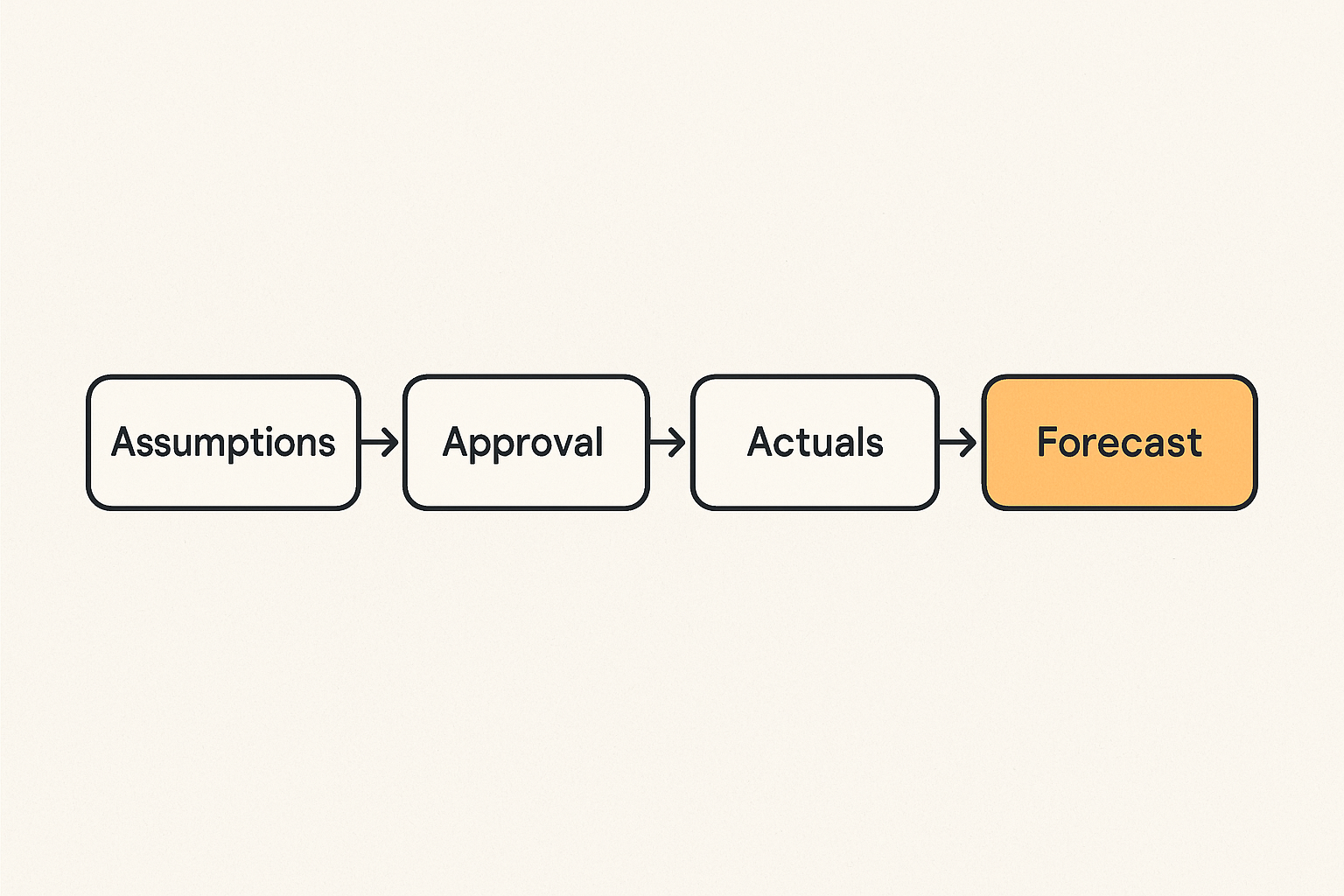
In 2026, budgeting software should do more than produce an annual plan. Many teams operate with changing headcount, flexible software spend, distributed projects, and tighter cash discipline. The budget is no longer a document reviewed once a year. It is a recurring decision workflow.
That does not mean every business needs enterprise financial planning software. It means even lightweight budgeting software should own a few core functions clearly.
Forecasting assumptions
A budget is only useful if people understand the assumptions behind it. Revenue growth, hiring timing, contractor spend, renewal dates, usage-based software bills, payment terms, and project deadlines all influence the plan.
What breaks in practice is that assumptions live in comments, side chats, or the finance lead's memory. Then a number changes and nobody knows whether the change reflects a new decision, a timing shift, or a data correction.
Good budgeting software should let teams attach assumptions to the plan in a way that survives review cycles. This can be as simple as structured notes, assumption drivers, scenario labels, or change history.
Approval and revision control
Budgets require approvals because they create commitments. If department owners can change numbers anytime without a clear revision process, the plan loses authority.
The same is true in reverse. If finance locks everything too early, the budget becomes disconnected from operational reality.
The practical middle ground is controlled revision:
- Draft stage for owner input.
- Review stage for finance validation.
- Approved stage for leadership signoff.
- Forecast stage for monthly updates.
- Archived stage for historical comparison.
This is where budgeting software should beat spreadsheets. It should make the state of the budget obvious.
Actuals, variance, and accountability
The budget matters only when compared against actuals. Variance review is where planning becomes management.
A healthy system shows:
- Budgeted amount.
- Actual amount.
- Variance amount and percentage.
- Driver of variance.
- Owner response.
- Decision or next action.
Without that loop, the budget becomes ceremonial. People approve it, reference it in board decks, and ignore it when operating decisions happen.
Spreadsheet, accounting add-on, or dedicated budgeting software
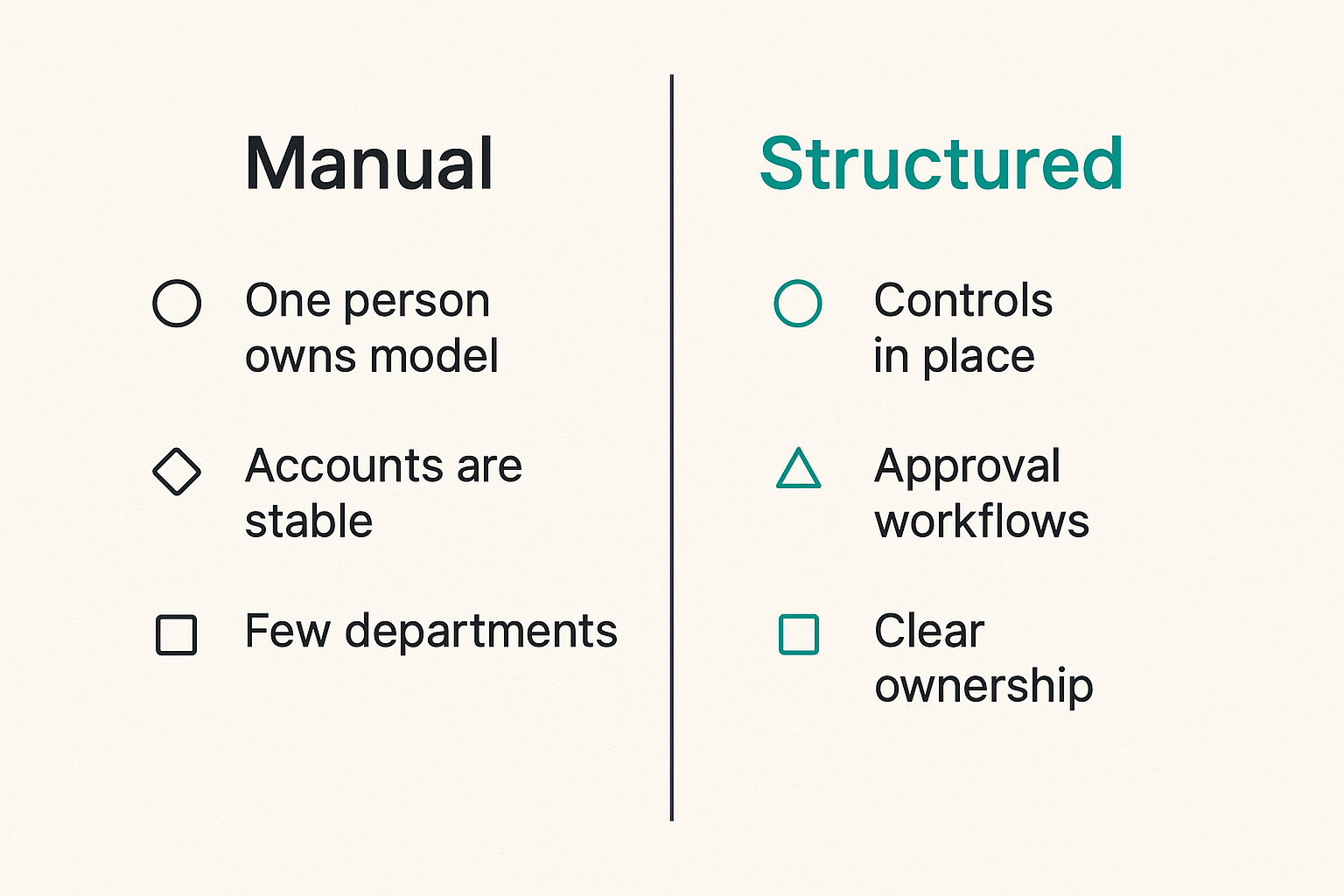
Not every team needs dedicated budgeting software immediately. Buying too early can create admin overhead before the business has enough complexity to justify it. Waiting too long creates hidden cost in manual work and slower decisions.
The practical question is where your complexity actually sits.
When spreadsheets still work
Spreadsheets still work when the budget is simple, ownership is centralized, and change frequency is low.
They are reasonable if:
- One person owns the model.
- The chart of accounts is stable.
- There are few departments or projects.
- Hiring plans are modest.
- Revenue is predictable or manually reviewed.
- Monthly variance analysis is simple.
Spreadsheets fail less because of formulas and more because of collaboration. If the team does not need broad collaboration, a well-controlled spreadsheet can be enough.
When an accounting add-on is enough
Some accounting systems include budgeting features or add-ons. These can be good for basic budget versus actual reporting, especially for small teams with straightforward expense categories.
They usually work best when:
- The budget maps closely to the general ledger.
- Non-finance users do not need heavy input workflows.
- Scenario planning is limited.
- Approval workflows are simple.
- The primary need is reporting, not planning.
The limitation is that accounting add-ons often start from the ledger. That is useful for actuals but weak for forward-looking operational inputs like headcount plans, renewal calendars, pipeline assumptions, and project commitments.
When dedicated budgeting software is justified
Dedicated budgeting software becomes justified when the budget is a cross-functional workflow.
Signals include:
- Department owners submit and revise budgets.
- Hiring plans materially change the forecast.
- Multiple scenarios are reviewed by leadership.
- Cash runway or margin depends on timing decisions.
- Spend categories require owner explanations.
- Actuals need to be reconciled against plans every month.
Related reading from our network: teams building differentiated products face similar operating tradeoffs around pricing, roadmap, and resource allocation, which is why product differentiation as an operating system is adjacent to how budget owners should think about spend priorities.
| Option | Best for | What works | What fails |
|---|---|---|---|
| Spreadsheet | Small, centralized teams | Flexible modeling and low cost | Version control, approvals, collaboration |
| Accounting add-on | Basic budget vs actuals | Ledger alignment and simple reporting | Operational forecasting and scenarios |
| Dedicated budgeting software | Cross-functional planning | Ownership, workflows, variance review | Overkill if the process is immature |
Practical rule: Upgrade from spreadsheets when collaboration, approval, and variance review consume more time than the model itself.
The core budgeting workflow to design before buying
Before you compare vendors, design the workflow. This is the part many teams skip because demos make budgeting software look self-explanatory. It is not.
A budgeting workflow should say how numbers enter the system, how they are reviewed, when they become official, and how actuals change the forecast. If you cannot write that sequence, you are not ready to evaluate tools effectively.
Step 1: define ownership
Start with ownership, not categories. Every meaningful budget line needs an owner. That owner may be a department head, project lead, finance manager, founder, or operations person.
Ownership should answer:
- Who proposes the number?
- Who validates the assumption?
- Who can approve the spend?
- Who explains variance?
- Who updates the forecast?
If you already manage cross-functional work in project software, the same ownership discipline applies. The saasrow.com guide to Asana project management software workflow architecture makes a similar point: boards and tools only work when ownership is explicit before the system is configured.
Step 2: standardize inputs
Budgeting software does not fix inconsistent input formats by magic. It can enforce structure, but only after you decide what structure matters.
For each budget area, define required fields:
- Budget owner.
- Category or account.
- Amount.
- Timing.
- Assumption.
- Confidence level.
- Approval status.
- Related vendor, headcount, project, or revenue driver.
This reduces back-and-forth and makes forecast changes easier to inspect.
Step 3: lock the calendar
Budgeting needs a calendar. Without one, every update becomes urgent and every review becomes late.
A simple monthly rhythm might be:
- Accounting close completes.
- Actuals sync into the budgeting tool.
- Finance reviews mapping and exceptions.
- Department owners explain variance.
- Forecast assumptions are updated.
- Leadership reviews decisions.
- Approved forecast is archived.
This is the implementation sequence you should test during a trial. Do not just click around the dashboard. Run the calendar.
Step 4: review variance
Variance review is not blame. It is learning. The team planned one thing, the business produced another, and the difference should improve the next decision.
Useful variance categories include:
- Timing variance: the cost or revenue moved to a different month.
- Volume variance: usage, hiring, pipeline, or demand changed.
- Price variance: vendor pricing, salaries, or rates changed.
- Scope variance: the team chose to do more or less work.
- Error variance: the original assumption or mapping was wrong.
If the tool cannot support this conversation, it will not improve budgeting discipline.
Integration architecture: where budgeting software breaks
Budgeting software succeeds or fails at the boundaries. The demo environment is clean. Production is not.
What breaks in practice is data mapping, timing, ownership, and exception handling. A tool can claim integrations with accounting, payroll, CRM, or billing systems. That does not mean the integration supports your planning workflow.
Accounting data is not enough
Accounting data is the backbone of budget versus actual reporting, but it is historical. It tells you what was recorded after transactions happened and after the close process resolved timing, coding, and accrual issues.
Budgeting needs forward-looking drivers. For a SaaS company or small business team, those may include:
- Planned hires.
- Expected renewals.
- Contract start and end dates.
- Pipeline stage assumptions.
- Project milestones.
- Usage-based infrastructure costs.
- Vendor commitments.
A budgeting tool that only imports ledger actuals can still be useful, but it should not be mistaken for a full planning system.
Payroll, CRM, billing, and project data
Payroll and headcount are often the largest planning variables. CRM and billing data may drive revenue assumptions. Project data may explain contractor spend, implementation costs, or customer delivery capacity.
The hard part is not connecting these systems once. The hard part is keeping mappings correct as the business changes.
For example:
- A department is renamed.
- A vendor supports multiple projects.
- An employee changes teams mid-quarter.
- Revenue moves from one segment to another.
- A subscription changes from annual to usage-based.
Related reading from our network: remote support and shared-control workflows have similar permission and handoff problems, and this piece on remote team screen sharing workflows is a useful adjacent reference for thinking about controlled access and operational handoffs.
API, CSV, and manual import realities
APIs are useful, but not every integration needs to be real time. Some budget workflows work better with controlled imports after close. CSV is not automatically bad if the process is documented, validated, and owned.
Evaluate integrations by operational fit:
- Is the sync one-way or two-way?
- Can mappings be reviewed before import?
- Are failed imports visible?
- Can users correct exceptions without corrupting history?
- Is there an audit log for data changes?
- Can finance lock periods after close?
Practical rule: Prefer a boring integration you can reconcile over a real-time sync nobody trusts.
Evaluation criteria for SaaS buyers and small teams
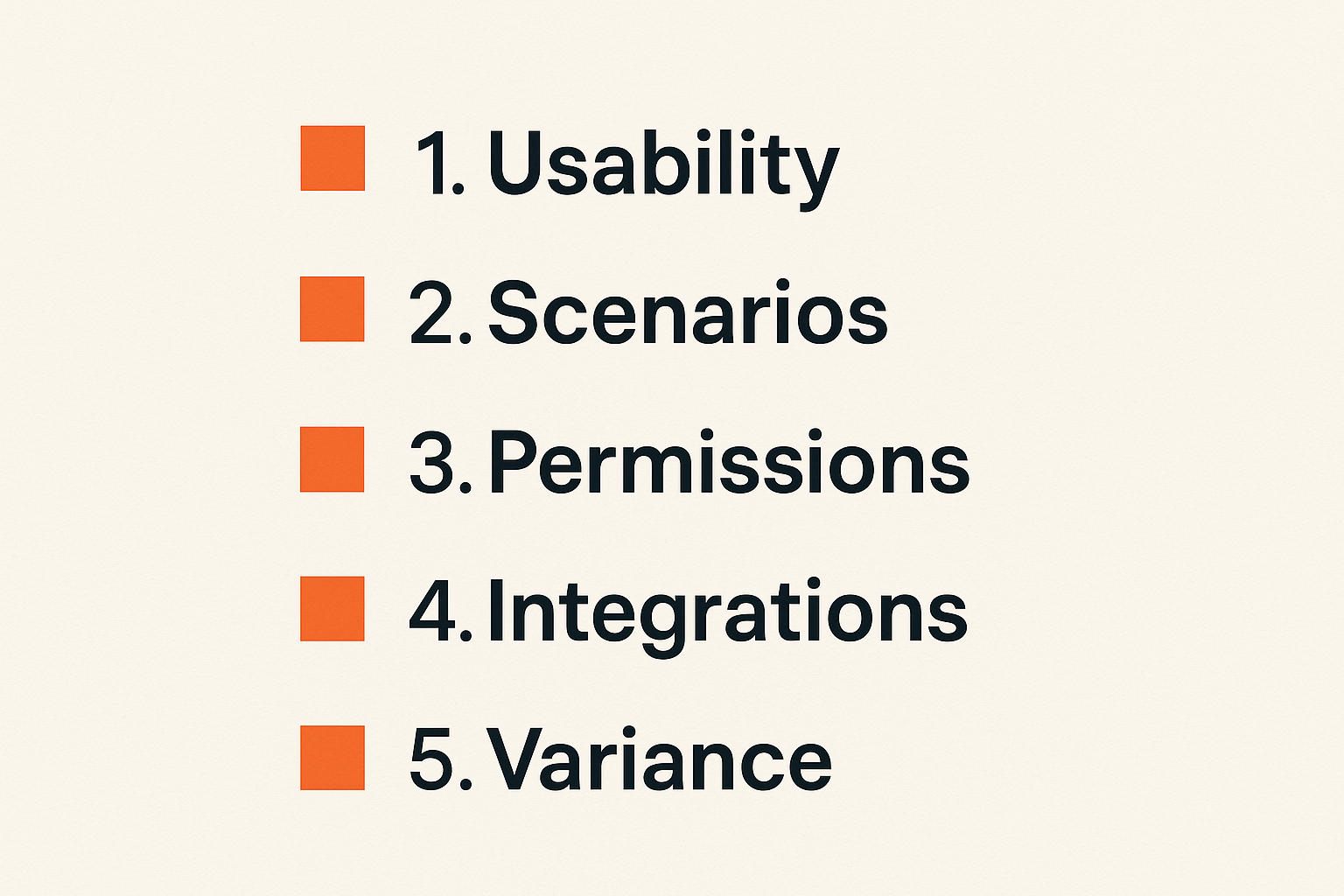
Budgeting software should be evaluated by workflow fit, not feature volume. A long feature list can hide poor implementation fit. A smaller product can work well if it matches your operating rhythm.
The buying team should include finance, operations, and at least one non-finance budget owner. If only finance tests the tool, you will miss adoption problems.
Usability for non-finance owners
Department owners should not need to become spreadsheet experts to submit, explain, and revise budgets. They do need enough context to understand what they are accountable for.
Test whether a non-finance user can:
- Find their budget lines.
- Understand current status.
- Add an assumption.
- Explain a variance.
- Request a change.
- See what has been approved.
If they cannot do those tasks in a trial without finance walking them through every click, adoption will be weak.
Scenario planning without model chaos
Scenario planning is one of the strongest reasons to buy budgeting software. It is also one of the easiest areas to abuse.
Teams create best case, base case, downside case, hiring case, fundraising case, pricing case, and cost reduction case. Soon nobody knows which case is current, which assumptions changed, or which scenario leadership approved.
Good scenario planning needs guardrails:
- Clear scenario names.
- Assumption differences shown explicitly.
- Approval status per scenario.
- Ability to compare scenarios side by side.
- Archiving of rejected or outdated scenarios.
The goal is not unlimited modeling freedom. The goal is controlled decision support.
Permissions and auditability
Permissions matter because budgets contain sensitive information. Salary, vendor contracts, cash assumptions, and strategic plans should not be broadly visible by default.
Look for role-based access that reflects your operating model:
- Finance administrator.
- Executive reviewer.
- Department budget owner.
- Project owner.
- Read-only stakeholder.
- External accountant or advisor.
Auditability matters just as much. You need to know who changed a number, when they changed it, and why. Without that record, finance will end up rebuilding trust manually.
Common failure modes in budgeting software rollouts
Most budgeting software failures are not dramatic. The tool gets purchased, configured, and partially adopted. Finance still exports to spreadsheets. Department owners still send Slack messages with changes. Leadership still asks for manual analysis outside the system.
The rollout did not fail because the software had no value. It failed because the operating model was not enforced.
The tool mirrors a broken process
If your current process has unclear categories, missing owners, late inputs, and inconsistent approvals, a budgeting platform can reproduce those problems at higher speed.
The mistake teams make is importing the old spreadsheet structure directly into the new tool without asking whether the structure still makes sense.
Before migration, review:
- Chart of accounts mapping.
- Department and team structure.
- Project naming.
- Vendor categories.
- Scenario logic.
- Approval levels.
- Reporting views.
Clean the workflow before you automate it.
The budget becomes stale after approval
Annual budgets often become stale quickly. A forecast that is not refreshed after actuals, hiring changes, renewals, or revenue movement is not useful for decisions.
This failure mode appears when the team treats budgeting software as a planning season tool instead of a monthly operating system.
Signs include:
- Actuals are imported late or inconsistently.
- Owners do not explain variance.
- Forecasts are not updated after decisions.
- Scenarios are built but not archived.
- Leadership relies on side spreadsheets for current views.
A stale budget creates false confidence. It looks official, but the business has moved on.
Finance owns everything and nothing changes
Finance should own the system, standards, and review process. Finance should not own every number in isolation.
When finance owns everything, department leaders avoid accountability. They treat the budget as something finance produces instead of something the business commits to. That creates slow responses and weak variance explanations.
A better model is shared ownership:
- Finance owns structure, controls, and reporting.
- Department owners own assumptions and explanations.
- Leadership owns tradeoffs and approvals.
- Operations helps connect workflows and systems.
This is also why budgeting software should be evaluated alongside broader productivity systems. A budget that is disconnected from project execution will always lag reality.
What works: an operating model for practical budgeting
Budgeting works when it becomes a small set of repeatable behaviors. The software should make those behaviors easier, not replace judgment.
The operating model does not need to be heavy. For many small teams, a lightweight monthly loop is enough.
Monthly close-to-forecast rhythm
A practical monthly loop looks like this:
- Close the books in the accounting system.
- Import actuals into budgeting software.
- Review mapping exceptions.
- Compare actuals to budget by owner.
- Collect explanations for material variances.
- Update forecast assumptions.
- Review cash, margin, hiring, and spend decisions.
- Archive the approved forecast.
The key is consistency. If the same loop happens every month, people learn how to participate. If every month is improvised, finance becomes the help desk for budget confusion.
Decision logs for assumptions
Assumption changes should leave a trail. Not every note needs to be formal, but material changes should be visible.
A simple decision log might capture:
- Date.
- Owner.
- Budget area.
- Previous assumption.
- New assumption.
- Reason.
- Approved by.
- Impact.
This protects the team from circular debates. When someone asks why contractor spend increased or why hiring moved out by one quarter, the answer should be in the system.
Related reading from our network: budget tools also create sensitive collaboration surfaces, so teams thinking about privacy and retention may find this adjacent guide to secure messaging apps and privacy workflow useful.
Lightweight automation with human review
Automation helps when it reduces repetitive work and preserves control. It hurts when it hides exceptions.
Good automation examples:
- Scheduled actuals imports after close.
- Renewal reminders before vendor contracts renew.
- Notifications for missing owner inputs.
- Variance alerts above a defined threshold.
- Approval routing for budget changes.
Bad automation examples:
- Updating approved forecasts without review.
- Auto-mapping ambiguous vendors permanently.
- Sending noisy alerts for every small variance.
- Syncing sensitive payroll details to users who should not see them.
If you are designing broader operational automations around finance, procurement, or approvals, the saasrow.com guide to workflow automation software in 2026 is a useful companion because the same rules apply: ownership, controls, and rollout matter more than demo magic.
Budgeting software comparison checklist
A good comparison process should produce a decision, not a pile of demo notes. Build a short list, run the same workflow through each product, and compare operational fit.
Do not let vendors drive the entire evaluation. Their demo path will show the cleanest version of the product. Your job is to test messy reality.
Capability matrix
Use a capability matrix to compare tools consistently.
| Capability | Why it matters | What to test |
|---|---|---|
| Budget input workflow | Owners need structured submissions | Can a department owner submit without finance intervention? |
| Budget vs actuals | Plans must connect to reality | Can actuals map cleanly to budget lines? |
| Scenario planning | Leaders need options | Can scenarios be compared and archived? |
| Approval workflow | Budgets create commitments | Can approval states be enforced? |
| Variance comments | Explanations prevent guesswork | Can owners explain changes in context? |
| Integrations | Manual work limits adoption | Can imports be reconciled and audited? |
| Permissions | Financial data is sensitive | Can users see only what they should? |
| Reporting | Decisions need clear views | Can leadership see cash, margin, and owner views? |
This table is not exhaustive, but it is enough to prevent a purely subjective buying process.
Questions to ask vendors
Ask operational questions, not just feature questions:
- How do customers handle monthly reforecasting?
- What happens when imported actuals do not map correctly?
- Can periods be locked after close?
- How are assumptions tracked over time?
- Can non-finance users comment without editing formulas?
- What permissions are available for salary and vendor data?
- How does the product handle scenario approval?
- What support is available during implementation?
- What data can be exported if we leave?
The export question matters. Budget history is business memory. You should not lose it because a tool relationship ends.
Red flags during a trial
Watch for red flags early:
- The tool requires too much custom consulting for basic setup.
- Non-finance users avoid using it during the trial.
- Reporting looks good but assumptions are hard to inspect.
- Integrations work only in ideal demo conditions.
- Permissions are too broad or too rigid.
- Scenario management creates duplicate confusion.
- The vendor cannot explain implementation ownership.
Also watch your own team. If nobody can agree on the budget workflow during evaluation, the tool will not solve that disagreement.
Product fit: how saasrow.com approaches budgeting software decisions
saasrow.com is built for readers who want practical articles, guides, and insights about software and productivity. For budgeting software, that means focusing less on category hype and more on how the tool changes daily work.
The best budgeting platform for one team may be wrong for another. A founder-led company with one finance owner needs a different system than a multi-department SaaS company with formal approvals. A services business with project-based profitability needs different views than a subscription company focused on runway and retention.
Compare tools by workflow fit
When we think about budgeting software, we care about the workflow around the tool:
- Can the team collect inputs without chaos?
- Can finance control the model without becoming a bottleneck?
- Can owners explain variance in the system?
- Can leadership compare scenarios safely?
- Can actuals and assumptions stay connected?
This is the same lens we use for productivity software more broadly. Tool selection is an architecture decision. The interface matters, but the operating model matters more.
Connect budgeting to productivity
Budgeting is a productivity problem because unclear budgets create rework. Teams revisit decisions, re-ask the same questions, rebuild reports, and debate numbers without shared context.
A good budgeting system reduces that drag. It gives the business a clearer path from plan to action:
- Inputs are collected once.
- Assumptions are documented.
- Approvals are visible.
- Actuals are reconciled.
- Variance is explained.
- Decisions are archived.
Project management tools show the same pattern. The saasrow.com practical guide to Asana project management software for SaaS and small business teams is adjacent because budgeting and project execution both fail when teams configure boards before defining workflow ownership.
When to keep looking
Keep looking if a budgeting tool only solves the finance team's interface pain but does not improve collaboration with the rest of the business.
Also keep looking if the tool is too complex for your current operating maturity. There is no value in buying an enterprise planning system if the team cannot maintain a monthly close-to-forecast rhythm.
The right fit should feel slightly structured but not suffocating. It should force better habits without requiring a full-time administrator for every small change.
Closing: choose budgeting software like an operating system
Budgeting software is not just a place to store numbers. It is a system for turning plans into decisions and decisions into accountability.
The practical question is whether the tool helps your team run the budget workflow better: cleaner inputs, clearer ownership, safer approvals, faster variance review, and more trusted forecasts. If it does, the software can improve how the business operates. If it does not, it becomes another system finance exports from.
Final implementation notes
Start smaller than the vendor demo. Pick one department, one monthly cycle, and one set of budget lines. Run the workflow end to end. Import actuals, collect explanations, update the forecast, and archive the decision.
Then expand.
A strong rollout sequence is:
- Document the current budget workflow.
- Clean categories and ownership.
- Map source systems.
- Configure permissions.
- Run one pilot cycle.
- Review what broke.
- Adjust process before expanding.
- Train owners on their specific tasks.
- Lock the monthly review rhythm.
Budgeting software should make the business easier to manage, not just the spreadsheet easier to replace. Choose it accordingly.
Try saasrow.com
You are writing for readers who want practical articles, guides, and insights about software and productivity. For more grounded software buying guides, Try saasrow.com and keep choosing budgeting software by workflow fit, not demo polish.