

July 14, 2026
Best Workflow Automation Software in 2026: A Practical Buying and Implementation Guide
A practical guide to choosing workflow automation software in 2026 by mapping processes, integrations, approvals, exceptions, ownership, and measurable rollout outcomes.
Choosing the best workflow automation software sounds like a tooling problem until the first broken handoff hits production.
A lead comes in from a form, but sales never gets the task. An invoice is generated, but the approval email goes to the wrong manager. A customer success renewal workflow runs twice because two systems disagree about state. Nobody owns the failure because every app says the event was delivered.
Teams think the problem is finding the tool with the most integrations. The real problem is designing a workflow architecture that survives messy data, human approvals, exceptions, retries, and ownership gaps.
That changes the conversation. The practical question is not which automation platform has the flashiest builder. It is which system can move work across your business without turning every exception into a support ticket, spreadsheet, or Slack thread.
This guide treats best workflow automation software as an operational decision for SaaS buyers, small business teams, and productivity-focused professionals in 2026. The goal is not to crown one universal winner. The goal is to help you choose and implement the tool that fits how your work actually moves.
Table of contents
- Best workflow automation software is an operating model decision
- What the best workflow automation software actually needs to do
- The main categories of workflow automation tools
- How to compare workflow automation software without getting distracted
- Implementation workflow for automation software
- What works when rolling out automation
- What fails in workflow automation projects
- Evaluation checklist for the best workflow automation software
- Workflow automation software examples by business function
- Where saasrow.com fits in the buying process
Best workflow automation software is an operating model decision
The mistake teams make is treating automation as a productivity shortcut instead of an operating model. They buy a tool, connect apps, and expect coordination to disappear. In practice, automation exposes every unclear owner, inconsistent field, missing approval rule, and undocumented exception.
A useful way to think about it is this: workflow automation software does not fix broken work. It formalizes work. If the underlying process is vague, the automation will make that vagueness faster and harder to inspect.
Why feature lists mislead buyers
Most comparison pages focus on features: visual builders, AI steps, templates, integrations, mobile approvals, dashboards, and connectors. Those matter, but they are not the buying decision.
A platform with 5,000 connectors can still fail if it cannot manage your approval rules. A tool with a beautiful interface can still create duplicate records if it does not support idempotency, deduplication, or reliable retry behavior. A system with AI summaries can still be dangerous if nobody reviews outputs before they affect customers.
The practical question is whether the tool can support your real workflows across the full lifecycle: trigger, decision, action, exception, audit, and improvement.
Practical rule: Do not compare automation tools until you can describe the workflow in plain language from trigger to completed outcome.
The workflow map comes before the tool
Before choosing software, map the work. Not the ideal process from a slide deck. The real process.
For example, a simple customer onboarding workflow may include:
- Deal marked closed won in CRM
- Contract reviewed by operations
- Invoice or subscription created
- Welcome email sent
- Implementation task assigned
- Internal kickoff notes copied to the customer success system
- Missing billing details escalated
- First value milestone tracked
Each step has data, ownership, timing, and failure conditions. The best workflow automation software is the one that can model those details without forcing your team into brittle workarounds.
Automation should reduce coordination debt
Coordination debt is the work created by keeping other work moving: status checks, reminders, copy-paste updates, manual approvals, follow-up messages, and reconciliation. Many teams do not notice it because it is spread across inboxes and chat.
Good automation reduces coordination debt. Bad automation hides it until something breaks.
That changes the conversation from buying a productivity app to designing an operating layer. You are choosing how work moves when nobody is watching.
What the best workflow automation software actually needs to do
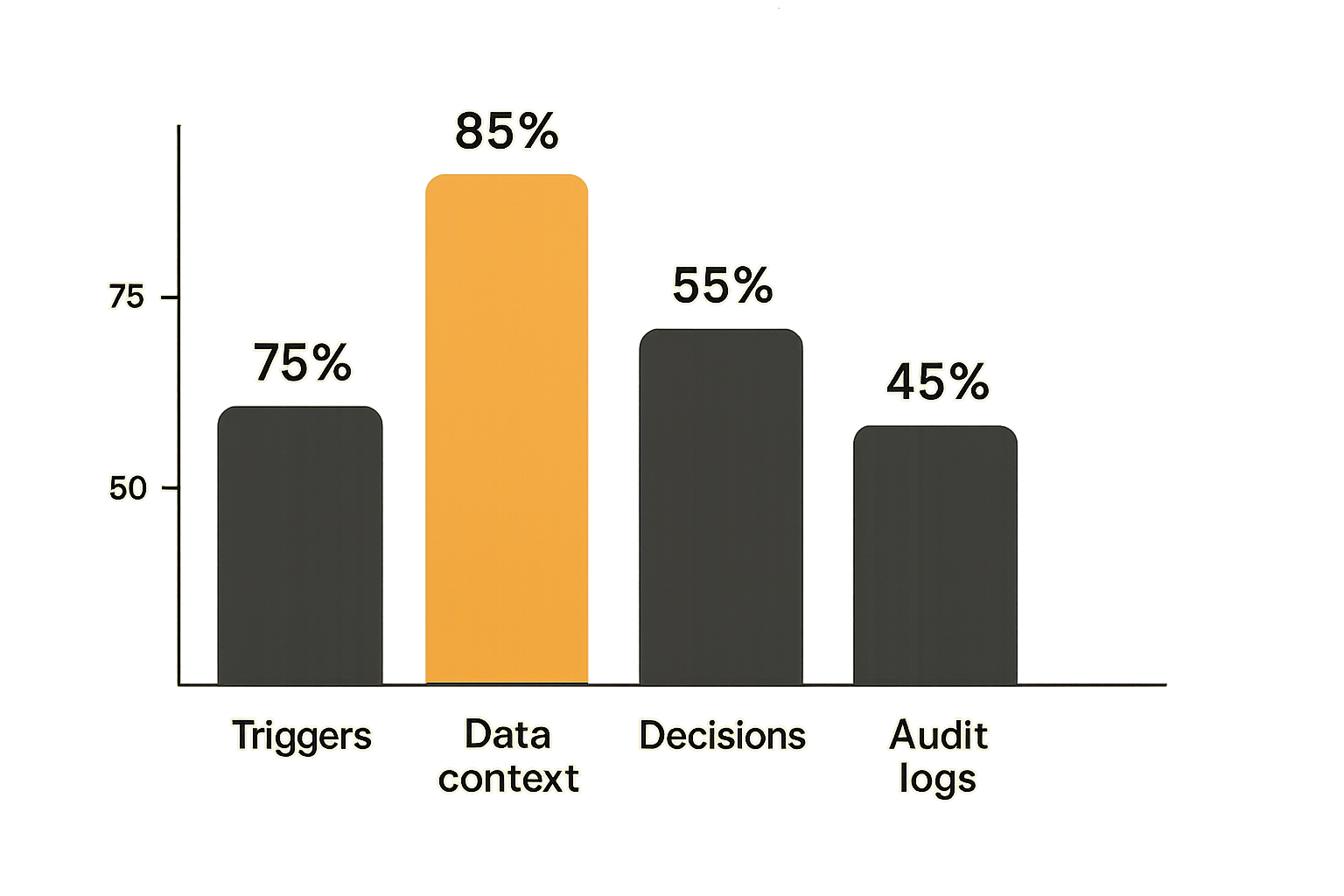
The best workflow automation software should do three boring things extremely well: notice that work should start, move the right context to the right place, and make clear what happened. If a platform cannot do those, advanced features are decoration.
Trigger work reliably
Every workflow starts somewhere. A form submission, payment event, CRM field update, file upload, support tag, contract signature, database change, calendar event, or manual button click.
What breaks in practice is trigger ambiguity. One field changes three times. A webhook fires before the destination system is ready. A user edits a record and accidentally restarts a workflow. A batch import creates hundreds of events that were never meant to notify anyone.
Reliable workflow automation software should support:
- Clear trigger conditions
- Filters and branching rules
- Manual and scheduled starts
- Duplicate prevention
- Re-run controls
- Logs showing why a workflow did or did not run
Move data without corrupting context
Workflow automation is mostly data movement with consequences. Moving a customer email from a form into a CRM is simple. Preserving the source, consent status, owner, company, plan, lifecycle stage, and next action is harder.
The mistake teams make is mapping fields once during setup and never revisiting them. Then a CRM field changes, a required property is added, or a billing system expects a different format. The automation keeps running, but the context degrades.
You need field mapping, transformations, validation, and clear error handling. For important workflows, teams should document which system is the source of truth for each object.
Handle human decisions
Not every step should be automatic. Approvals, exceptions, quality checks, refunds, legal review, and high-value customer decisions often need a person in the loop.
The best workflow automation software supports human judgment without falling back to chaos. That means approval steps, assignments, deadlines, comments, escalation rules, and audit trails.
Practical rule: Automate movement and reminders aggressively, but be careful automating decisions that change money, access, contracts, or customer commitments.
The main categories of workflow automation tools
There is no single category that covers every automation need. Most teams end up with a mix. The practical question is which layer owns which type of work.
No-code and low-code automation platforms
These tools help business users connect apps and build automations through visual builders. They are useful for marketing ops, sales ops, customer success, recruiting, reporting, internal notifications, and back-office tasks.
They usually work best when:
- The workflow spans several SaaS apps
- Business users understand the process better than engineers
- Speed matters more than deep customization
- The risk of failure is manageable
- The team needs templates and connectors
They can become fragile when workflows become deeply conditional, high-volume, or mission-critical without governance.
Embedded automation inside business apps
Many CRM, help desk, project management, finance, HR, and marketing tools now include automation. These are often the easiest place to start because the automation is close to the data.
For example, a CRM can assign leads, update lifecycle stages, create follow-up tasks, and notify account owners. A project tool can route tasks, enforce statuses, and trigger reminders. An invoicing tool can send payment reminders and update billing states. If billing operations are part of your automation plan, the workflow-first approach in this invoicing software guide is a useful adjacent model.
Embedded automation works well when the process mostly lives inside one system. It fails when teams expect it to orchestrate complex cross-functional workflows across many apps.
Related reading from our network: editorial and content teams face similar control issues when automating publishing, especially around approvals and review lanes, as covered in publishing automation software workflow architecture.
Developer-first orchestration tools
Some workflows are too important or too complex for point-and-click automation alone. Developer-first orchestration tools, job queues, workflow engines, internal platforms, and custom services provide more control over state, retries, permissions, testing, and versioning.
These are better for:
- Product workflows that affect customer accounts
- High-volume backend jobs
- Payment and provisioning flows
- Complex data synchronization
- Regulated or audit-heavy processes
- Workflows needing strong reliability guarantees
The tradeoff is implementation cost. Business users may need dashboards or admin tools built around the workflow engine.
How to compare workflow automation software without getting distracted
The vendor demo is designed to show what is possible. Your evaluation should show what is dependable.
A better comparison starts with the work you need to move, the systems involved, the failure cost, and the people who will maintain it.
Compare by workflow type
Not all workflows have the same shape. A simple notification workflow is different from a finance approval workflow, and both are different from a provisioning workflow.
| Workflow type | Good fit | Main risk | Buying focus |
|---|---|---|---|
| Notifications | Low-code tools, embedded rules | Noise and ignored alerts | Filtering, routing, ownership |
| Approvals | Workflow platforms, project tools | Delayed decisions | Escalation, audit trail, delegation |
| Data sync | Integration platforms, iPaaS | Duplicate or stale records | Field mapping, retries, source of truth |
| Customer lifecycle | CRM and CS automation | Broken handoffs | State model, tasks, visibility |
| Finance operations | Billing and accounting workflows | Incorrect money movement | Controls, approvals, reconciliation |
| Product operations | Developer-first orchestration | Customer-impacting failures | Reliability, testing, observability |
This table is more useful than a generic ranking because it connects tool choice to operational risk.
Compare by integration depth
Integration count is a weak signal. Integration depth matters more.
Ask what each connector can actually do:
- Can it trigger on the specific event you need?
- Can it read and write the required fields?
- Can it search before creating records?
- Can it update existing objects safely?
- Can it handle custom fields?
- Does it expose errors clearly?
- Does it support rate limits and retries?
A shallow connector creates manual cleanup. A deep connector becomes part of the operating system.
Compare by control and auditability
Automation creates leverage, which means mistakes scale. You need visibility into who changed a workflow, when it ran, what data it touched, and what happened when it failed.
For small teams, this may be a simple run history and owner list. For larger teams, it may require role-based access, change approvals, versioning, environment separation, and exportable logs.
Practical rule: If an automation touches revenue, customer access, legal obligations, or sensitive data, treat auditability as a core feature, not an enterprise extra.
Implementation workflow for automation software
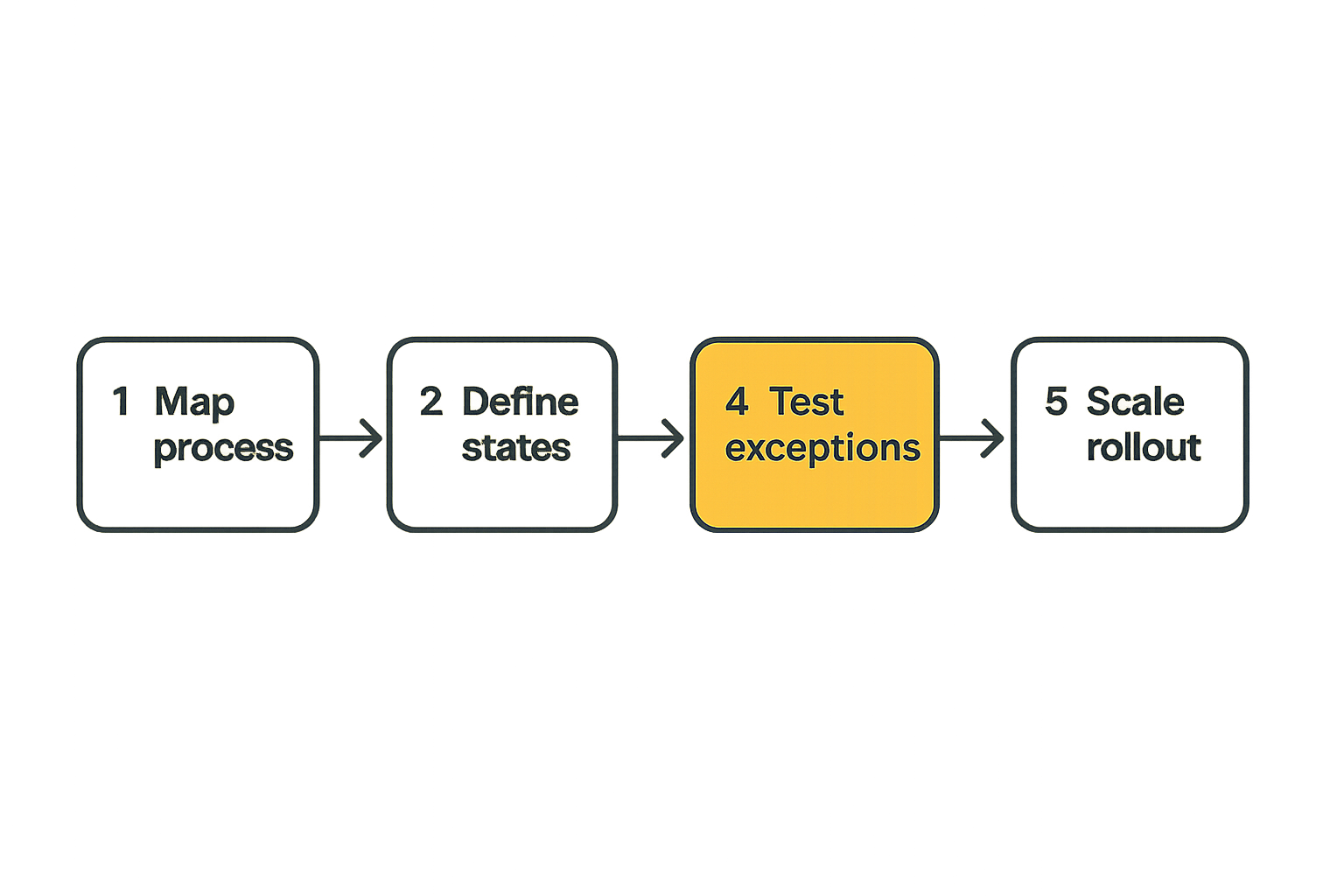
Buying the best workflow automation software is only half the work. The rollout determines whether the tool becomes infrastructure or another app people work around.
A simple implementation sequence works better than a large automation program with vague goals.
Step 1 map the current process
Start with one workflow. Interview the people who do the work. Watch where they copy data, wait for approvals, search for context, send reminders, or reconcile mismatches.
Document:
- Trigger
- Inputs
- Systems involved
- Required decisions
- Outputs
- Failure points
- Owner at each stage
- Completion definition
Do not skip the current-state map. Many teams discover that the process they want to automate is not actually standardized.
Step 2 define states and owners
Workflows need state. Without state, teams cannot tell whether work is new, pending, blocked, approved, completed, failed, or canceled.
Define states in plain language. Then assign owners. A workflow without an owner is just a scheduled future problem.
For example:
- New request: operations owns triage
- Waiting for customer: customer success owns follow-up
- Pending approval: department manager owns decision
- Failed sync: systems owner investigates
- Completed: source system records final state
This is where the architecture becomes practical. You are not just connecting apps. You are defining accountability.
Step 3 build the smallest reliable automation
Start with the narrowest version that removes real friction. Avoid the temptation to automate every branch at once.
A good first release might:
- Trigger from one trusted source
- Update one destination system
- Notify one owner
- Log every run
- Stop safely on missing data
- Create a manual review task for exceptions
This gives you a working base. Then you add branches, approvals, and integrations after the team trusts the core flow.
Step 4 test exceptions before scale
Most demos test the happy path. Production breaks on exceptions.
Test what happens when:
- Required fields are missing
- A destination app is unavailable
- A record already exists
- A user lacks permission
- A webhook fires twice
- A customer changes status mid-flow
- An approver is out of office
- A rate limit is hit
The mistake teams make is discovering these cases after rollout. Test them before the automation becomes invisible.
What works when rolling out automation
Automation rollouts succeed when they are treated like operational change, not a software installation. People need to know what changed, what the system owns, what they still own, and how to report problems.
Start with high-friction repeatable work
The best first workflows are painful, frequent, and structured. They are not always the most glamorous.
Good candidates include:
- Lead routing
- Customer onboarding tasks
- Invoice follow-ups
- Support escalation
- Renewal reminders
- Employee onboarding checklists
- Content review routing
- Internal approval requests
- Weekly reporting assembly
These workflows have clear triggers and measurable outcomes. They also create visible relief for the team.
Keep humans in the loop where judgment matters
Human-in-the-loop automation is not a compromise. It is often the correct architecture.
For example, an automation can collect context, prepare a summary, assign an approver, send reminders, and record the decision. The human still approves the discount, refund, exception, or account change.
That pattern works because the software handles coordination while people handle judgment.
Related reading from our network: launch teams making vendor and fulfillment decisions face the same timing and ownership tradeoffs, which is why this guide to choosing a promotional products supplier for a software launch is relevant as an adjacent workflow example.
Create visible operational ownership
Every automation should have an owner, a backup owner, and a place where issues are tracked. Otherwise, automations become ghost processes.
A lightweight ownership record can include:
- Workflow name
- Business purpose
- Owner
- Systems touched
- Trigger
- Expected volume
- Failure notification path
- Last reviewed date
- Change history
This sounds bureaucratic until the first critical automation fails and nobody knows who built it.
What fails in workflow automation projects
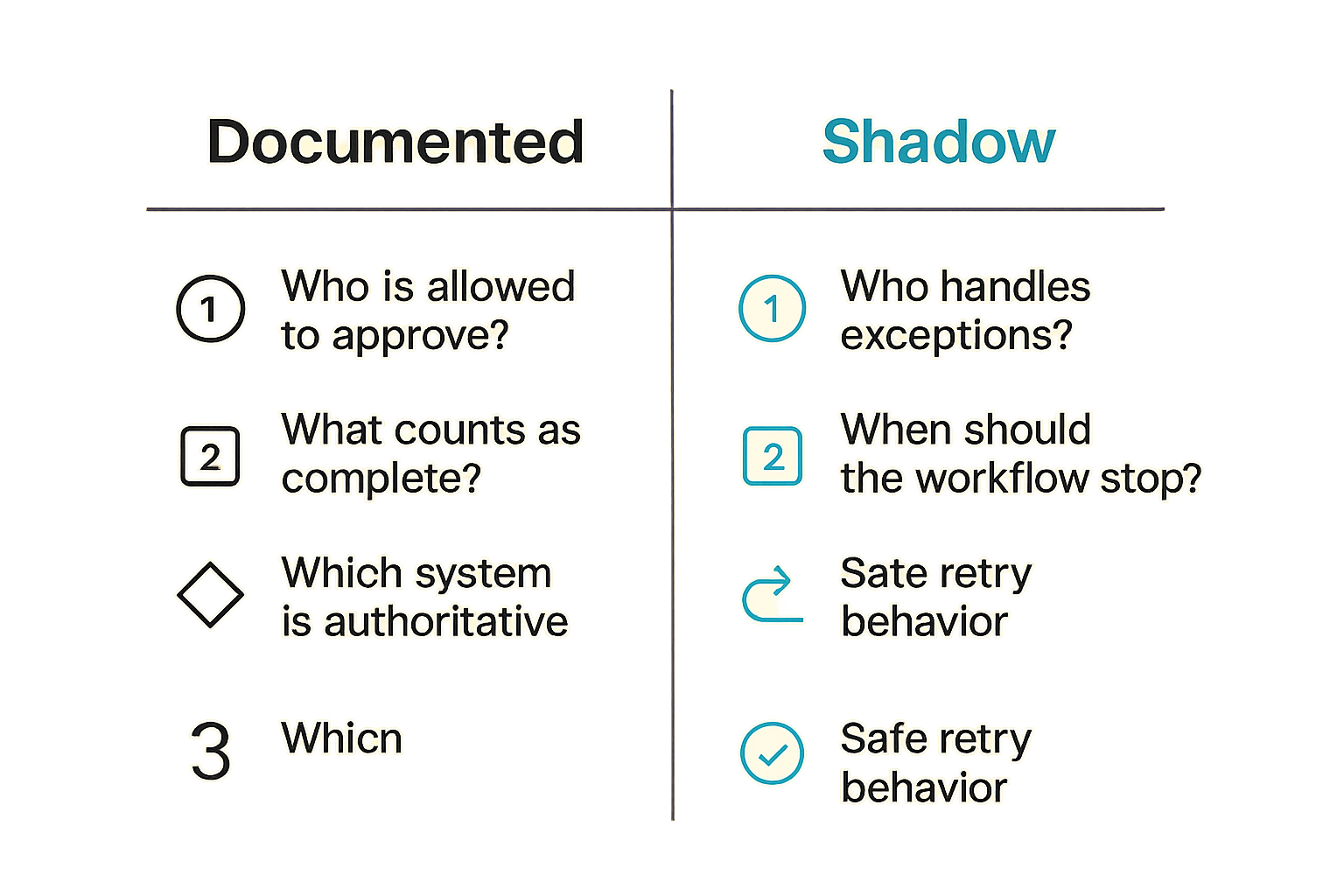
What breaks in practice is usually not the automation tool. It is the gap between a diagram and the messy operating environment around it.
Automating unclear processes
If five people describe the workflow five different ways, automation will not fix the problem. It will force one version into software and create conflict when the exceptions appear.
Before automating, resolve questions like:
- Who is allowed to approve?
- What counts as complete?
- Which system is authoritative?
- What happens when data is missing?
- Who handles exceptions?
- When should the workflow stop?
The mistake teams make is using automation to avoid these decisions. The tool then becomes the place where unresolved process arguments are encoded.
Ignoring edge cases and retries
Retries are not a technical detail. They are an operational requirement.
If a workflow creates a customer record, sends a welcome email, assigns an implementation task, and then fails on billing setup, what should happen next? Should the workflow retry? Should it pause? Should it notify finance? Should it roll back anything? Should the customer success manager see a warning?
Many workflow tools can retry failed steps. Fewer teams design what retry success actually means.
For important workflows, define:
- Safe retry behavior
- Duplicate detection
- Error notifications
- Manual override process
- Run history review
- Recovery owner
Letting automations become shadow infrastructure
Shadow infrastructure happens when business-critical processes live inside personal accounts, undocumented zaps, hidden scripts, or workflows only one employee understands.
This is common in fast-moving teams. It is also dangerous.
You can reduce the risk by requiring shared workspaces, naming conventions, owner records, permission reviews, and quarterly workflow audits. If a workflow matters, it should not depend on one person remembering how it was built.
Practical rule: Any automation that would disrupt customers, revenue, payroll, security, or reporting if it stopped running should be documented like infrastructure.
Evaluation checklist for the best workflow automation software
A checklist will not choose the tool for you, but it will prevent the most expensive evaluation mistakes. Use it after you map the workflow and before you commit to a platform.
Questions for business users
Business users should evaluate whether the tool makes daily work clearer or just adds another place to check.
Ask:
- Can non-technical users understand the workflow?
- Can owners see what is waiting on them?
- Are approvals easy to complete?
- Are exceptions visible?
- Can users pause, reroute, or cancel work when appropriate?
- Does the tool reduce status chasing?
- Are notifications useful or noisy?
A good automation platform should make the next action obvious.
Questions for operations and IT
Operations and IT should focus on reliability, permissions, integration quality, and maintainability.
Ask:
- How are credentials managed?
- Can workflows be versioned?
- Is there a sandbox or test mode?
- Are logs searchable?
- Can failures be replayed safely?
- How are rate limits handled?
- Can access be limited by role?
- What happens when an employee leaves?
- Can the platform support your expected volume?
If the answer to most of these is unclear, the tool may still be fine for lightweight automations, but risky for core processes.
Questions for finance and leadership
Finance and leadership should care about cost, control, and measurable impact.
Ask:
- What manual work will be removed?
- What errors should decrease?
- What cycle time should improve?
- What reporting becomes more reliable?
- What new operational risk is introduced?
- How does pricing scale with tasks, users, or volume?
- What happens if the platform becomes expensive to leave?
For workflows tied to billing, collections, or month-end close, it is worth comparing automation decisions against billing operations. The broader invoicing software workflow guide covers how controls, lifecycle states, and reconciliation shape tool selection.
Workflow automation software examples by business function
The best workflow automation software for one team may be the wrong choice for another because each function has different failure costs. Sales wants speed. Finance wants control. Support wants visibility. Product operations wants reliability.
Sales and marketing workflows
Sales and marketing teams usually start with lead capture, enrichment, routing, nurture, campaign follow-up, and CRM hygiene.
What works:
- Clear lead source tracking
- Routing rules by territory, segment, or product
- Duplicate checks before record creation
- Automated task creation for follow-up
- Alerts only when action is required
- Lifecycle stage updates based on defined events
What fails:
- Sending every event to sales
- Creating duplicate CRM records
- Routing leads without ownership rules
- Automating outreach without suppression logic
- Letting campaign tools overwrite CRM truth
Related reading from our network: independent operators building service pipelines deal with similar platform-stack decisions, and this comparison of the best freelance websites for beginners in 2026 shows how workflow, proof, fees, and repeat work shape tool choice.
Finance and billing workflows
Finance workflows need more discipline because mistakes affect money and reporting.
Common automations include:
- Invoice creation
- Payment reminders
- Approval routing
- Expense categorization
- Revenue report assembly
- Subscription status updates
- Failed payment notifications
- Month-end task tracking
Finance automation should be conservative. It should make work faster without hiding approvals or weakening controls. If an automation changes invoice status, customer balance, payout timing, or accounting records, it needs auditability.
Customer success and support workflows
Customer-facing workflows should reduce handoff failures and shorten response time.
Useful automations include:
- Assigning onboarding tasks after purchase
- Escalating high-priority support tickets
- Creating renewal reminders
- Updating customer health scores
- Notifying account owners about risk signals
- Routing feedback into product boards
- Triggering internal reviews after churn events
The risk is over-automation. Customers can tell when a workflow is optimized for internal convenience rather than their outcome. Automate the coordination, but keep room for account context.
Where saasrow.com fits in the buying process
Software buying is easier when teams separate tool marketing from workflow reality. That is the role saasrow.com should play in your process: a practical layer for comparing software by how it works in the business, not just how it looks in a demo.
Use guides to pressure-test assumptions
Before you shortlist workflow automation platforms, use buying guides to pressure-test your assumptions. The best question is often not which app is best. It is what job the app must reliably perform.
For automation, that means asking:
- What work should move automatically?
- What decisions still need humans?
- What systems must stay in sync?
- What failures are acceptable?
- What failures are not?
- Who owns the workflow after launch?
This is also where adjacent architecture thinking helps. The automation direct SaaS workflow architecture article uses the same operating lens: start with workflow design, then select tools.
Build a shortlist around operating fit
A strong shortlist usually includes three types of candidates:
- A simple no-code platform for quick cross-app workflows
- An embedded automation option inside your existing CRM, project, finance, or support tool
- A more controlled orchestration approach for high-risk or high-volume workflows
Run the same workflow through each option. Compare setup time, maintainability, failure visibility, permissions, and how easily business users can understand what is happening.
That approach prevents the classic mistake: choosing the most impressive platform, then forcing every workflow into it.
Try saasrow.com
saasrow.com is for readers who want practical articles, guides, and insights about software and productivity. If you are comparing the best workflow automation software in 2026, start with workflow fit before vendor hype: Try saasrow.com.