

August 11, 2026
Best Software Review Sites in 2026: A Practical Buying Workflow for SaaS Teams
The best software review sites are useful inputs, not buying answers. Learn how to compare reviews, build shortlists, validate SaaS tools, and avoid review-driven mistakes.
You can lose weeks comparing software and still make the wrong call.
That is the real pain behind searches for the best software review sites. Teams open ten tabs, scan star ratings, read a few glowing reviews, watch vendor demos, and call it due diligence. Then the tool lands in production and the real issues appear: bad integrations, weak reporting, awkward permissions, confusing onboarding, or a workflow nobody wants to use.
Teams think the problem is finding more reviews. The real problem is turning review data into a buying workflow.
That changes the conversation. The practical question is not which review site has the most listings. It is how your team should use review sites, editorial guides, peer feedback, demos, trials, and internal criteria without outsourcing judgment to a rating average.
Table of contents
- Why software review sites are now a buying workflow
- The best software review sites in 2026 are not interchangeable
- How to read reviews without outsourcing judgment
- Comparison table: where review sites help and where they fail
- Build a shortlist from the best software review sites
- Validate claims with demos trials and reference checks
- What breaks when teams implement review-driven buying badly
- A practical workflow for comparing SaaS tools
- Best software review sites for different buyer roles
- Where saasrow.com fits in the software buying stack
- Closing: use the best software review sites as inputs not answers
Why software review sites are now a buying workflow
The review site is not the decision
Software buying used to be slower, but the process had fewer moving parts. A manager asked peers, booked a demo, got a quote, and made a call. In 2026, even a small business choosing project management, CRM, finance, HR, analytics, or automation software faces hundreds of options.
The mistake teams make is treating review sites like answer engines. They search, sort by rating, open the top three profiles, and assume the market has already done the thinking for them.
That is backwards. Review platforms show signals. They do not know your approval process, data model, handoffs, customer promises, internal politics, security constraints, or adoption tolerance.
Practical rule: A review site can help you discover options and risks. It cannot define your workflow, ownership model, or rollout plan.
A useful way to think about it is this: review sites are upstream evidence sources. Your decision system is downstream. If the downstream system is weak, more reviews create more noise.
The hidden cost is context loss
The biggest problem in software evaluation is not lack of information. It is loss of context as information moves across tabs, meetings, spreadsheets, demos, and Slack threads.
One person reads reviews about reporting limitations. Another tests the mobile app. A manager asks about pricing. Someone in IT worries about permissions. By the final meeting, the team has opinions but no shared evidence model.
What breaks in practice is traceability. Nobody can explain why Tool A beat Tool B except that it felt better, had better reviews, or looked easier in the demo.
A review-driven workflow should preserve context:
- Which user type wrote the review?
- What company size and industry were they in?
- Which workflow did they describe?
- Was the complaint about setup, daily use, billing, support, reporting, or integrations?
- Does the issue matter for your operating model?
Without that context, teams overvalue polished ratings and undervalue operational fit.
What a good review source should reduce
The best review sources reduce uncertainty in specific areas. They should help you answer better questions, not simply produce a winner.
Good review research should reduce:
- Discovery risk: Are we missing obvious tools in the category?
- Fit risk: Are buyers like us succeeding with this product?
- Implementation risk: What breaks during setup and migration?
- Adoption risk: Do non-admin users actually like using it?
- Support risk: What happens when something fails?
- Commercial risk: Are pricing, contracts, and add-ons predictable?
If a site helps with one of those areas, use it. If it only reinforces a vague sense that a product is popular, treat it as weak evidence.
The best software review sites in 2026 are not interchangeable

Marketplace directories
Marketplace directories are useful when you need breadth. They list categories, alternatives, pricing snapshots, screenshots, integrations, and sometimes buyer guides. Their main value is discovery.
Use marketplace directories to build the first version of your market map. You are not deciding yet. You are learning the shape of the category.
Look for:
- Category coverage
- Filter quality
- Verified integration lists
- Pricing visibility
- Alternative and competitor pages
- Buyer segmentation by company size or use case
The practical question is whether the directory helps you exclude bad fits quickly. A strong directory makes it easy to eliminate tools that do not support your size, region, compliance needs, or integration stack.
Peer review platforms
Peer review platforms are useful when you need operational color. They show what users liked, what disappointed them, and where vendors create friction after purchase.
But peer reviews are noisy. A five-star review from a solo consultant may not help a 60-person operations team. A one-star review from a frustrated user may describe a billing dispute, not product quality.
Read peer reviews by pattern, not by isolated comments. Ten reviews mentioning weak onboarding matter more than one dramatic complaint. Three reviews from teams similar to yours matter more than 100 generic ratings.
Practical rule: Weight reviews by similarity to your use case, not by emotional intensity.
Peer platforms are especially useful for identifying hidden costs: configuration work, reporting gaps, support delays, permission complexity, and renewal surprises.
Analyst and editorial sites
Analyst, editorial, and independent guide sites are useful when you need interpretation. They can explain category boundaries, compare workflows, and highlight tradeoffs that are hard to see in user reviews.
Editorial content is not automatically better than peer reviews. Some pages are thin, affiliate-driven, or outdated. But a good guide can reframe the decision around architecture and operating fit.
For example, when evaluating broad workplace tooling, a guide like Best Productivity Software for Small Business in 2026 is most useful when it helps you connect features to ownership, integrations, rollout, and day-to-day work instead of just listing familiar logos.
Related reading from our network: teams building content operations face a similar evaluation problem when software claims to scale output, and this guide to AI publishing software workflow architecture shows how review, approval, and measurement lanes change the buying conversation.
How to read reviews without outsourcing judgment
Separate sentiment from fit
A review usually contains two things: sentiment and fit data. Sentiment is how the reviewer felt. Fit data is what happened in their environment.
Sentiment sounds like this:
- Easy to use
- Support was terrible
- Great value
- Too complicated
- Best tool we tried
Fit data sounds like this:
- We migrated 12 users from spreadsheets
- We connected HubSpot, QuickBooks, and Slack
- Approval routing took two weeks to configure
- Reporting worked for managers but not executives
- Mobile usage dropped after rollout
The mistake teams make is reading sentiment as proof. Sentiment is a clue. Fit data is evidence.
When reviewing comments, copy only the operational parts into your scorecard. If a review says the tool is confusing, ask: confusing for whom, during which task, after how much onboarding, and compared with what alternative?
Watch for review recency and version drift
SaaS products change constantly. Pricing models shift. AI features appear. Old modules get rebuilt. Integrations break and get fixed. A review from two years ago may describe a product that no longer exists in the same form.
That does not mean older reviews are useless. They can reveal patterns in vendor behavior: slow support, confusing contracts, weak documentation, or a history of overpromising. But product-specific complaints need recency checks.
Use a simple rule:
- Last 90 days: strong signal for current product experience
- 3 to 12 months: useful signal, verify in demo or trial
- 12 to 24 months: pattern signal only
- Older than 24 months: background context, not decision evidence
Related reading from our network: remote and hybrid teams face similar context decay when evaluating collaboration tools, and this piece on remote work architecture is useful adjacent reading for teams comparing software across distributed workflows.
Compare negatives by workflow impact
Negative reviews are often more useful than positive ones. Positive reviews tell you why people bought or stayed. Negative reviews tell you where the system may fail.
But not all negatives matter equally.
A complaint about advanced analytics may be irrelevant if your team only needs task tracking. A complaint about weak mobile support may be critical if your field staff live on phones. A complaint about slow bulk imports may matter only during migration.
Classify negatives by workflow impact:
- Blocking: prevents required work
- Expensive: creates manual workarounds
- Annoying: slows users but does not break the process
- Irrelevant: outside your intended use
This is where review reading becomes operational. You are not looking for a tool with no complaints. That tool does not exist. You are looking for complaints your team can tolerate, mitigate, or ignore.
Comparison table: where review sites help and where they fail
Use each source for a specific job
The best software review sites are more useful when you stop asking each one to do every job. A directory is not a reference check. A peer review is not an implementation plan. A vendor comparison page is not a neutral architecture review.
| Source type | What works | What fails | Best use |
|---|---|---|---|
| Marketplace directory | Broad discovery, category filters, alternatives | Overweighting popularity and sponsored placement | Build the initial market map |
| Peer review platform | Real user complaints, adoption signals, support patterns | Context mismatch, emotional extremes, stale reviews | Identify risks to validate |
| Editorial guide | Workflow framing, category education, practical tradeoffs | Thin summaries, affiliate bias, outdated lists | Shape the evaluation criteria |
| Vendor website | Product detail, roadmap, security docs, pricing path | Selective framing, demo polish, missing edge cases | Confirm capabilities and constraints |
| Community discussion | Unfiltered opinions, niche use cases, workaround patterns | Low verification, anecdotal noise | Find edge cases and implementation tips |
| Reference call | Similar buyer context, post-sale reality | Vendor-selected optimism, limited sample size | Validate operational fit before purchase |
The table is not meant to rank sources. It is meant to assign jobs.
Practical rule: Do not ask one evidence source to answer discovery, fit, implementation, adoption, and commercial risk at the same time.
Do not average your way into a decision
Averages feel objective. They are often lazy.
If Tool A has 4.7 stars and Tool B has 4.4 stars, that tells you almost nothing without context. The difference may reflect review volume, category maturity, buyer type, user expectations, or how aggressively the vendor asks satisfied customers for reviews.
A better model is weighted evidence. Decide what matters before looking too hard at ratings.
Example weighting for a small business buying project management software:
- Workflow fit: 30 percent
- Ease of adoption: 20 percent
- Integrations: 20 percent
- Reporting: 10 percent
- Support quality: 10 percent
- Price predictability: 10 percent
Now reviews become inputs into categories. A comment about confusing permissions affects workflow fit. A complaint about invoice surprises affects price predictability. A compliment about templates may affect adoption.
This keeps the team from treating popularity as strategy.
Build a shortlist from the best software review sites
Start with the job to be done
Shortlisting starts before you open review sites. Define the job first.
Bad starting point:
- We need the best CRM.
- We need the best project management app.
- We need the best AI writing tool.
Better starting point:
- We need to track leads from website form to signed proposal with clear owner handoffs.
- We need to manage client projects across sales, delivery, and billing without losing status.
- We need to produce approved content with traceable review steps and publishing accountability.
The second version gives you evaluation criteria. It also prevents the team from getting distracted by features that look impressive but do not change the workflow.
Related reading from our network: product teams evaluating software can borrow ideas from launch operations, and this guide to building a repeatable shipping system is a useful adjacent lens on promises, feedback loops, and repeatable execution.
Score integrations before features
Features are visible. Integrations are where work breaks.
A tool may have beautiful dashboards but fail if it cannot sync contacts, invoices, tickets, files, identities, or approvals correctly. Small business teams often underestimate this because early demos use clean sample data.
Before you score features, score integration reality:
- Does it connect to your current tools natively?
- Does the integration support the objects and fields you need?
- Is the sync one-way or two-way?
- How are conflicts handled?
- Are permissions preserved across systems?
- Is there an API, webhook, or export path if native integration fails?
- Who owns the connection when it breaks?
If workflow automation is part of the plan, review-site research should be paired with an implementation view like Best Workflow Automation Software in 2026, because automation decisions depend on triggers, data quality, ownership, controls, and exception handling.
Keep the shortlist small
A useful shortlist usually has three to five serious candidates. More than that and the team stops evaluating deeply.
The mistake teams make is building a long list to feel thorough. Long lists create shallow analysis. Shallow analysis favors the vendor with the best demo, not the best fit.
Use review sites to eliminate quickly:
- Remove tools that do not support required integrations.
- Remove tools with pricing models that do not match your scale.
- Remove tools aimed at a different company size.
- Remove tools with repeated complaints about your critical workflow.
- Remove tools that require implementation capacity you do not have.
A shortlist is not a popularity contest. It is a set of plausible operating models.
Validate claims with demos trials and reference checks
Turn reviews into demo scripts
A demo should not be a vendor-led tour. It should be a test of claims and risks.
Use review research to write demo prompts. If reviews mention weak reporting, ask the vendor to build the exact report you need. If reviews mention difficult onboarding, ask for the first-week implementation plan. If reviews mention permissions confusion, ask the vendor to set up your real roles live.
Example demo script:
- Create a new customer record from an inbound request.
- Assign the owner based on region and deal size.
- Trigger an approval when discount exceeds threshold.
- Sync the approved deal to billing.
- Show the manager dashboard for open exceptions.
- Reassign ownership when an employee leaves.
This forces the product into your workflow instead of letting the vendor stay inside a polished path.
Test the handoffs
Most tools look fine when one person uses them. Problems appear at handoffs.
Test handoffs between:
- Sales and operations
- Manager and individual contributor
- Finance and department owner
- Customer support and product
- Admin and end user
- Internal team and external client
What breaks in practice is often not the core feature. It is status visibility, permission transfer, notification overload, duplicate records, or unclear ownership.
If your tool will support budgeting, approvals, or spend control, the same principle applies. A practical buying guide such as Budgeting Software in 2026 is useful because finance software decisions depend heavily on approvals, variance review, integrations, and ownership rather than spreadsheet replacement alone.
Ask references about failure modes
Reference calls are usually too polite. Buyers ask whether the customer likes the product. The customer says yes. Everyone moves on.
Ask better questions:
- What took longer than expected during implementation?
- Which team resisted adoption and why?
- What reports did you have to rebuild manually?
- Which integration required the most cleanup?
- What surprised you at renewal?
- What would you configure differently if starting again?
- When support failed, what happened next?
You are not trying to catch the vendor lying. You are trying to learn the real operating cost before you sign.
Practical rule: A reference call is valuable only when it reveals what went wrong and how the team recovered.
What breaks when teams implement review-driven buying badly
Review chasing
Review chasing happens when teams keep researching because they do not have decision criteria. Every new review opens another branch. Every alternative looks plausible. Every negative comment restarts the debate.
This creates evaluation drag. The team confuses motion with diligence.
Signs of review chasing:
- The shortlist keeps expanding.
- Nobody can name the top three decision criteria.
- The team debates star ratings more than workflows.
- Demos are scheduled without scripts.
- The buying owner keeps asking for one more comparison.
The fix is not to stop reading. The fix is to time-box review research and force evidence into a scorecard.
Feature checklist inflation
Feature checklists are useful until they become a dumping ground. Teams add every feature mentioned in reviews, competitor pages, and demos. The checklist grows to 80 rows. Every vendor claims yes. The result is false precision.
A better checklist has three layers:
- Must-have: required for the workflow to function
- Important: materially improves adoption or control
- Nice-to-have: useful but not decision-driving
Most teams have too many must-haves. A must-have should be something you would reject the tool for lacking.
The mistake teams make is using feature coverage as a proxy for operating fit. More features can mean more configuration, more training, and more governance work.
No owner for adoption
The biggest post-purchase failure is not that the team picked the wrong product. It is that nobody owned the change.
Review sites can tell you that users like a tool. They cannot make your team adopt it.
Before purchase, assign owners for:
- Admin configuration
- Data migration
- Integration setup
- User training
- Process documentation
- Reporting validation
- Support escalation
- Renewal review
If nobody owns these, the buying process is incomplete. The purchase order is not the finish line. It is the start of implementation.
A practical workflow for comparing SaaS tools
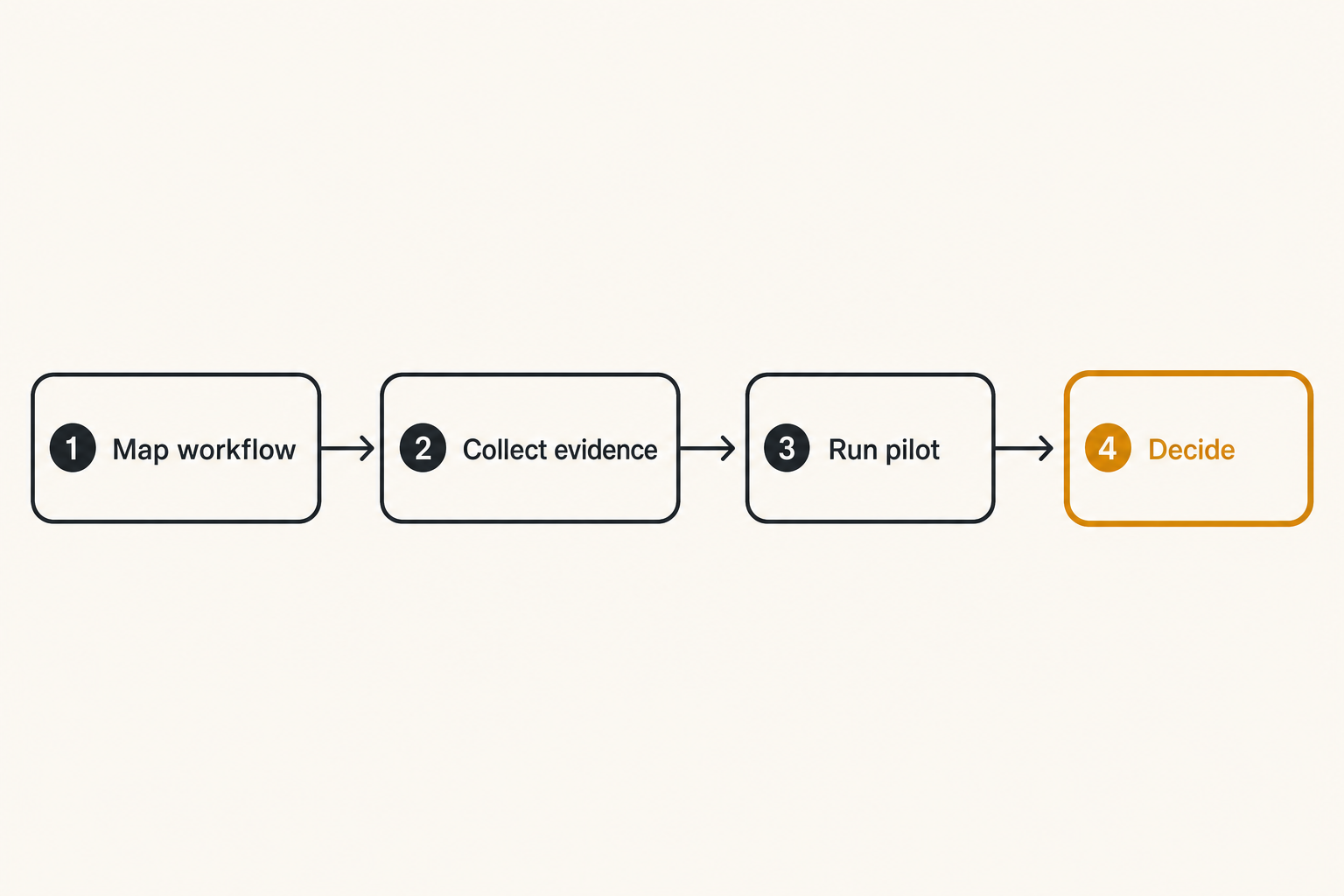
Step 1 map the workflow
Start with the current process. Do not start with vendor categories.
Map:
- Trigger: What starts the work?
- Inputs: What data or files are required?
- Actors: Who touches the process?
- Decisions: Where are approvals or exceptions handled?
- Systems: Which tools are involved?
- Outputs: What must be created, updated, sent, or reported?
- Failure points: Where does the process currently slow down?
This map becomes the buying brief. It should be short enough to use in meetings and specific enough to test in demos.
A lightweight format works:
- Workflow: client onboarding
- Current pain: status lost between sales, delivery, and billing
- Required outcome: one shared onboarding record with owner, deadline, files, billing status, and exceptions
- Critical integrations: CRM, accounting, shared drive, email
- Adoption constraint: non-technical users must update status in under one minute
Step 2 collect evidence
Now use the best software review sites as evidence sources.
Collect evidence into categories:
- Candidate name
- Target buyer profile
- Best-fit use cases
- Repeated positive themes
- Repeated negative themes
- Integration notes
- Pricing concerns
- Support patterns
- Implementation complexity
- Questions for demo
Keep each note tied to a source. Do not paste generic impressions into a spreadsheet with no origin.
A simple scorecard can be enough:
| Criteria | Weight | Tool A | Tool B | Tool C |
|---|---|---|---|---|
| Workflow fit | 30 | 4 | 3 | 5 |
| Adoption ease | 20 | 5 | 3 | 4 |
| Integrations | 20 | 3 | 5 | 4 |
| Reporting | 10 | 4 | 4 | 3 |
| Support risk | 10 | 3 | 4 | 4 |
| Pricing clarity | 10 | 4 | 2 | 3 |
The point is not mathematical perfection. The point is forcing the team to explain tradeoffs.
Step 3 run controlled pilots
A trial is not a pilot. A trial gives you access. A pilot tests the operating model.
Run a controlled pilot with:
- A real workflow
- A small user group
- Defined success criteria
- Required integrations or realistic substitutes
- Time-boxed usage
- A feedback form tied to the scorecard
- A go or no-go meeting
Do not let pilots drift. If users are just clicking around, you are not learning enough.
Pilot questions should include:
- Did the tool reduce manual work?
- Did it make ownership clearer?
- Did users understand what to do next?
- Did notifications help or create noise?
- Did reporting match management needs?
- What would break at 5x usage?
Step 4 decide with operating criteria
The final decision should be boring. If the workflow map, scorecard, demo scripts, and pilot were done well, the team should already know the tradeoffs.
Use operating criteria:
- Can we implement this with our current team?
- Will users adopt it without constant enforcement?
- Does it integrate with our system of record?
- Are reporting and permissions good enough?
- Is pricing predictable at next-year usage?
- Do we know what the vendor is bad at?
- Do we have an owner for rollout?
If the answer is unclear, do not buy because the product has strong reviews. Go back and validate the unclear point.
Best software review sites for different buyer roles
Small business operators
Small business operators need practical evidence fast. They do not have time for a six-month procurement cycle, but they also cannot afford a tool that creates admin burden.
For this group, the best software review sites are the ones that help answer:
- Can a small team implement this without consultants?
- Will it replace manual work or just move it?
- Is pricing clear as seats grow?
- Does support respond when setup gets messy?
- Are templates and onboarding strong enough?
Small teams should pay special attention to reviews from companies with similar headcount. Enterprise praise can be misleading. A tool loved by a 2,000-person company may be too heavy for a 12-person team.
Productivity focused teams
Productivity-focused professionals often evaluate tools through personal experience: interface, speed, notifications, search, templates, keyboard shortcuts, mobile experience, and how quickly work can be captured.
Those details matter. But productivity tools become business systems once teams depend on them.
Evaluate:
- Shared visibility
- Permission controls
- Cross-tool search
- Task ownership
- Comment and notification hygiene
- Reporting for managers
- Export and backup options
- Integration with calendar, email, files, and chat
A tool that feels fast for one user can become noisy for a team. Review sites help when they expose that difference.
Finance procurement and IT
Finance, procurement, and IT buyers read reviews differently. They care about risk, contract terms, security, data governance, access control, and lifecycle management.
They should look for review patterns around:
- Billing surprises
- Renewal pressure
- Admin controls
- SSO and permissions
- Audit logs
- Data export
- Vendor support responsiveness
- Implementation effort
This group should not enter the process only at the end. If finance and IT appear after the preferred vendor is chosen, the team may discover blockers too late.
A good buying workflow brings them in early enough to define constraints, not late enough to act as blockers.
Where saasrow.com fits in the software buying stack
Use guides to frame the work
saasrow.com is for readers who want practical articles, guides, and insights about software and productivity. In the buying stack, that means helping you frame the work before you drown in product pages and review tabs.
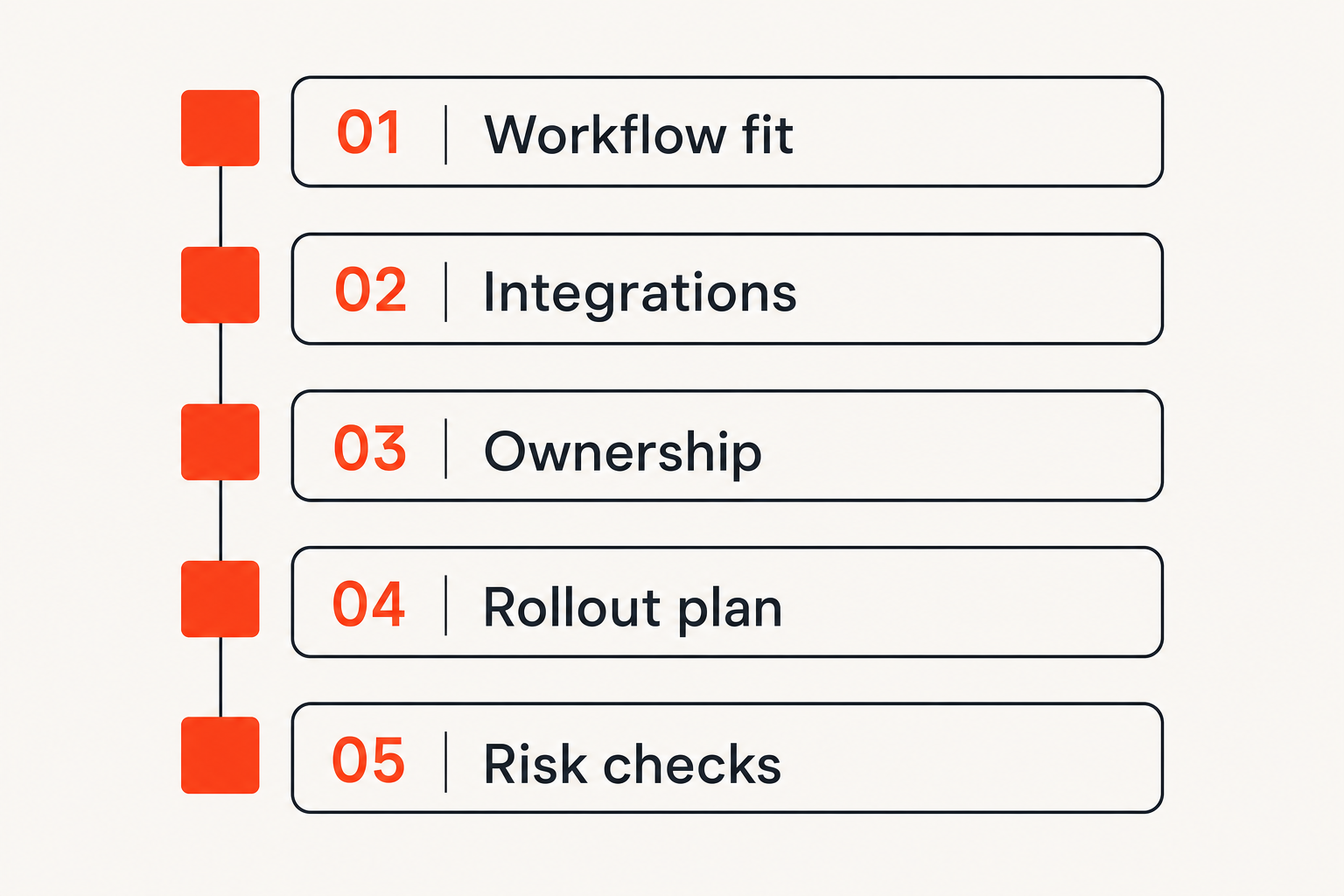
A useful guide should help you ask sharper questions:
- What workflow are we improving?
- Who owns the process?
- Which integrations matter?
- What breaks during rollout?
- Which features are must-have versus nice-to-have?
- How should we compare tools without pretending every team is the same?
That is different from telling every reader to pick the same product.
Connect reviews to workflows
The product-fit role for saasrow.com is not to replace review sites. It is to sit between broad review research and internal decision-making.
Use review platforms to discover candidates and collect user signals. Use practical guides to turn those signals into workflow questions, shortlist rules, and implementation checks.
That changes the conversation from which tool has the highest rating to which tool fits the way this team actually works.
This is especially important for productivity software, where the UI is not the whole system. The real system includes habits, handoffs, notifications, integrations, reporting, permissions, and ownership.
Keep the decision practical
Good software buying is not about finding a perfect vendor. It is about making a decision your team can operate.
Before you buy, make sure you can answer:
- What problem are we solving?
- What will change in the workflow?
- Who owns configuration?
- Who owns training?
- What data must migrate?
- Which integrations are required on day one?
- What risks did reviews reveal?
- How will we know the tool worked after 30, 60, and 90 days?
If a review site helped answer those questions, it was useful. If it only made the choice feel popular, it was not enough.
Closing: use the best software review sites as inputs not answers
The best software review sites can save time, reveal risks, and help SaaS buyers discover credible options. They are worth using. The mistake is treating them like decision engines.
Reviews are inputs. Your workflow is the decision frame.
Use directories for discovery, peer reviews for operational signals, editorial guides for framing, demos for validation, pilots for adoption testing, and reference calls for failure modes. Keep the shortlist small. Weight evidence by your use case. Assign ownership before purchase.
That is how teams turn the best software review sites from a pile of opinions into a practical SaaS buying workflow.
Try saasrow.com
saasrow.com publishes practical articles, guides, and insights for people who want to compare tools, improve workflows, and choose software wisely. Try saasrow.com.