

July 16, 2026
Best Productivity Software for Small Business in 2026: A Practical Buying and Workflow Guide
A practical 2026 guide to choosing productivity software for small business teams by workflow architecture, integrations, adoption, reporting, and rollout fit.
Small business teams rarely wake up needing another app. They wake up with missed follow-ups, buried approvals, duplicate spreadsheets, vague ownership, and work scattered across chat, email, docs, and project boards.
That is why the phrase best productivity software for small business is easy to search and hard to answer. The tool list is not the real problem. The real problem is how your business decides what matters, routes work, captures decisions, and proves that important tasks actually happened.
Teams think the problem is finding the most feature-rich productivity platform. The real problem is designing a lightweight operating system that people will actually use.
That changes the conversation. Instead of asking which app has the longest feature page, the practical question is: which combination of software reduces coordination cost without creating another place where work goes to hide?
Table of contents
- Why the best productivity software for small business is an operating system decision
- Map the work before you compare tools
- Build the small business productivity stack by layer
- Compare productivity software categories without turning the stack into soup
- Selection criteria that matter in production
- A practical buying workflow for 2026
- What breaks when productivity software is implemented badly
- Best productivity software for small business by team shape
- What works and what fails after rollout
- Product fit and saasrow.com
Why the best productivity software for small business is an operating system decision
Software sprawl is the visible symptom
Most small businesses do not start with a clean software architecture. They start with whatever solved the last urgent problem.
A sales lead needed tracking, so someone bought a CRM. Projects were slipping, so a project board appeared. Files were hard to find, so the team created another shared drive. Approvals were slow, so people moved decisions into chat. Then reporting became unreliable, so someone rebuilt the truth in a spreadsheet.
The mistake teams make is treating each pain as separate. In production, the pains are connected. A missed deadline may come from unclear ownership. Unclear ownership may come from decisions living in chat. Bad reporting may come from tasks not being linked to customer, project, or revenue data.
A useful way to think about it is this: productivity software is not one app. It is the coordination layer between people, work, data, and decisions.
Practical rule: If a productivity tool does not reduce handoffs, clarify ownership, or improve visibility, it is probably adding surface area instead of productivity.
The real decision is how work moves
The best productivity software for small business depends less on company size and more on work movement.
Ask a few practical questions:
- Where does work enter the business?
- Who decides priority?
- Where does ownership live?
- What system records status?
- Where are approvals captured?
- What happens when work is blocked?
- Which reports do managers trust?
If you cannot answer those questions, buying software will not fix the workflow. It will only move confusion into a cleaner interface.
For example, a five-person agency may need strong task templates, client approvals, file sharing, and time tracking. A ten-person SaaS startup may need sprint planning, product feedback loops, support escalation, release notes, and customer success handoffs. Both are small businesses. Their productivity architecture is different.
That changes the buying process. You are not choosing the most popular app. You are choosing the system of record for how work flows through your company.
Map the work before you compare tools
Start with recurring workflows
Before you compare dashboards, map the recurring work that actually runs the business. Do not start with features. Start with repeatable motion.
Common small business workflows include:
- Lead intake to sales follow-up
- Proposal creation to approval
- Client onboarding to delivery kickoff
- Feature request to product decision
- Support issue to escalation
- Invoice approval to payment review
- Hiring request to offer approval
- Content idea to publication
- Monthly reporting to leadership review
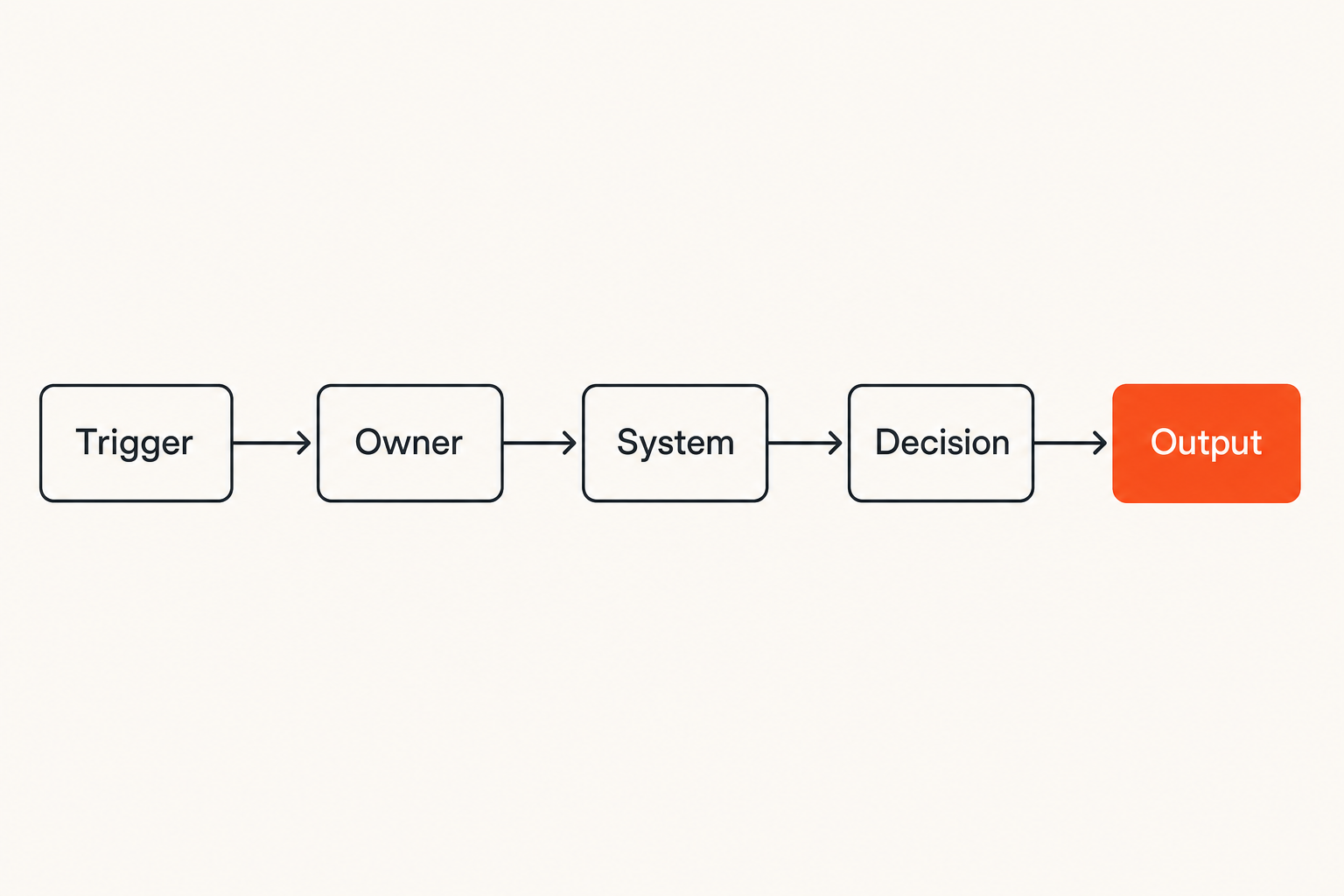
For each workflow, capture five things:
- Trigger: what starts the work?
- Owner: who is accountable?
- System: where is the work tracked?
- Decision: where are approvals or tradeoffs recorded?
- Output: what proves the work is done?
This does not need to become a consulting project. A simple table is enough. The goal is to expose where work currently disappears.
Related reading from our network: teams selling digital products face similar launch workflow problems around offers, checkout, delivery, and support, which are covered in how to sell digital products in 2026.
Separate tasks projects and records
What breaks in practice is mixing every type of work into one bucket.
A task is an action someone needs to complete. A project is a coordinated set of tasks with a goal, timeline, and owner. A record is durable business data, such as a customer, invoice, employee, deal, or asset.
Many productivity problems come from treating records like tasks or tasks like records. A CRM deal should not be managed only as a chat thread. A customer onboarding project should not live only as a folder of documents. A finance approval should not depend on someone remembering to update a spreadsheet.
Use this distinction when evaluating software:
| Work type | Needs | Bad fit | Better fit |
|---|---|---|---|
| Task | Owner, due date, status | Email threads | Task or project tool |
| Project | Milestones, dependencies, roles | Chat channels only | Project management software |
| Record | Structured fields, history, permissions | Free-form notes | CRM, database, finance, HR, or ops system |
| Decision | Context, approver, timestamp | Verbal agreement | Comment, approval, or documented decision log |
| Knowledge | Search, freshness, ownership | Random docs | Knowledge base or managed workspace |
The practical question is not whether one tool can technically hold everything. It is whether the team can reliably tell what kind of thing they are looking at and what should happen next.
Build the small business productivity stack by layer
Communication and decision capture
Communication tools are where work gets discussed. They should not automatically become where work is managed.
Chat is useful for quick clarification, escalation, and lightweight coordination. Email remains important for external communication, formal records, and customer or vendor threads. Meetings are still useful when tradeoffs require live discussion.
The failure mode is letting communication become the system of record. If the only proof of a decision is buried in a chat channel, the team will eventually lose it. If approvals happen in a meeting but never reach the work tracker, execution will drift.
A practical communication layer needs:
- Clear channels or spaces by function, project, or customer
- Rules for what belongs in chat versus the task system
- Meeting notes that link back to owners and actions
- Decision summaries that can be found later
- Escalation paths when work is blocked
Practical rule: Use chat to discuss work, not to own work. Ownership should live in the system where status, due dates, and dependencies are visible.
Project task and process management
Project and task software is usually the center of a small business productivity stack. This is where many teams compare Asana, ClickUp, Monday.com, Trello, Notion, Jira, Airtable, or Microsoft Planner.
The category matters less than fit. Some teams need simple boards. Others need structured dependencies, workload views, recurring templates, approvals, and reporting. A practical guide to Asana project management software is useful here because it shows how a tool should be judged by workflow design, not just task lists.
Look for project software that supports:
- Standard templates for repeatable work
- Views for different roles, such as board, list, calendar, timeline, and workload
- Comments tied to tasks, not scattered elsewhere
- Custom fields for priority, customer, revenue impact, risk, or department
- Permission models that match internal and client-facing work
- Reporting that managers can use without manual cleanup
The mistake teams make is overbuilding too early. A small business does not need enterprise process theater. It needs enough structure that people stop asking the same status questions every week.
Documents knowledge and search
Documents are where deeper context lives: proposals, policies, customer notes, operating procedures, product specs, onboarding guides, and meeting notes.
The knowledge layer has a different job from the task layer. A task tells someone what to do next. A knowledge base explains how or why the work should be done.
Good knowledge systems have ownership. Someone knows which page is current, which template is approved, and which process should be retired. Without ownership, knowledge bases become archives of stale confidence.
Evaluate document and knowledge tools by:
- Search quality
- Permission control
- Version history
- Template support
- Linkability from tasks and projects
- Clear page ownership
- Ease of archiving outdated content
For small teams, the best setup is often boring: a shared document workspace, a project system, and a clear linking habit between them. The habit matters more than the brand.
Compare productivity software categories without turning the stack into soup
Suites versus specialists
The biggest buying tension in 2026 is suite versus specialist.
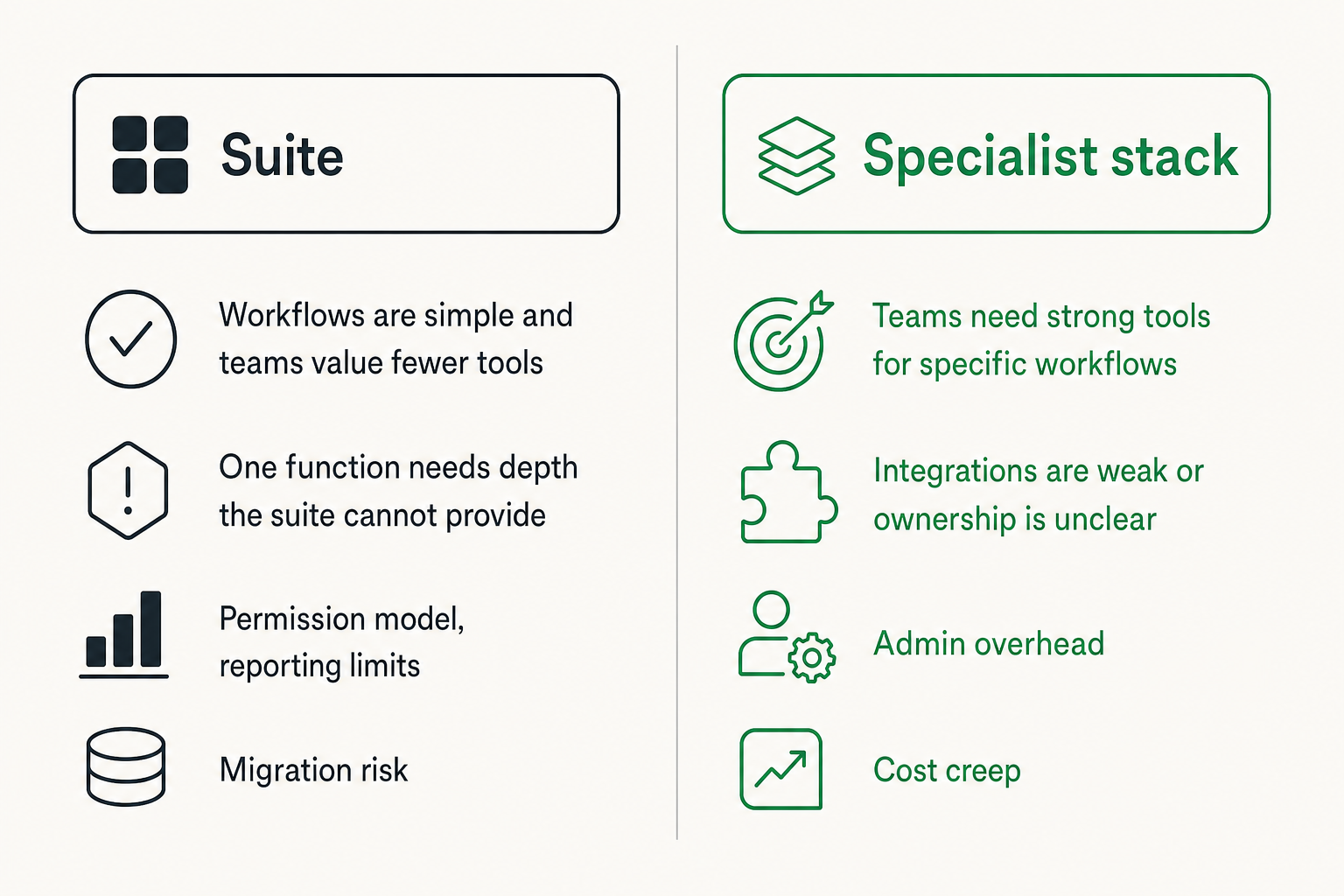
Suites promise fewer vendors, unified billing, shared permissions, and one place for work. Specialists usually offer deeper capability in a specific area, such as project management, CRM, documentation, automation, scheduling, design review, finance, or support.
Neither approach is automatically better. The right answer depends on operating complexity.
| Approach | Works well when | Fails when | Watch closely |
|---|---|---|---|
| All-in-one suite | Workflows are simple and teams value fewer tools | One function needs depth the suite cannot provide | Permission model, reporting limits, migration risk |
| Specialist stack | Teams need strong tools for specific workflows | Integrations are weak or ownership is unclear | Admin overhead, duplicate data, cost creep |
| Hybrid stack | Core work is centralized but key teams use specialist systems | No one defines systems of record | Data sync, handoffs, governance |
A useful way to think about it is to pick one primary work hub, then allow specialists only where they solve a real workflow constraint.
For adjacent reading, remote teams often face a similar control problem when multiple people need to share access without creating confusion; Related reading from our network: Vizio remote control thinking for remote teams frames that handoff problem in a different but useful context.
Where automation belongs
Automation should remove predictable handoffs. It should not hide broken process logic.
Good automation examples:
- Create an onboarding project when a deal closes
- Assign a finance review when an invoice exceeds a threshold
- Notify support leadership when a ticket breaches priority rules
- Move a task to review when required fields are complete
- Generate recurring monthly close tasks
- Sync customer status between CRM and project software
Bad automation examples:
- Auto-assigning work without checking capacity
- Moving statuses based on partial data
- Sending notifications that no one owns
- Creating duplicate tasks across multiple tools
- Syncing messy fields between systems and calling it integration
If automation is central to your stack decision, compare tools by architecture. The guide to best workflow automation software in 2026 is a useful companion because automation choices depend on integrations, controls, ownership, and rollout fit.
Practical rule: Automate after the workflow is understood. If humans cannot explain the process clearly, software will only execute the confusion faster.
Selection criteria that matter in production
Adoption and interface cost
The best productivity software for small business is not the tool with the most features. It is the tool your team can use consistently under pressure.
Every interface has a cost. A powerful tool may still fail if users need too many clicks to update status, too much training to find their work, or too much judgment to decide where something belongs.
When evaluating adoption, test common daily actions:
- Can a new user find assigned work in under a minute?
- Can a manager see blocked work without asking for updates?
- Can a task be created from chat, email, or a form without retyping everything?
- Can users understand the difference between backlog, active, blocked, and done?
- Can templates be reused without creating clutter?
- Can mobile users complete essential actions?
Adoption is not a vibe. It is a workflow test.
Integrations permissions and admin control
Small businesses often underweight administration until something breaks.
You need to know who can create workspaces, invite guests, export data, change fields, edit automations, delete records, and view sensitive information. This matters even in a small company because software becomes operational memory.
Check integrations for practical reliability:
- Does the integration sync the fields you actually need?
- Are updates one-way or two-way?
- What happens when an update fails?
- Are duplicate records detected?
- Can automations be tested before going live?
- Is there an activity log?
- Can admins disable risky behaviors?
Permissions should match the way your business works. Client-facing projects need different controls from internal planning. Finance workflows need stricter approval trails. HR records need tighter access. A generic everyone can see everything model feels simple until the business handles sensitive work.
Reporting audit trails and ownership
Reporting is where weak implementations get exposed.
If status is optional, reports are fiction. If fields are inconsistent, dashboards become decoration. If ownership is unclear, metrics create arguments instead of action.
Useful productivity reporting usually includes:
- Work by owner
- Work by status
- Blocked items
- Overdue work
- Cycle time or completion time
- Project health
- Capacity or workload
- Recurring process completion
- Customer or revenue impact where relevant
Audit trails matter because small businesses still need accountability. Who changed the due date? Who approved the discount? Who marked the task done? Who edited the process template? These details are boring until they are needed.
If finance workflows are part of the productivity stack, the same principle applies to budget ownership, approvals, and variance review. The guide to budgeting software in 2026 covers that buying problem through workflow and control design rather than spreadsheet frustration.
A practical buying workflow for 2026
Step 1 define the operating model
Start by writing a one-page operating model. Keep it plain.
Include:
- The core workflows the tool must support
- The teams or roles involved
- The systems that must integrate
- The reports leadership needs
- The permissions and guest access requirements
- The rollout owner
- The definition of success after 60 or 90 days
This document prevents demo drift. Vendors will show impressive capabilities. Your operating model keeps the conversation grounded.
Step 2 shortlist by constraints
Shortlist tools by constraints before preferences.
Hard constraints might include:
- Budget per user
- Required integrations
- Guest or client access
- Data residency or compliance needs
- Mobile requirements
- Approval workflows
- Custom fields
- API access
- Admin controls
- Export capability
Soft preferences might include interface style, templates, dashboard design, or vendor ecosystem. Those matter, but they should not override constraints.
The mistake teams make is falling in love with the demo environment. Demo data is clean. Real work is messy, late, political, duplicated, and interrupted.
Step 3 pilot with real work
A pilot should not be a sandbox where people click around. It should run live work with limited scope.
Pick one workflow with enough complexity to be meaningful but not so much risk that failure hurts the business. Examples:
- Client onboarding for one customer segment
- Weekly content production
- Sales-to-delivery handoff
- Product bug triage
- Monthly finance review
- Hiring pipeline for one role
During the pilot, track practical signals:
- Did people update the tool without being chased?
- Did managers reduce status meetings?
- Did handoffs become clearer?
- Did reports match reality?
- Did automation reduce work or create cleanup?
- Did users know where to put exceptions?
If the pilot only proves that the software can be configured, you have not learned enough. You need to prove that the workflow survives normal business pressure.
Step 4 roll out with governance
Rollout is where good tools often become messy.
Use a simple implementation sequence:
- Name an owner for the productivity system.
- Define workspace, project, folder, and naming rules.
- Create templates for recurring workflows.
- Set permission and guest access defaults.
- Connect only the integrations needed for phase one.
- Train users on daily actions, not every feature.
- Review adoption and reporting after 30 days.
- Retire old tools or freeze them as archives.
Governance does not mean bureaucracy. It means someone is responsible for keeping the system usable.
Practical rule: Every productivity tool needs an owner, a cleanup rhythm, and a rule for what does not belong there.
What breaks when productivity software is implemented badly
Tool duplication creates invisible work
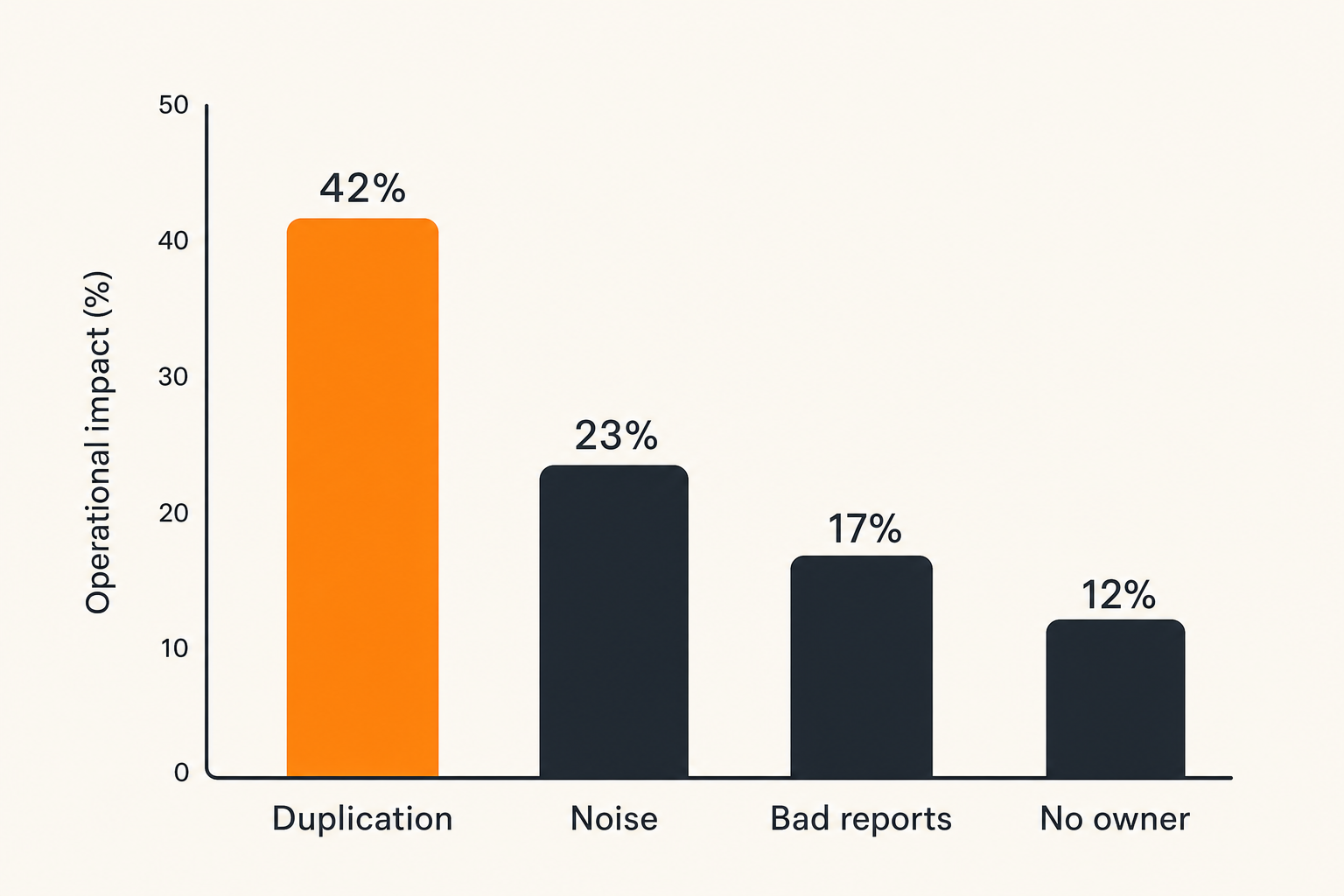
Tool duplication is the quiet killer.
One team tracks work in a project board. Another tracks the same work in a spreadsheet. Leadership asks for updates in slides. Customers ask for updates by email. Soon, the team is not doing more productive work. It is translating the same work across formats.
Duplication usually appears when systems of record are not defined. If the CRM owns customer status, say that. If the project tool owns delivery status, say that. If the finance system owns invoice approval, say that. If a dashboard pulls from multiple systems, define which fields are authoritative.
What fails is letting every department choose its own truth.
Notifications become the new inbox
Many teams buy productivity software to escape email, then recreate email through notifications.
Too many alerts train people to ignore the system. Too few alerts make the system unreliable. The goal is not maximum notification coverage. The goal is useful interruption.
Good notification rules are tied to ownership and urgency:
- Notify an owner when work is assigned
- Notify a reviewer when an approval is ready
- Notify a manager when a priority item is blocked
- Notify a team when a milestone changes
- Avoid notifying everyone for routine status changes
A productivity stack should reduce the number of places people need to check. If users must monitor email, chat, project boards, dashboards, forms, and spreadsheets to know what matters, the implementation has failed.
Reporting fails when data is optional
Dashboards are only as good as the operating discipline behind them.
If due dates are optional, overdue reports are incomplete. If priorities are subjective, priority reports are noisy. If owners are missing, accountability breaks. If statuses mean different things by team, leadership cannot compare progress.
This is not solved by buying better analytics. It is solved by defining required fields, shared status meanings, and review habits.
A basic status model can be enough:
| Status | Meaning | Owner action |
|---|---|---|
| Backlog | Accepted but not active | Prioritize or defer |
| Ready | Can start with no known blocker | Assign or schedule |
| In progress | Active work is happening | Update progress and risks |
| Blocked | Cannot proceed without input | Escalate blocker |
| Review | Output needs approval | Reviewer acts |
| Done | Accepted as complete | Close and archive |
Related reading from our network: private communication tools face similar problems around retention, access, and trust boundaries, which makes secure messaging apps in 2026 useful adjacent reading for teams thinking about communication governance.
Best productivity software for small business by team shape
Lean service teams
Lean service teams need clarity across client work, deadlines, approvals, files, and communication. The priority is usually delivery visibility, not complex enterprise planning.
Strong fits often include:
- Project management with reusable client templates
- Shared client folders or portals
- Time tracking if billing depends on hours
- Forms for intake and change requests
- Lightweight automation for recurring delivery steps
- Reporting by client, owner, and deadline
Avoid tools that require heavy administration before the team gets value. Service businesses need fast setup, clear client boundaries, and easy status reporting.
The best productivity software for small business service teams is often a simple project hub plus document storage and a communication layer with firm rules about where approvals live.
Product and SaaS teams
Product and SaaS teams have different constraints. They need to connect customer feedback, roadmap decisions, engineering work, releases, support issues, and internal operations.
A practical stack may include:
- Product or project management software for roadmap and delivery
- Issue tracking for engineering work
- Knowledge base for product specs and internal documentation
- CRM or customer success system for account context
- Support desk for customer issues
- Automation to connect feedback, bugs, and release notes
The key is not forcing every team into one view. Engineering may need detailed issue workflows. Customer success may need account-level context. Leadership may need portfolio visibility. The architecture should connect those views without pretending they are identical.
What breaks in practice is a product team managing roadmap decisions in one tool, support escalations in another, and customer context somewhere else with no linking model. That creates slow triage and repeated debates.
Operations sales and finance teams
Operations, sales, and finance teams need structured records more than flexible task boards.
Sales needs pipeline ownership, follow-up discipline, and handoff quality. Finance needs approvals, auditability, budget context, and payment visibility. Operations needs process consistency, vendor tracking, internal requests, and exception handling.
For these teams, productivity software should support:
- Structured intake forms
- Approval workflows
- Role-based permissions
- Record linking across customers, vendors, invoices, and projects
- Escalation rules
- Reporting by cycle time, owner, and exception type
The practical question is where the system of record belongs. A project tool can track an approval task, but the finance system may need to own the official transaction. A CRM can track a customer handoff, but the delivery project may own execution. Define the boundary before integrating tools.
What works and what fails after rollout
What works
The implementations that work tend to be disciplined but not overdesigned.
They usually have:
- One primary work hub for most internal execution
- Clear systems of record for customers, finance, documents, and projects
- Templates for recurring workflows
- Required fields that support reporting
- Simple status definitions
- A named owner for administration
- Integrations that solve specific handoffs
- A monthly cleanup rhythm
- Training focused on real daily work
They also accept that software choices evolve. A small business may start with a lightweight suite, then add specialist tools as complexity grows. Or it may consolidate after realizing that too many tools create coordination drag.
The point is not purity. The point is operational fit.
What fails
Failed rollouts usually share the same patterns.
They include:
- Buying based on feature lists instead of workflow fit
- Letting every team configure its own process language
- Automating unclear handoffs
- Keeping old tools alive without a migration plan
- Treating dashboards as a substitute for data discipline
- Ignoring permissions until external guests or sensitive data appear
- Training users once and never reviewing actual usage
- Adding tools because leadership wants visibility but not changing how work is entered
The mistake teams make is assuming productivity software creates productivity by default. It does not. It creates a place where productive or unproductive habits become more visible.
A useful test after rollout is simple: ask five people where their most important work lives, what is blocked, and what changed this week. If answers are inconsistent, the stack is not yet operating cleanly.
Product fit and saasrow.com
How to use software guides without outsourcing judgment
Software guides are useful when they help you ask better operational questions. They are less useful when they pretend there is one universal winner.
At saasrow.com, the goal is to help readers compare tools, improve workflows, and choose software wisely. That means treating productivity software as a business system, not a shopping category.
Use guides to pressure-test your assumptions:
- Does this tool match our workflow or just look modern?
- Will our team update it during busy weeks?
- Does it integrate with the systems that already own key data?
- Can managers trust the reporting?
- Are permissions good enough for customers, contractors, finance, and HR?
- Can we roll it out in phases without breaking the business?
The best productivity software for small business is the software that makes the next action obvious, the owner visible, the decision traceable, and the report believable. Everything else is secondary.
Try saasrow.com
saasrow.com is for readers who want practical articles, guides, and insights about software and productivity. For grounded software comparisons and workflow-focused buying advice, Try saasrow.com.
Choosing the best productivity software for small business in 2026 is not about chasing the biggest platform. It is about building a stack your team can trust when real work gets messy.