

June 5, 2026
Automation Direct in SaaS: A Practical Workflow Architecture for 2026
Automation direct is not just a shortcut or integration checkbox. It is a workflow architecture decision about ownership, triggers, exceptions, and trust.
Automation direct sounds like a simple promise: connect the software, remove the manual step, and let work move on its own. In real teams, that promise gets expensive when nobody knows which system owns the task, why an action fired, or how to repair a failed handoff.
Teams think the problem is automation coverage. The real problem is workflow control.
That changes the conversation. The practical question is not whether a SaaS tool can automate something. Most tools can. The practical question is whether automation direct can run through your business without creating hidden queues, duplicate records, bad customer experiences, or support work that nobody budgeted for.
In 2026, small teams are buying more specialized software, remote work is normal, AI features are appearing inside every app, and integrations are easier to turn on than to govern. Automation direct should be treated as an architecture decision: what triggers work, where state lives, who owns exceptions, and how humans stay in the loop when the system is wrong.
Table of contents
- What automation direct really means in SaaS
- Automation direct is an architecture decision, not a feature
- The automation direct workflow map
- Tool selection criteria for automation direct
- What works when automation direct is implemented well
- What fails in bad automation direct rollouts
- Implementation sequence for small teams
- Automation direct metrics that matter
- Buying questions before you commit
- Where saasrow.com fits
What automation direct really means in SaaS
Automation direct is usually discussed as a product capability. A CRM can create a task when a deal changes stage. A billing tool can send a failed-payment email. A project management app can assign work when a form is submitted. Useful, but incomplete.
A useful way to think about it is this: automation direct is the shortest governed path between a business event and the next correct action.
That phrase matters because shortest is not the same as safest, and automatic is not the same as governed. The goal is not to remove every human. The goal is to remove avoidable delay while keeping the workflow explainable.
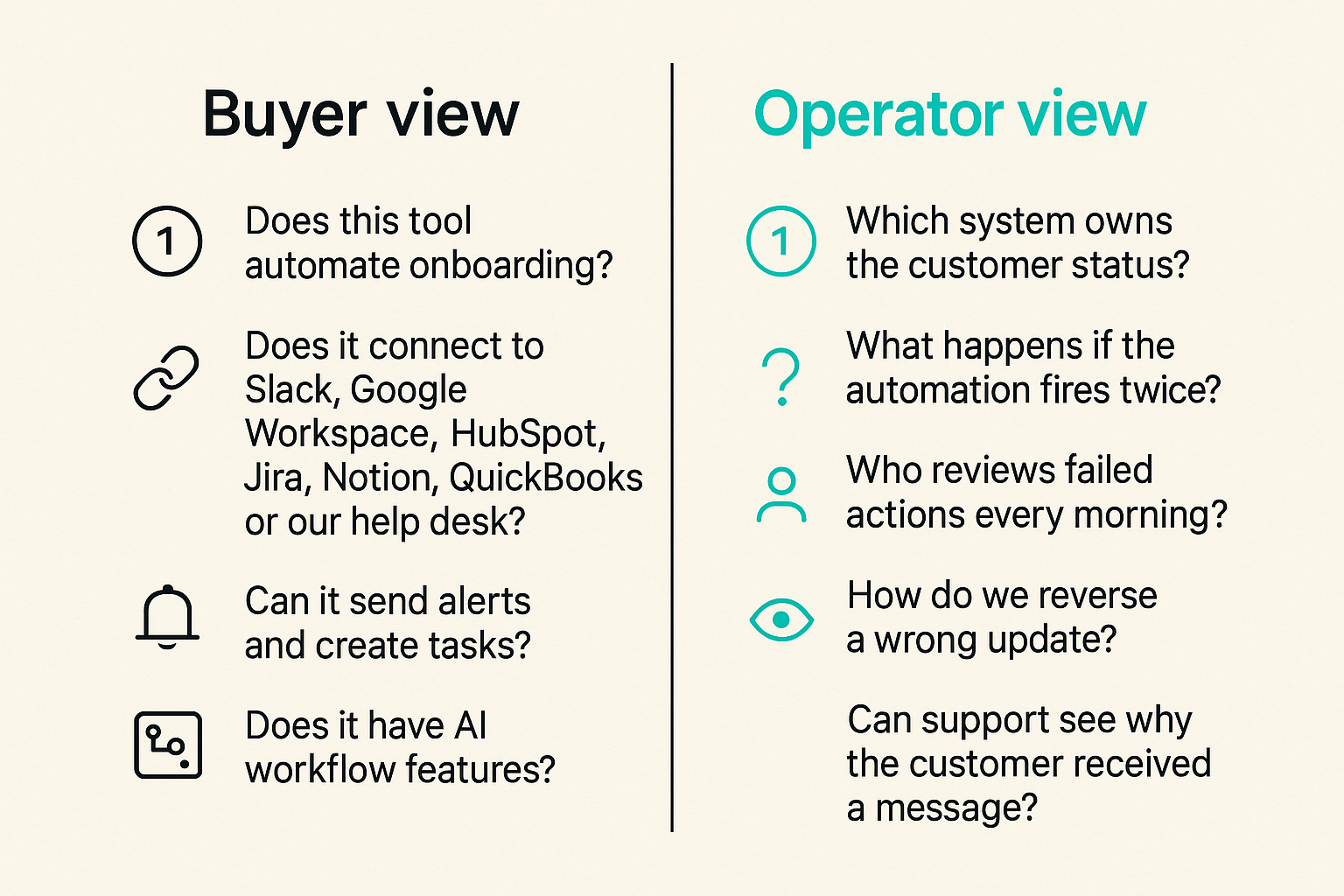
The buyer version versus the operator version
The buyer version sounds like this:
- Does this tool automate onboarding?
- Does it connect to Slack, Google Workspace, HubSpot, Jira, Notion, QuickBooks, or our help desk?
- Can it send alerts and create tasks?
- Does it have AI workflow features?
The operator version sounds different:
- Which system owns the customer status?
- What happens if the automation fires twice?
- Who reviews failed actions every morning?
- How do we reverse a wrong update?
- Can support see why the customer received a message?
The mistake teams make is evaluating automation direct from the buying screen instead of the operating floor. Features get turned on by admins. Consequences land on support, sales, finance, customer success, and managers who now have to explain why the system did something nobody expected.
Why 2026 workflows make direct automation harder
The modern small business stack is not one application. It is a loose operating system made of SaaS tools: CRM, email, calendar, project management, billing, docs, support, analytics, video, forms, automation platforms, and sometimes AI assistants layered across all of them.
More tools create more trigger points. More trigger points create more possible state conflicts. A customer can be active in billing, blocked in support, warm in CRM, overdue in project management, and unknown in analytics at the same time.
Automation direct is valuable because it can reduce this coordination burden. It is risky for the same reason. When the wrong event moves directly into action, the error travels faster than a person would have moved it.
Related reading from our network: remote teams face a similar architecture problem when choosing cloud based productivity and collaboration tools, because the hard part is not the app list; it is the flow of work across people and systems.
Where the phrase causes confusion
Some readers use automation direct to mean a specific software vendor or industrial automation category. In SaaS buying, the more useful interpretation is broader: direct automation between business systems without unnecessary manual routing.
That includes:
- Native SaaS automations inside one platform.
- Cross-app workflows using middleware.
- Webhook-driven actions between systems.
- Form-to-task, lead-to-record, ticket-to-escalation, and invoice-to-reminder flows.
- AI-assisted routing where a model suggests or performs the next action.
The practical question is not which label a vendor uses. The practical question is whether the workflow has clear ownership, stable state, reliable triggers, observable failures, and a human repair path.
Automation direct is an architecture decision, not a feature
The reason automation projects disappoint is rarely that the button did not exist. It is that the team automated a workflow they did not understand.
If the workflow is vague when humans run it, automation will make the vagueness faster. If ownership is political, automation will expose the politics. If data is messy, automation will distribute the mess.
Practical rule: Do not automate a workflow until you can describe the owner, trigger, decision, action, exception, and rollback in plain language.
Source of truth comes first
Every automation direct workflow needs a primary record. That record might be the customer in the CRM, the subscription in billing, the ticket in the help desk, or the task in project management. Without a source of truth, the automation becomes a guessing machine.
For example, suppose a customer cancels a subscription. Billing knows first. The CRM may not update immediately. Support may still show an open escalation. Customer success may have a renewal task already assigned.
If billing is the source of truth for subscription state, the cancellation event should drive the downstream workflow. If the CRM is the source of truth for commercial status, billing should update it but not independently trigger every customer-facing action. This sounds boring. It prevents real problems.
Events beat status meetings
Many teams use automation to compensate for weak communication. They create Slack alerts, email notifications, and task assignments. Then they still hold status meetings because nobody trusts the workflow.
A better automation direct design starts with events, not reminders.
Examples:
- New qualified lead submitted.
- Trial account reached activation threshold.
- Payment failed.
- Support ticket breached response window.
- Contract signed.
- Project task blocked for more than two days.
Each event should have one next action and one accountable owner. If the event requires five people to interpret it, it is not ready for direct automation.
Humans still own exceptions
Automation direct does not remove human responsibility. It clarifies where human attention belongs.
Humans should not copy fields from a form into a CRM if the mapping is stable. Humans should review duplicate accounts, unclear intent, high-value customer changes, unusual refunds, access changes, and customer-visible actions with reputational risk.
In other words, automate the predictable path and route the uncertain path to a person with context.
The automation direct workflow map
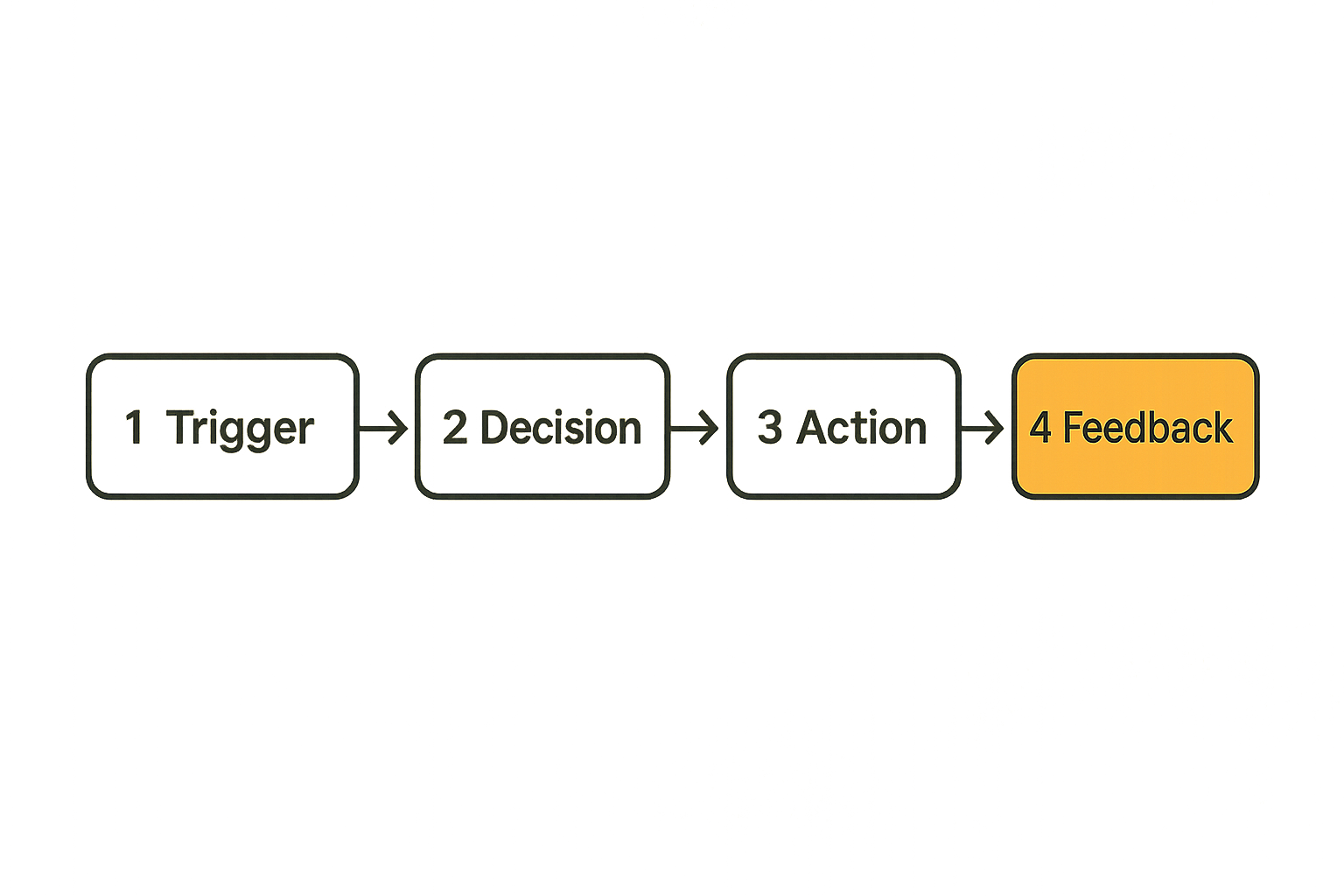
A simple workflow map keeps teams honest. You do not need a heavy enterprise process model. You need enough structure to prevent enthusiasm from turning into hidden operational debt.
Think of each automation direct workflow as four linked stages: trigger, decision, action, and feedback.
Trigger
The trigger is the event that starts the workflow. Bad triggers are vague, duplicated, or dependent on fields that people update inconsistently.
Good triggers are specific:
- Form submitted with required fields.
- Deal stage changed to Closed Won.
- Invoice marked overdue.
- Ticket priority changed to urgent.
- User invited to workspace.
Bad triggers sound like:
- When something changes.
- When a customer looks important.
- When sales is done.
- When support needs help.
The trigger should be visible in the system that owns the event. If nobody can find the triggering event later, investigation becomes guesswork.
Decision
The decision layer determines whether the action should happen. This can be a simple rule or a more complex condition.
Examples:
- If lead source equals partner and company size is above threshold, assign to partner sales.
- If payment failed once, send reminder; if it failed three times, create retention task.
- If customer is enterprise tier, route urgent ticket to senior support.
- If project is blocked and launch date is within seven days, notify project owner.
What breaks in practice is hidden decision logic. If the rule lives in one admin account, inside a vendor workflow screen, with no documentation, the business eventually forgets why actions happen.
Action
The action is what the system does. Create a task, update a field, send a message, open a ticket, revoke access, assign an owner, or trigger another workflow.
Actions should be narrow. One event should not quietly update six systems unless the team has strong auditability and rollback. A small action is easier to test and easier to repair.
This is where project management discipline helps. If an automation creates work for a person, that work needs a queue, owner, due date, and completion signal. Teams choosing task systems should treat workflow ownership as seriously as features; our guide to project management software in 2026 takes that same workflow-first view.
Feedback
Feedback is the most ignored stage. Did the action succeed? Did a person complete the task? Did the customer respond? Did the system retry after an error? Did someone review exceptions?
Without feedback, automation direct becomes fire-and-forget. That is fine for low-risk notifications. It is dangerous for billing, access, sales handoffs, support escalations, and customer communications.
Practical rule: Every automation that creates work should also create evidence that the work was accepted, completed, failed, or intentionally ignored.
Tool selection criteria for automation direct
Most SaaS evaluation grids overweight features and underweight operating constraints. A vendor can have a beautiful automation builder and still be a poor fit if permissions are crude, logs are thin, or pricing punishes normal workflow volume.
Here is a practical comparison table for buyers.
| Criterion | Strong signal | Weak signal | Why it matters |
|---|---|---|---|
| Trigger quality | Specific events with filters | Broad change events only | Reduces false actions |
| Audit logs | Who, what, when, before and after | Basic success message | Speeds investigation |
| Permissions | Role-based workflow editing | All admins can change everything | Prevents accidental breakage |
| Error handling | Retries, dead-letter queues, alerts | Silent failures | Keeps work from disappearing |
| Human review | Approval steps and exception queues | Only full automation | Supports risky decisions |
| Portability | Exportable rules and data | Locked workflow logic | Lowers switching cost |
| Pricing | Predictable by usage tier | Surprise per-task charges | Protects scale economics |
Native integrations versus middleware
Native integrations are easier to start with. They usually require less setup, fewer credentials, and less technical knowledge. They are good for simple workflows inside a small stack.
Middleware and automation platforms are better when workflows cross several systems or require branching logic. They add flexibility, but they also become infrastructure. Someone must own them.
A useful split:
- Use native automation when the workflow stays inside one system or one direct partner integration.
- Use middleware when you need routing, transformations, retries, logging, or multi-step orchestration.
- Use custom API work only when the workflow is high value, high volume, or strategically important.
The mistake teams make is starting with custom work because it feels powerful, or starting with native automation because it feels easy, without asking who will operate the workflow six months later.
Permissions and audit trails
Automation direct changes business state. That means permissions matter.
At minimum, ask:
- Who can create automations?
- Who can edit active automations?
- Is there a change history?
- Can changes require approval?
- Can automations run under service accounts instead of personal user accounts?
- Are logs searchable by customer, record, event, and action?
Security teams learned this lesson in CI/CD pipelines: automation is useful only when controls, ownership, and rollback are part of the implementation. The same logic applies outside engineering, and our CI/CD security SaaS guide is a helpful adjacent model for thinking about automated change.
Related reading from our network: security operations teams deal with similar questions of telemetry, response, and ownership in cloud computing security operations, even though the tool category is different.
Pricing that survives scale
Automation pricing can look cheap during evaluation and strange in production. Some platforms charge by task, run, record, premium connector, user, seat, or automation step. A workflow that runs ten times per week is a different economic object than one that runs 50,000 times per month.
Before committing, model three scenarios:
- Current volume.
- Expected volume after adoption.
- A spike scenario caused by campaign, migration, incident, or seasonal demand.
If the cost model discourages useful automation, users will route around the system. If the platform makes every extra action feel expensive, teams will under-automate and keep manual work in spreadsheets.
What works when automation direct is implemented well
Good automation direct rollouts do not start with a massive transformation deck. They start with one workflow where manual coordination is clearly wasting time or creating mistakes.
The best early candidates are frequent, boring, and measurable.
Start with one painful handoff
Look for handoffs where one team waits for another team to notice something.
Examples:
- Sales closes a deal and onboarding needs a kickoff task.
- Support marks a bug pattern and product needs visibility.
- A trial user activates and customer success needs to intervene.
- Finance sees payment failure and account management needs to know.
- A project task blocks launch and the owner needs escalation.
Do not start with the most politically complex workflow. Start with one where the owner is clear, the event is specific, and the next action is obvious.
Design for reversibility
Automation mistakes happen. A tool outage, a bad rule, a changed field, a duplicate record, or a misunderstood condition can trigger the wrong action.
Design the workflow so it can be reversed.
That means:
- Keep before-and-after values when updating records.
- Prefer draft messages before customer-facing sends in sensitive flows.
- Use approval gates for high-risk actions.
- Log workflow version changes.
- Keep a manual override path.
- Avoid deleting data automatically unless retention rules are explicit.
Practical rule: If a wrong automation action would embarrass the business, cost money, or remove access, add a human review step before it runs automatically.
Measure time saved and risk added
Automation should have a business case, but the business case should include risk.
A simple scorecard works:
- Minutes saved per run.
- Runs per week.
- Number of teams affected.
- Customer visibility.
- Error severity if wrong.
- Ease of rollback.
- Monitoring quality.
A workflow that saves five minutes 500 times per month may be worth automating even if each instance is small. A workflow that saves thirty minutes twice per month but can send the wrong invoice may need more review.
What fails in bad automation direct rollouts
Bad automation rarely fails all at once. It quietly creates queues, duplicate tasks, confused customers, and exceptions that live in Slack threads.
The failure is not always technical. Often the software is doing exactly what it was configured to do. The configuration was just based on a fantasy version of the workflow.
Automating unclear ownership
If everyone owns a customer handoff, nobody owns it. Automation does not fix that.
Symptoms include:
- Tasks assigned to teams instead of named owners.
- Alerts sent to channels where nobody is accountable.
- Records updated without follow-up responsibility.
- Managers asking who saw the notification.
- Users creating side spreadsheets to track real work.
The fix is not more notifications. The fix is ownership. Every automated action should land somewhere specific enough that a person can accept or reject responsibility.
Ignoring edge cases
Edge cases are where automation direct earns or loses trust.
Common edge cases:
- Duplicate customer records.
- Customers with multiple products.
- Paused subscriptions.
- Failed payment followed by immediate update.
- Sales-assisted accounts mixed with self-serve accounts.
- Contractors or temporary users with unusual access.
- Customers in regulated industries requiring different communication.
You do not need to solve every edge case before launch. You do need to route them somewhere. A good exception queue is better than a brittle rule that pretends uncertainty does not exist.
Letting vendors define the workflow
Vendors design defaults for broad adoption, not your operating model. Their template may be a good starting point. It should not be treated as the truth.
A vendor onboarding flow might assume every new customer gets the same email sequence. Your business may need different paths for self-serve, assisted onboarding, enterprise customers, partners, and reactivated accounts.
A vendor support automation might escalate based on priority. Your team may need escalation based on customer tier, open revenue risk, product area, or time zone.
Related reading from our network: product teams face the same trust and onboarding tradeoffs when planning collaboration launches, as shown in this guide to a screen sharing product launch workflow.
Implementation sequence for small teams
The practical implementation sequence is simple, but it requires discipline. Do not turn on ten automations because the demo looked good. Build one reliable path, learn how it behaves, then expand.
Step 1 document the current path
Write down the current workflow exactly as it happens, not as leadership thinks it happens.
Capture:
- The triggering event.
- The person who notices it.
- The tools they check.
- The fields they update.
- The messages they send.
- The decision points they use.
- The exceptions they handle manually.
- The places work gets stuck.
This can be a one-page document. The point is to expose the real operating path before changing it.
Step 2 define the minimum safe automation
Minimum safe automation is the smallest automated action that reduces work without creating unacceptable risk.
For example:
- Instead of automatically emailing every new customer, create a draft task for customer success.
- Instead of closing accounts automatically after payment failure, create a finance review queue.
- Instead of updating five systems, update the source of truth and notify downstream owners.
- Instead of assigning every ticket by AI classification, suggest a category and let support confirm.
The first version should prove the trigger and ownership model. You can add speed later.
Step 3 ship behind monitoring
Monitoring does not need to be enterprise-grade, but it must exist.
Track:
- How many times the automation ran.
- How many actions succeeded.
- How many actions failed.
- Which records were affected.
- Which users changed workflow rules.
- Which exceptions were created.
For small teams, a daily review dashboard or saved view may be enough. For higher-volume workflows, you may need alerts, retry handling, and structured logs.
Step 4 expand only after review
After two to four weeks, review the workflow with the people who live with it.
Ask:
- Did it reduce manual work?
- Did it create new support questions?
- Were exceptions handled quickly?
- Did any team create a workaround?
- Did customers experience anything confusing?
- Did the owner trust the output?
- What should be automated next, if anything?
Expansion should be earned. If the first automation is already creating cleanup work, adding more automation compounds the problem.
Automation direct metrics that matter
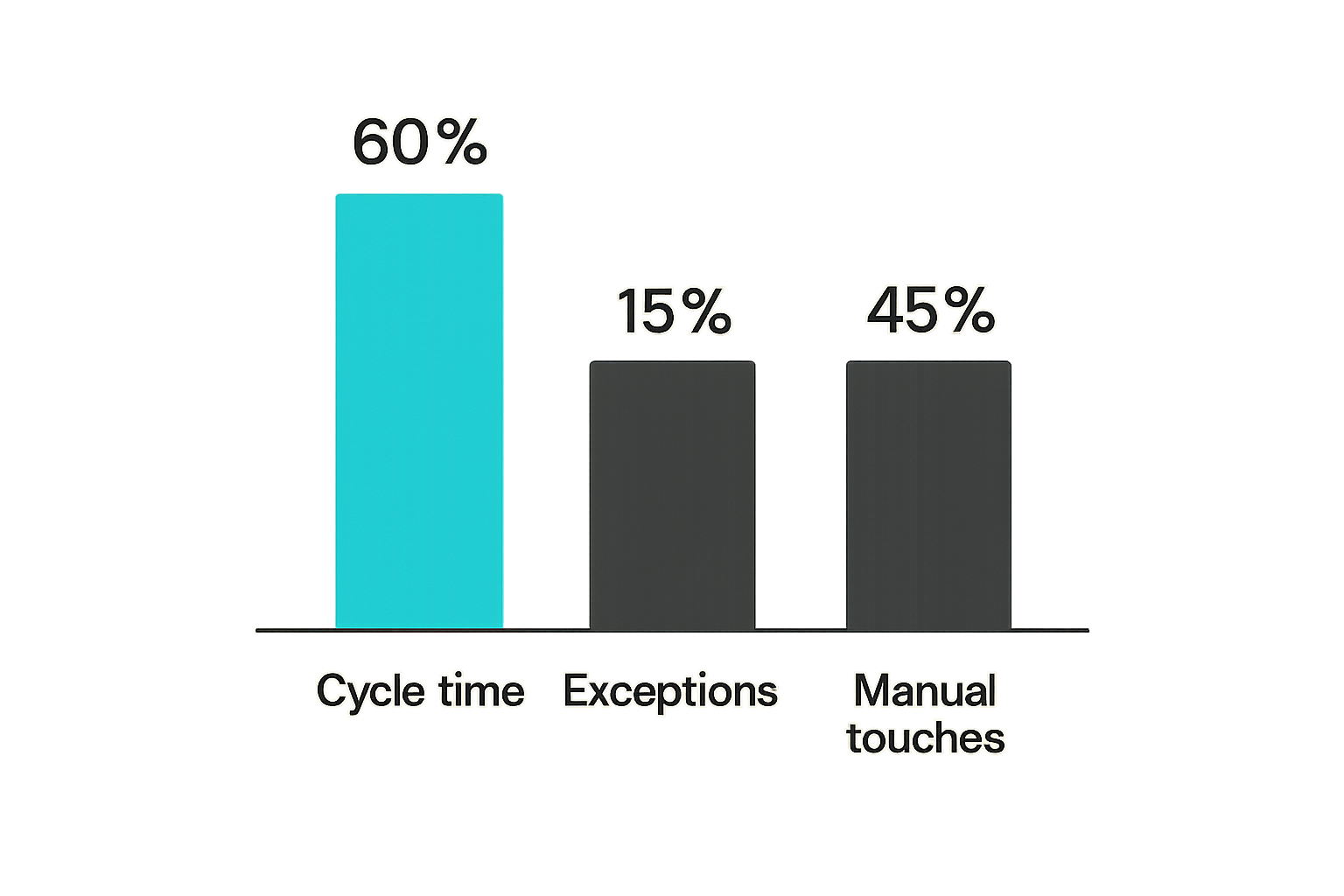
Automation direct should be measured like an operating system, not like a feature adoption campaign. Usage alone is not enough. A workflow can run thousands of times and still be harmful if it creates bad state or support load.
The best metrics connect speed, accuracy, and recoverability.
Cycle time
Cycle time measures how long it takes for work to move from trigger to completed action.
Examples:
- Lead submitted to owner assigned.
- Deal closed to onboarding kickoff created.
- Ticket escalated to specialist response.
- Payment failure to customer follow-up.
- Project blocker to manager review.
Automation direct should reduce cycle time by removing waiting. If cycle time does not improve, the automation may be notifying the wrong people, creating tasks in the wrong place, or waiting on a decision that still has no owner.
Exception rate
Exception rate is the percentage of workflow runs that require human repair or review outside the normal path.
A high exception rate is not automatically bad. It may mean the team wisely routed uncertainty to humans. But if the rate stays high, the workflow may be too broad, the data may be poor, or the trigger may be wrong.
Track exception categories, not just counts:
- Duplicate record.
- Missing field.
- Conflicting status.
- Permission error.
- Vendor outage.
- Human rejected action.
- Customer-specific policy.
Categories show whether you have a data problem, tool problem, design problem, or training problem.
Manual touch count
Manual touch count measures how many human actions remain in the workflow.
The goal is not always zero. In many workflows, the right goal is fewer low-value touches and better high-value review.
For example, a customer onboarding workflow might still require a human kickoff call, but it should not require a coordinator to copy company name, plan type, start date, and account owner across three tools.
Manual touch count also helps compare tools. If one platform reduces clicks but increases exception handling, the productivity gain may be fake.
For a broader workflow-buying frame, our earlier guide to Automation Direct in 2026 covers how to evaluate the concept before narrowing to specific tools.
Buying questions before you commit
A vendor evaluation should create confidence that the workflow can be operated, not just configured. The demo should include failure, not only the happy path.
Ask the vendor to show what happens when a trigger fires incorrectly, an API is unavailable, a user lacks permission, a record is duplicated, or an automation is edited by mistake. If the answer is basically check the logs, ask to see the logs.
Can the system explain its actions
Explainability is not only an AI concern. Rule-based automation also needs explanation.
A user should be able to answer:
- Why was this task created?
- Which event triggered it?
- Which rule matched?
- Which fields were read?
- Which fields were changed?
- Who configured the workflow?
- Has the workflow changed since last month?
If users cannot answer those questions, they will stop trusting the system. Then the team is back to screenshots, side messages, and manual confirmation.
Can nontechnical users repair failures
Small teams cannot send every workflow issue to engineering or an external consultant. Business owners need safe repair tools.
Look for:
- Clear failed-run views.
- Retry buttons with guardrails.
- Editable mappings.
- Test mode or dry run.
- Version history.
- Permission-scoped admin roles.
- Human-readable errors.
A workflow that only one technical admin can fix is a fragile workflow. That does not mean every user should edit automation. It means the people accountable for the business process should be able to diagnose and recover from ordinary failures.
Can you leave without rebuilding everything
Portability matters. Automation logic often becomes part of how the business operates. If the logic is trapped in a tool with poor export options, switching costs rise quickly.
Before buying, ask:
- Can rules be exported?
- Can logs be exported?
- Can field mappings be documented?
- Are integrations based on standard APIs?
- Can workflow ownership be transferred between users?
- What happens to automations if an admin leaves?
The best time to ask exit questions is before the tool becomes critical.
Where saasrow.com fits
SaaS buying is often treated as a hunt for the best tool. That is too narrow. For productivity-focused teams, the better question is which tool fits the workflow you are actually willing and able to operate.
saasrow.com is built for readers who want practical articles, guides, and insights about software and productivity. The emphasis is not hype, feature worship, or generic top-ten lists. The useful work is comparing software through workflow, ownership, integration, and operating tradeoffs.
Use software guides as workflow reviews
A buying guide should help you ask better internal questions, not just collect vendor names.
Before selecting an automation platform, run a quick review:
- Which workflows are painful enough to change?
- Which teams are affected?
- Which systems own key records?
- Which automations are safe to run directly?
- Which actions require approval?
- Which metrics will prove improvement?
That review prevents tool selection from becoming a proxy for process design.
Compare tools against operating constraints
The right tool for a solo operator may be wrong for a 40-person team. The right native integration may be wrong once finance, support, and customer success all depend on the same state change.
Compare tools against constraints such as:
- Team technical skill.
- Data quality.
- Customer visibility.
- Workflow volume.
- Compliance expectations.
- Need for auditability.
- Budget predictability.
- Switching cost.
Automation direct is powerful when it shortens the path from event to action. It is dangerous when it shortens the path from bad data to customer impact. Keep that distinction visible, and the buying decision gets much clearer.
Try saasrow.com
saasrow.com is for readers who want practical articles, guides, and insights about software and productivity. If you are comparing tools or redesigning workflows, Try saasrow.com for grounded software guidance. Automation direct works best when the workflow is designed before the button is turned on.